


Building an AI agent is easier than ever. You can connect a language model to external tools, give it a task, and let it handle the heavy lifting. But what happens when your agent needs reliable, up-to-date information from the web?
Think about an AI agent that finds jobs matching your resume, monitors websites for changes, researches companies, or uses the latest documentation to build applications. All these tasks require access to real-world information beyond the model's training data.
That is where Olostep comes in.
Olostep provides APIs for web search, scraping, crawling, structured extraction, and website monitoring, making it easier to build AI agents without managing complex data pipelines.
Over the past few months, I have been experimenting with Olostep and using it to build different AI-powered applications.
In this article, I will share 10 practical agentic AI projects, ranging from beginner-friendly applications to advanced, production-ready solutions.
I have personally built and tested every project on this list, so these are not just ideas. Each one comes with working code and a detailed, step-by-step guide to help you build it yourself.
Beginner-Friendly Agentic AI Projects
These projects are ideal if you already know basic Python and want to understand how AI agents use external tools, access live information, and complete tasks.
1. Build an AI job search assistant that matches your resume
Finding the right job can take hours of browsing job boards, reading descriptions, and comparing requirements with your skills. In this project, you will build JobFit AI, a web application that searches for relevant job opportunities based on your resume and preferences.
It generates a ranked report with job-fit scores, application links, potential concerns, and recommendations on which positions are worth applying for.
The application uses Gradio for the web interface and pypdf to extract information from your uploaded resume. The OpenAI Agents SDK, powered by Kimi K2.6, manages the search and analysis workflow.
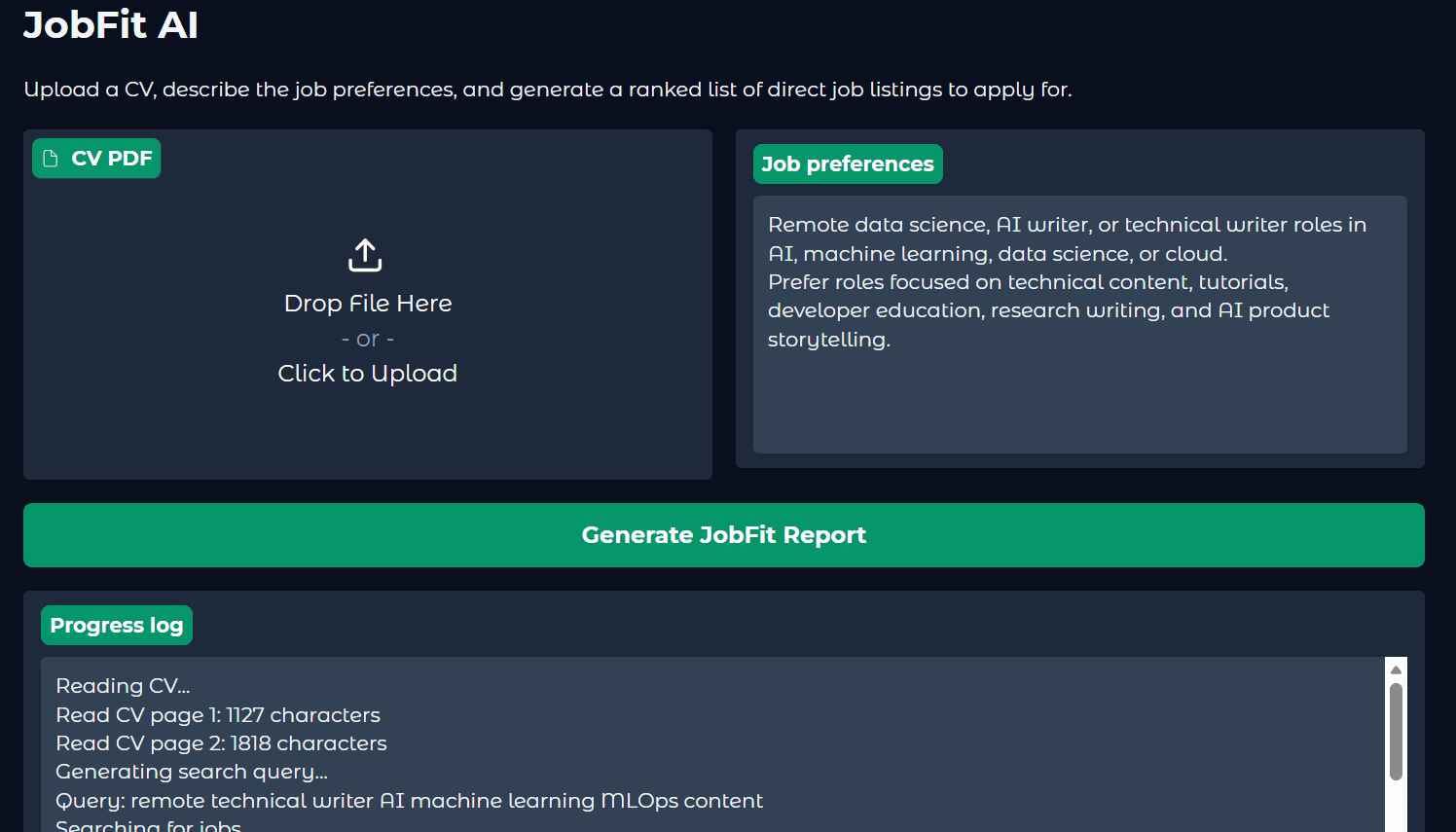
It uses Olostep to search for live job listings and scrape up to three selected pages before comparing opportunities against your profile. The final report includes an Apply, Maybe, or Do not apply recommendation for each role.
Project code: JobFit AI on GitHub
Step-by-step tutorial: Kimi K2.6 API Tutorial: Building an AI Job Search Assistant
2. Build an AI financial research agent with FastAPI
Researching a company means going through financial reports, earnings announcements, recent news, and competitor updates. In this beginner-friendly project, you will build a financial research assistant that does this work for you.
Simply enter a company name, select a research period, and choose what you want to investigate. The application generates a detailed report covering financial performance, market developments, competitors, risks, and potential opportunities, with links to public sources.
The application uses FastAPI to provide a web interface and REST API, while GPT-5.6 Luna and the OpenAI Agents SDK handle the research process. Olostep provides live web search and source reading so the agent can gather current information.
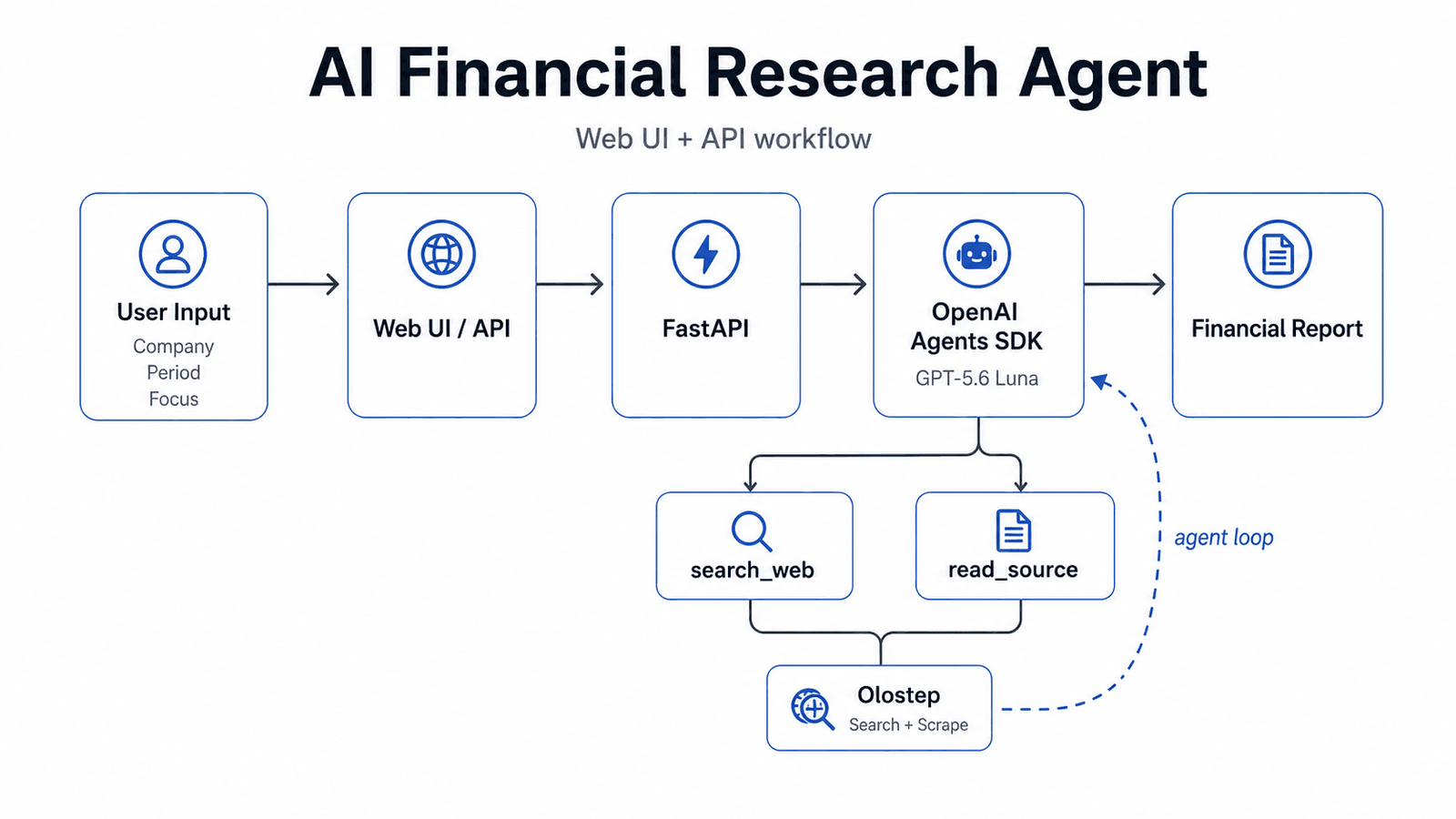
What makes this project beginner-friendly is its simple architecture: one Python backend, a lightweight HTML/CSS/JavaScript interface, and a few API endpoints. You also get automated tests, error handling, and interactive API documentation to learn how a complete AI application works.
Project code: Financial Research AI Agent on GitHub
Step-by-step tutorial: Build and Deploy Your First Autonomous AI Agent with FastAPI Cloud
3. Build a Discord AI assistant with Claude Code and Olostep
Imagine controlling your AI coding assistant directly from your phone. You could ask it to search the web, scrape a website, read documentation, or save research results to your computer without sitting at your desk.
In this beginner-friendly project, you will connect Claude Code to Discord, turning a regular Discord bot into a remote interface for your AI assistant.
The setup combines Claude Code Channels for receiving Discord messages with Olostep MCP for live web search, scraping, and crawling. I tested it by asking the bot for the latest news, scraping the Claude Code changelog, and crawling 10 documentation pages into Markdown files.
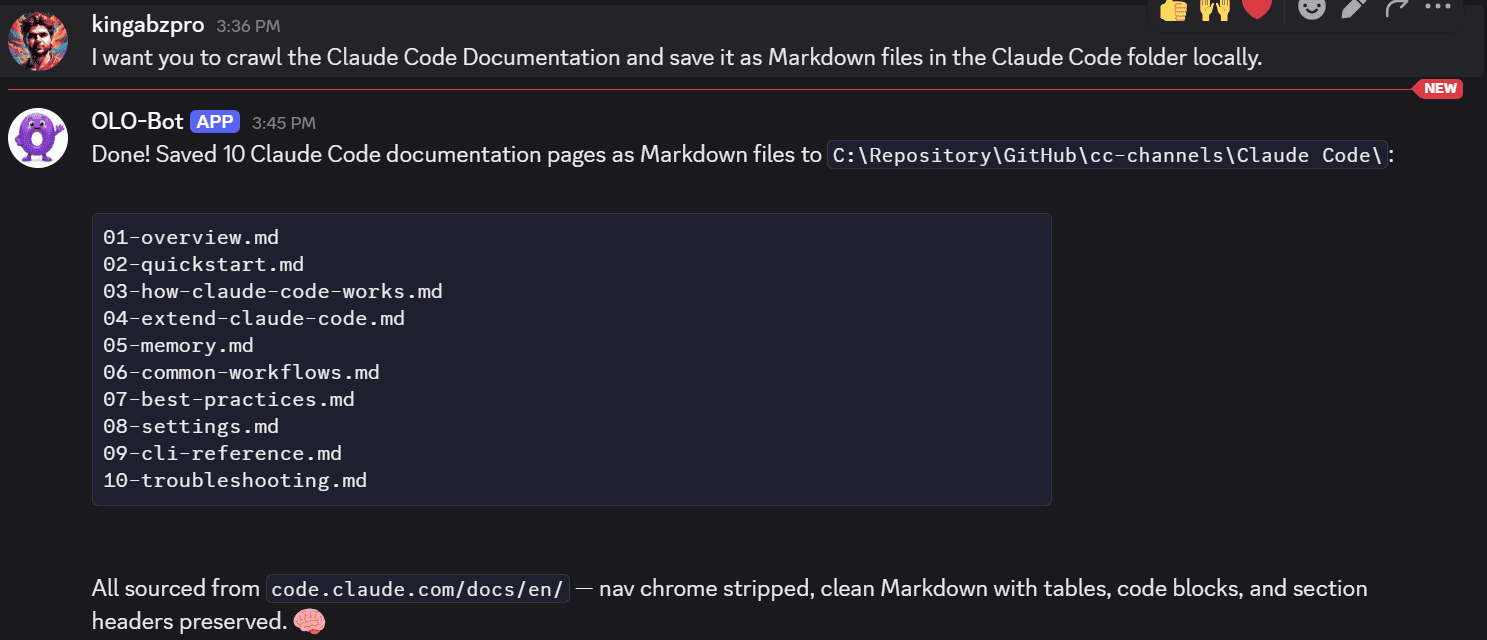
It is beginner-friendly because you do not need to build a Discord application from scratch or write complex Python code. Most of the work involves installing plugins, configuring API keys, and following a few terminal commands. Just remember that your Claude Code session must remain running for the bot to respond.
Step-by-step tutorial: How to Use Olostep With Claude Code Channels
Intermediate Agentic AI Projects
These projects take things a step further by introducing scheduled automation, real-time interactions, and workflows that can operate with minimal manual intervention. You will learn how to connect multiple services, handle events, and build AI applications that work beyond a simple prompt-and-response system.
4. Build an AI website monitoring agent
Keeping track of website changes sounds simple until you realize that you need a scraper, scheduler, database, change detection system, and notification service. In this project, you will build an automated website monitoring system that tracks important updates, such as pricing changes, product availability, and software releases.
The application uses Olostep Monitors API to check websites on a schedule, compare snapshots, and generate alerts when meaningful changes occur. You simply describe what matters in natural language, and the service handles the monitoring.
In my tutorial, I tested the system using MonitorBench, a website designed to evaluate monitoring tools. Olostep successfully ignored formatting changes while detecting an actual product availability change from Available to Waitlist.
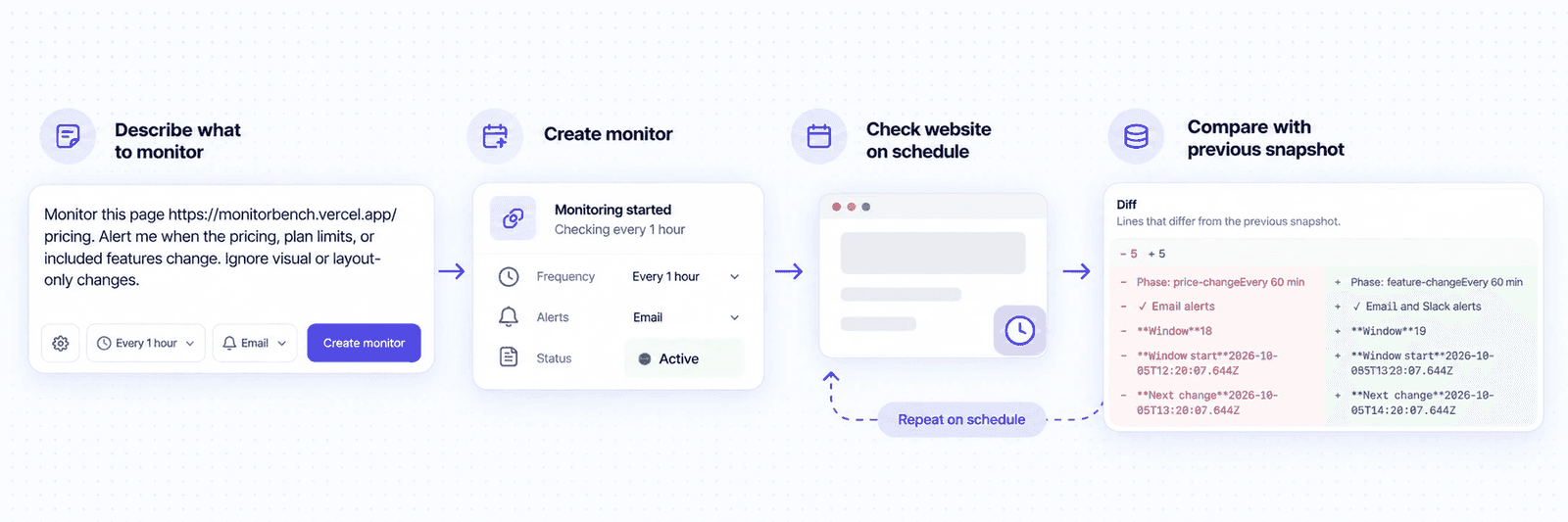
This is an intermediate project because you move beyond one-time API calls into scheduled, event-driven automation. You will learn how to create monitors with Python, retrieve events, filter irrelevant changes, and use webhooks to trigger more advanced AI workflows.
Step-by-step tutorial with Python code: How to Monitor Any Website for Changes With Olostep
5. Build an automated investment research agent with n8n
Researching multiple stocks every day can become repetitive. You need to check financial news, earnings reports, company announcements, and market developments. In this project, you will build an automated investment research assistant that monitors your stock watchlist and sends a consolidated research report directly to your inbox.
The workflow uses n8n for automation and Olostep to search public sources for each stock ticker. OpenAI combines the findings into a structured report, which is converted into an HTML email and delivered through Gmail.
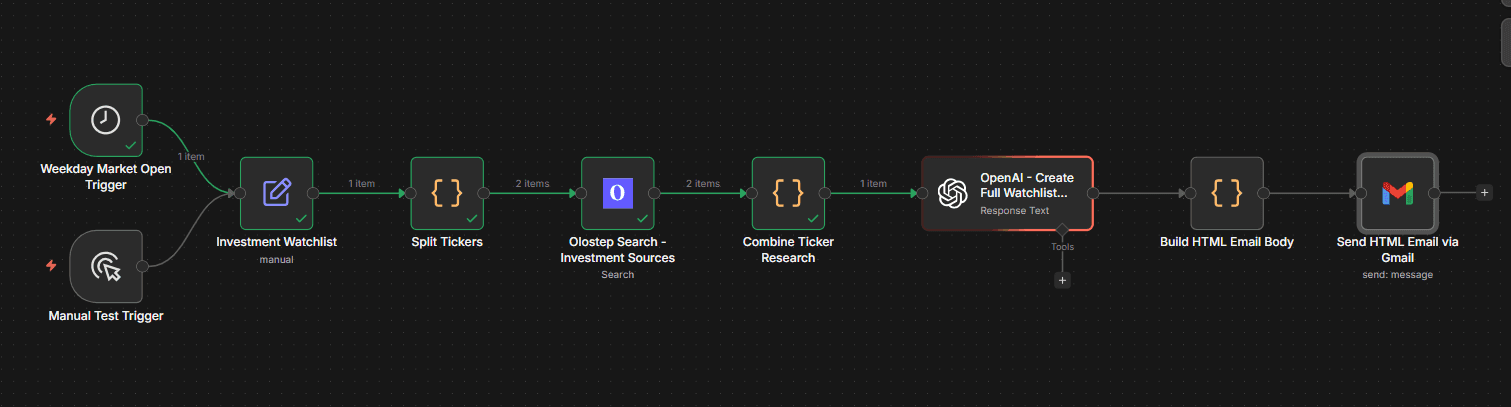
I built the workflow to run automatically on weekdays at US market open. You can customize the watchlist, schedule, email recipient, and report format. The GitHub repository also includes a ready-to-import n8n workflow and Docker configuration, so you do not have to build everything from scratch.
This project is intermediate because it combines multiple APIs, scheduled triggers, data processing, and automated delivery. You will learn how to build multi-step workflows in n8n, configure API credentials, connect Gmail using OAuth, and turn raw search results into useful research reports.
Project code: Automated Investment Research Agent on GitHub
Step-by-step tutorial: How to Automate Investment Research Using Olostep and n8n
6. Build an AI scholarship finder with Olostep and Hugging Face
Finding scholarships can be frustrating. You spend hours searching university websites, checking eligibility requirements, and comparing funding opportunities, only to discover that some deadlines have passed or you do not qualify. In this project, you will build ScholarScope, an AI-powered scholarship finder that searches for opportunities based on your country, degree, field of study, and preferences.
The application uses Olostep to search the web and scrape official scholarship pages, while Hugging Face Inference with DeepSeek-V4-Flash analyzes the information. It ranks relevant opportunities, explains why they match your profile, and highlights missing or uncertain details such as funding, eligibility, and deadlines.
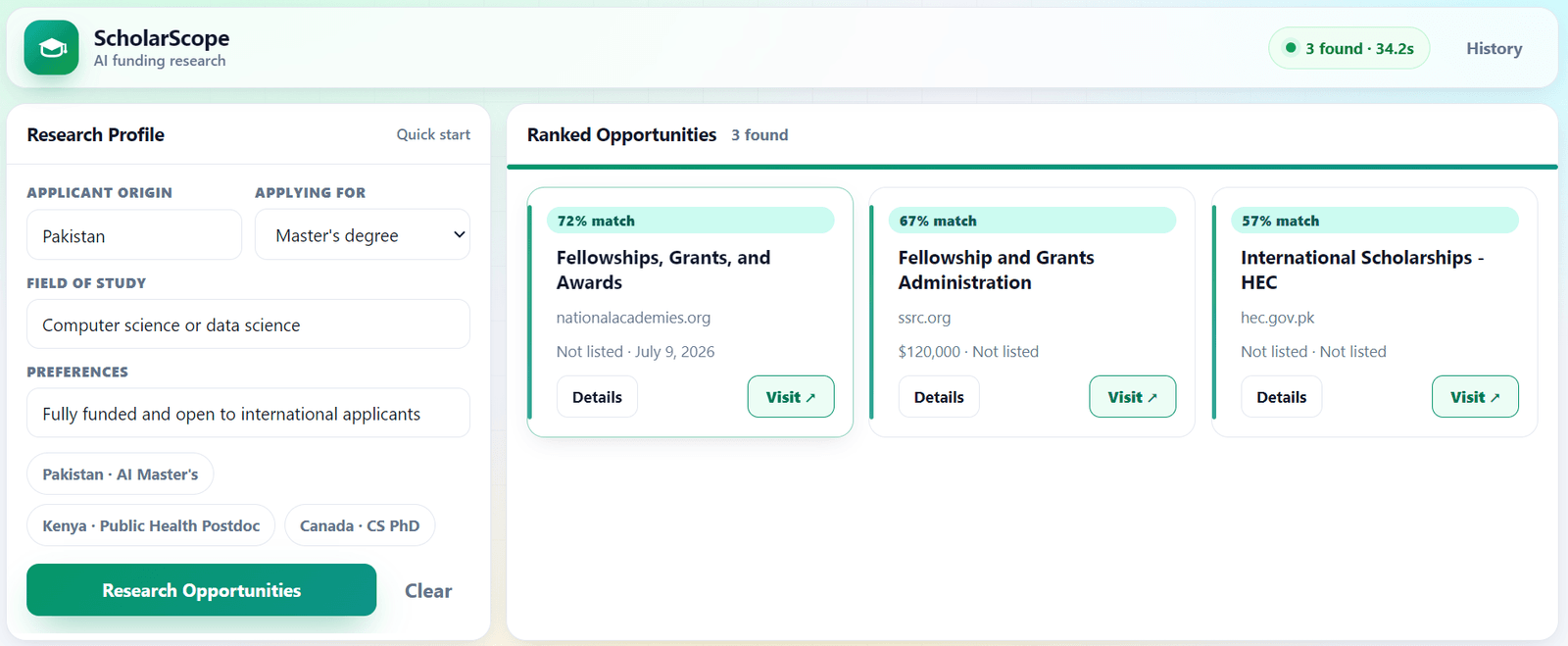
I built and deployed ScholarScope on Hugging Face Spaces, with a web interface for searching, reviewing, and saving opportunities. The workflow performs five focused searches, filters unreliable sources, scrapes up to eight relevant pages, and uses AI to evaluate the results. I also included a beginner-friendly Jupyter notebook to help you understand the implementation.
This is an intermediate project because you will learn how to build multi-stage research pipelines, filter web search results, validate structured AI outputs, and manage API costs. You will also learn when to use regular Python code instead of an AI agent, making your application faster, more predictable, and easier to maintain.
Project code: ScholarScope on Hugging Face
Step-by-step tutorial: How I Built an AI Scholarship Finder With Olostep
Advanced Agentic AI Projects
These projects go beyond basic AI agents by introducing multi-agent collaboration, task delegation, and complex research pipelines. You will learn how to coordinate specialized agents, manage information across multiple stages, and build systems that can handle more demanding tasks.
7. Build an AI agent swarm with CrewAI
A single AI agent can research, write, and review content, but handling everything at once can affect the quality of its work. In this project, you will build an AI agent swarm where multiple specialized agents collaborate to research a topic and produce a complete, reviewed article.
The application uses CrewAI and Gemini 3.5 Flash to coordinate four agents: a Researcher, Writer, Reviewer, and Manager. The Researcher uses Olostep to search the live web and retrieve source material, while the Writer and Reviewer handle content creation and improvement. The Manager oversees the entire process and delegates tasks.
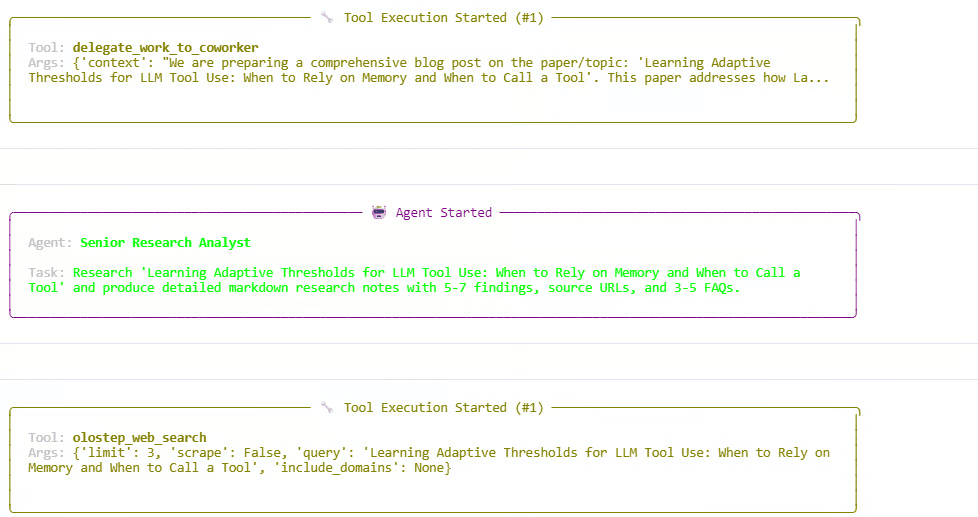
In the tutorial, I tested the swarm by asking it to research adaptive thresholds for LLM tool use. The system collected information, created a draft, and reviewed the final article. I also implemented a search budget that limits the Researcher to six external web calls, preventing unnecessary API usage.
This is an advanced project because you will work with hierarchical agent orchestration, where a manager dynamically delegates tasks instead of following a simple fixed sequence. You will learn how to define agent roles, share research between tasks, build custom tools, control API usage, and coordinate multiple agents through CrewAI.
Step-by-step tutorial with Python code: Agent Swarm Tutorial: Coordinate AI Agents With CrewAI
8. Build a multi-agent market research and trend analysis system
Collecting market information is relatively easy, but identifying meaningful trends across multiple sources requires more work. In this project, you will build an AI-powered market research application that investigates a topic, extracts important developments, identifies recurring patterns, and generates a structured research brief.
The application combines Olostep, GPT-5.2, and the OpenAI Agents SDK. It starts with a source-backed overview using Olostep Answers API, selects relevant websites, and scrapes their content. Four specialized agents then handle research, signal extraction, trend analysis, and report generation.
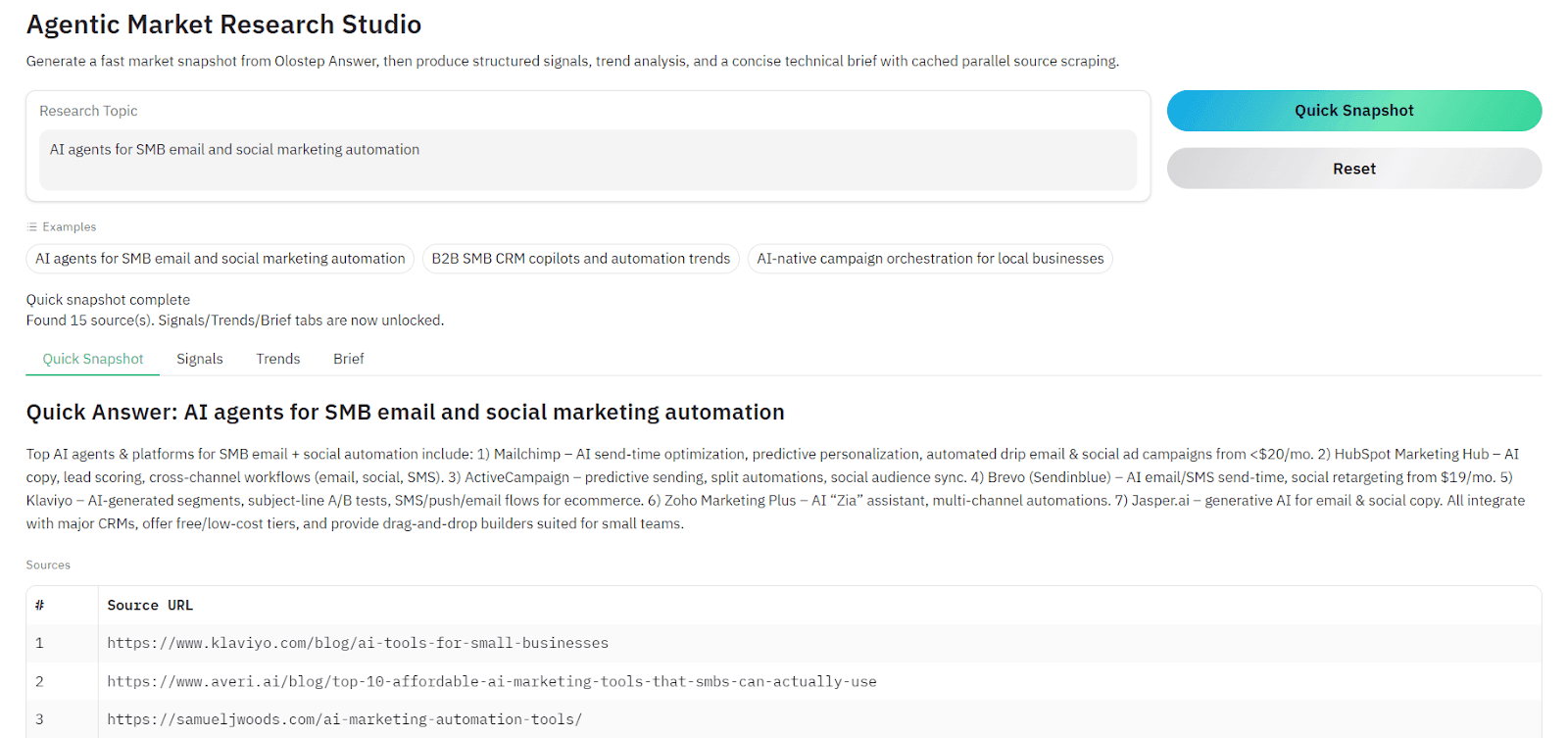
I also built an interactive Gradio interface where you can enter a research topic, generate a quick overview, and run deeper analysis when needed. The project includes terminal and standalone Python versions, Markdown and JSON exports, caching to reduce repeated API calls, and retry handling for temporary API failures.
This is an advanced project because it involves multi-stage research pipelines, structured information extraction, and coordination between specialized agents. You will learn how to pass information between research stages, combine web search with scraping, manage API failures, and build a reusable research application that works across different industries.
Project code: Multi-Agent Market Research on GitHub
Step-by-step tutorial: Agentic Market Research and Trend Analysis With Olostep
Production-Ready Agentic AI Projects
These projects bring everything together, from multi-agent collaboration and decision-making to complete web applications, automated workflows, and external integrations. You will learn how to build more sophisticated AI systems with practical features such as evidence verification, risk controls, and persistent results.
9. Build a multi-agent deep research assistant with evidence verification
Most AI research assistants gather information and generate a report without checking whether the evidence is sufficient. In this project, you will build a multi-agent deep research assistant that evaluates the quality of its findings, performs additional research when necessary, and produces a detailed report with supporting sources.
The application uses the OpenAI Agents SDK to coordinate three agents: a Manager, Judge, Researcher, and Analyst. The Manager retrieves an initial answer using Olostep, while the Judge evaluates whether the evidence meets a confidence threshold of 0.85. If it does not, the system performs additional searches and scrapes relevant webpages before passing the collected evidence to the Analyst.
I built the application using Reflex, with a browser interface that lets you submit research questions, follow agent progress in real time, and export formatted PDF reports using ReportLab. You can also try the application directly through its Hugging Face Space.
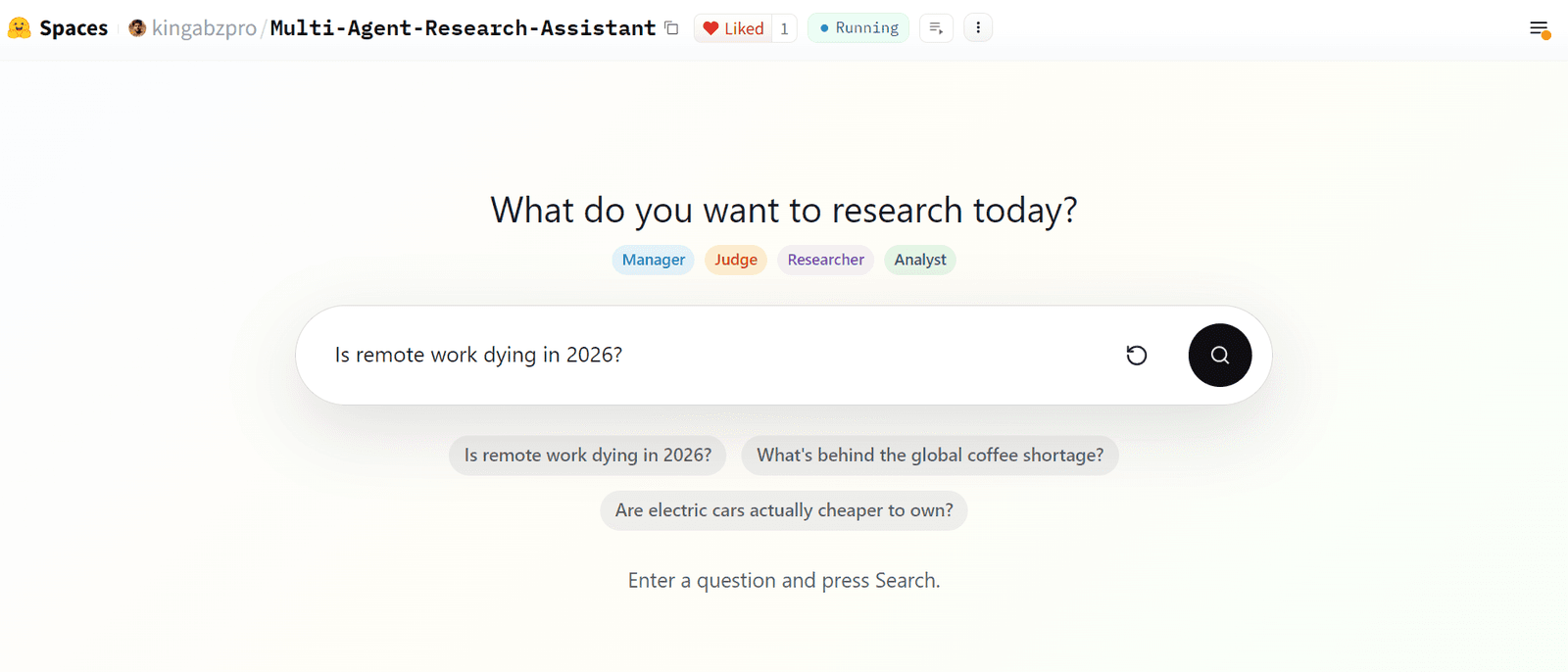
This is a production-oriented project because it introduces conditional agent workflows, evidence evaluation, and dynamic research depth rather than simply running agents in a fixed sequence. You will learn how to coordinate specialized agents, implement research quality checks, manage multiple retrieval stages, and build an interactive application with downloadable reports.
Project code: Multi-Agent Research Assistant on GitHub
Live application: Try the Research Assistant on Hugging Face
Step-by-step tutorial: How to Build a Multi-Agent Research Assistant in Python
10. Build a multi-agent stock research and paper trading platform
Building an AI trading application requires much more than asking a model whether to buy or sell a stock. You need reliable market data, financial research, competing viewpoints, and risk management. In this project, you will build BetterTradingAgents, a complete multi-agent stock research and paper trading platform that analyzes stocks, explains its decisions, and lets you experiment with trading strategies without risking real money.
The platform uses CrewAI to coordinate six specialized analysts covering market conditions, technical indicators, fundamentals, news, social sentiment, and price forecasting. Olostep, Finnhub, and yfinance provide market research and financial data, while TimeGPT offers optional forecasting. Depending on the selected analysis depth, bull and bear agents debate their findings, a Judge evaluates the arguments, and a Portfolio Manager produces a BUY, HOLD, or SELL recommendation.
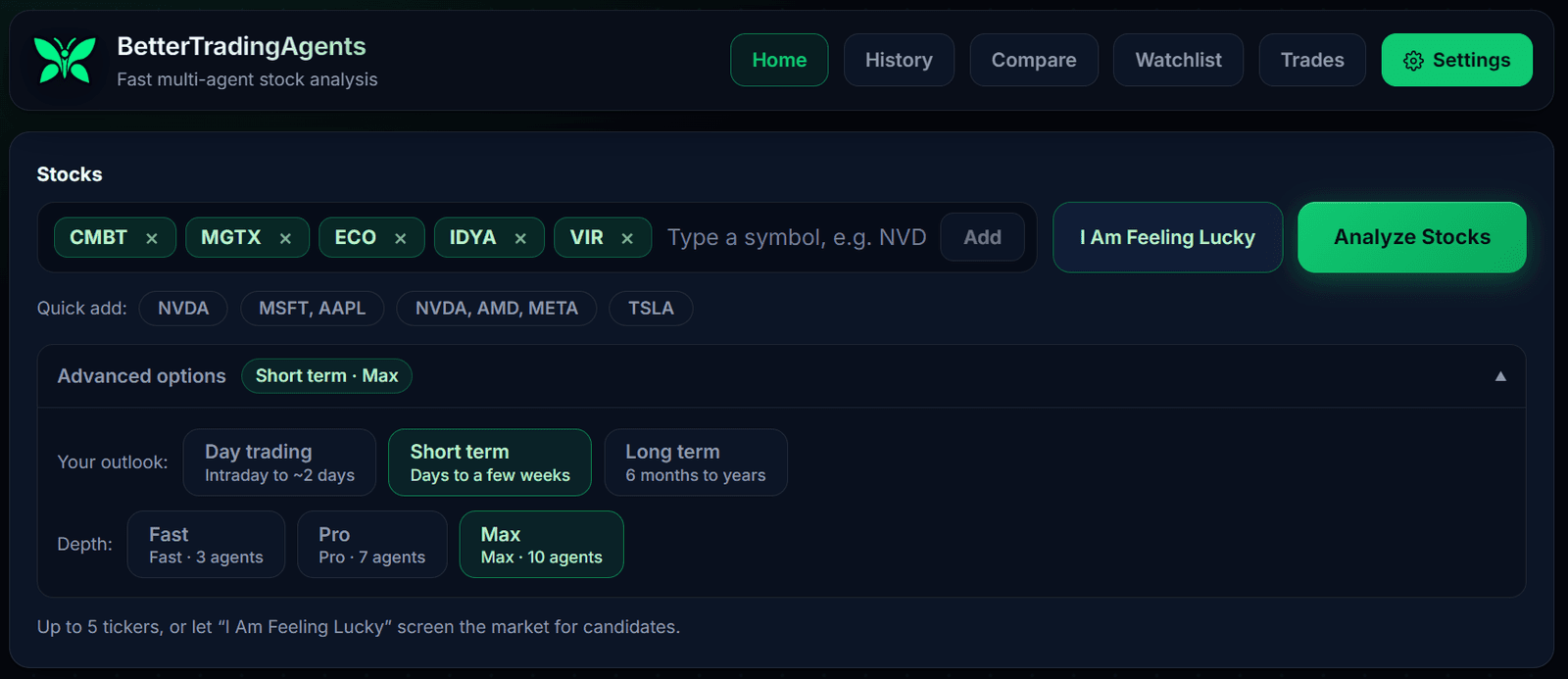
I built the platform with a FastAPI backend and an interactive browser dashboard where you can analyze up to five stocks, follow agent progress, review historical decisions, and chat with the Portfolio Manager. It also supports walk-forward backtesting, Alpaca paper trading, scheduled trading sessions, configurable LLM providers, and risk controls that limit position sizes and trading exposure.
This is the most advanced project on the list because it combines parallel multi-agent execution, financial data pipelines, agent debates, portfolio risk management, and automated decision-making in one application. You will learn how to coordinate complex agent workflows, evaluate decisions against historical market performance, integrate a paper-trading broker, and build a system that can run scheduled research and trading experiments.
Guide (GitHub Wiki): BetterTradingAgents Wiki
Project code: BetterTradingAgents on GitHub
Getting Started with Olostep
Getting started with Olostep is simple. First, create an account and generate your API key. Once you have your key, you can start scraping websites, searching the web, and extracting structured data with just a few lines of code.
For Python, install the official SDK:
pip install olostepNow, let us try a simple example that scrapes a webpage and returns its content as Markdown:
import os
from olostep import Olostep
client = Olostep(api_key=os.environ["OLOSTEP_API_KEY"])
result = client.scrapes.create(
    url_to_scrape="https://en.wikipedia.org/wiki/Artificial_intelligence",
    formats=["markdown"],
)
print(result.markdown_content)
Before running the script, set your API key as an environment variable named OLOSTEP_API_KEY. The script uses Olostep to retrieve the webpage and convert its content into clean Markdown that you can pass to an AI model.
Olostep also provides a JavaScript/TypeScript SDK, a Python SDK, REST APIs, and MCP integrations for AI agents. You can explore more examples in the official documentation or follow the project tutorials above to build complete applications.
Final Thoughts
Building these 10 projects has shown me how much you can do with agentic AI, from simple job search assistants to complex multi-agent research and trading applications. The good thing is that you do not need to start with something complicated. You can build a useful application with just a few lines of code and gradually work your way up.
Olostep makes this easier by handling the web data side of things. Beyond scraping and search, it offers crawling, structured extraction, website monitoring, and integrations with popular AI agent frameworks. It is also built as web infrastructure for knowledge-work AI, making it suitable for both personal projects and more demanding business and enterprise applications.
And we have only scratched the surface. Hopefully, these projects give you a few ideas and enough practical examples to start building something of your own. Pick one, follow the tutorial, and see where you can take it.
Frequently Asked Questions (FAQs)
Is Olostep free to use?
Yes. Olostep offers a free trial with 500 successful requests, and you do not need a credit card to get started. The Starter plan costs $9 per month and includes 5,000 credits. For larger projects, the Standard plan starts at $99 per month.
How much does it cost to build an AI agent with Olostep?
It depends on what your agent does. A standard webpage scrape uses 1 credit, while an Answers API request uses 20 credits. So, 100 scrapes cost just 100 credits. You will also need to factor in AI model usage, hosting, and any additional APIs.
Do I need coding experience to build these projects?
Not necessarily. Projects built with n8n offer visual workflows that require less coding, making them suitable for beginners. However, projects involving the OpenAI Agents SDK, CrewAI, FastAPI, and custom multi-agent systems generally require basic Python knowledge. If you are new to agentic AI, start with an n8n automation before moving to Python-based agents.
Can I use Olostep with OpenAI, Claude, Gemini, or open-source models?
Yes. Olostep is not tied to a specific language model. You can integrate its APIs with OpenAI, Claude, Gemini, or open-source models through frameworks such as the OpenAI Agents SDK, LangGraph, or CrewAI. You can also connect Olostep to compatible tools using MCP, allowing AI agents to retrieve live web information without maintaining their own scraping infrastructure.
What is the difference between Olostep and a traditional web scraper?
Olostep goes beyond basic scraping by offering web search, crawling, monitoring, structured extraction, and batch processing of up to 100,000 URLs per job. It is particularly useful for businesses and enterprises handling large volumes of web data, with lower per-request pricing at higher usage levels and custom enterprise discounts. You can also start small and scale without managing proxies, browsers, or scraping infrastructure yourself.
Can I scale my AI agent projects from a simple prototype to an enterprise application?
Yes. You can start with a simple Python script and gradually build more advanced AI applications. Olostep supports this growth with batch processing, higher concurrency limits, and enterprise plans for larger workloads. You will still need to handle security, error handling, and monitoring, but you do not have to build your own web data infrastructure.