

Trusted by the best startups startups in the world

















One API to Automate Web Data
Search, scrape, structure and monitor the whole web with one
API. Reliable, cost-effective, scalable. Handling Billions of requests
The OS for Knowledge Work AI
Introducing bOSs, the Business Operating System Stack
that makes the world’s data useful to knowledge work AIs
Built for Engineering Teams
Object-oriented API, native Python and NodeJS SDK clients,
metadata support, webhook events


Get clean data from any URL



1# pip install olostep
2from olostep import Olostep
3
4client = Olostep(api_key="YOUR_REAL_KEY")
5
6result = client.scrapes.create(
7    url_to_scrape="https://en.wikipedia.org/wiki/Alexander_the_Great",
8    formats=["markdown", "html"],
9)
10
11print(result.markdown_content)
12print(result.html_content)1// npm i olostep
2import Olostep from 'olostep'
3
4const client = new Olostep({ apiKey: 'YOUR_REAL_KEY' })
5
6const result = await client.scrapes.create({
7 url: 'https://en.wikipedia.org/wiki/Alexander_the_Great',
8 formats: ['markdown', 'html'],
9})
10
11console.log(result.markdown_content)
12console.log(result.html_content)1curl -s -X POST "https://api.olostep.com/v1/scrapes" \
2 -H "Authorization: Bearer <YOUR_API_KEY>" \
3 -H "Content-Type: application/json" \
4 -d '{
5 "url_to_scrape": "https://en.wikipedia.org/wiki/Alexander_the_Great",
6 "formats": ["markdown", "html"]
7 }'


Crawl all the subpages
1# pip install olostep
2from olostep import Olostep
3
4client = Olostep(api_key="YOUR_REAL_KEY")
5
6crawl = client.crawls.create(
7    start_url="https://olostep.com",
8    max_pages=100,
9    include_urls=["/**"],
10    exclude_urls=["/collections/**"],
11    include_external=False,
12)
13
14print(crawl.id, crawl.status)
15
16# Wait for completion and iterate pages
17for page in crawl.pages():
18    print(page.url)
19    content = page.retrieve(["markdown"])
20 print(content.markdown_content[:200])1// npm i olostep
2import Olostep from 'olostep'
3
4const client = new Olostep({ apiKey: 'YOUR_REAL_KEY' })
5
6const crawl = await client.crawls.create({
7 url: 'https://olostep.com',
8 maxPages: 100,
9 includeUrls: ['/**'],
10 excludeUrls: ['/collections/**'],
11 includeExternal: false,
12})
13
14console.log(crawl.id, crawl.status)
15
16// Wait for completion and iterate pages
17for await (const page of crawl.pages()) {
18 console.log(page.url)
19 const content = await client.retrieve({ retrieveId: page.retrieve_id, formats: ['markdown'] })
20 console.log(content.markdown_content.slice(0, 200))
21}1# Start crawl
2curl -s -X POST "https://api.olostep.com/v1/crawls" \
3 -H "Authorization: Bearer <YOUR_API_KEY>" \
4 -H "Content-Type: application/json" \
5 -d '{
6 "start_url": "https://olostep.com",
7 "max_pages": 100,
8 "include_urls": ["/**"],
9 "exclude_urls": ["/collections/**"],
10 "include_external": false
11 }'
12
13# Check status (replace <CRAWL_ID>)
14curl -s "https://api.olostep.com/v1/crawls/<CRAWL_ID>" \
15 -H "Authorization: Bearer <YOUR_API_KEY>"
16
17# Get pages (replace <CRAWL_ID>)
18curl -s "https://api.olostep.com/v1/crawls/<CRAWL_ID>/pages" \
19 -H "Authorization: Bearer <YOUR_API_KEY>"
20
21# Retrieve content (replace <RETRIEVE_ID>)
22curl -s -G "https://api.olostep.com/v1/retrieve" \
23 -H "Authorization: Bearer <YOUR_API_KEY>" \
24 --data-urlencode "retrieve_id=<RETRIEVE_ID>" \
25 --data-urlencode "formats=markdown"Get all the URLs on a website
1# pip install olostep
2from olostep import Olostep
3
4client = Olostep(api_key="YOUR_REAL_KEY")
5
6sitemap = client.maps.create(
7    url="https://docs.olostep.com",
8    include_urls=["/features/**"],
9    top_n=100,
10)
11
12print(f"Map ID: {sitemap.id}")
13
14# Iterate all URLs (handles pagination automatically)
15for url in sitemap.urls():
16 print(url)1// npm i olostep
2import Olostep from 'olostep'
3
4const client = new Olostep({ apiKey: 'YOUR_REAL_KEY' })
5
6const map = await client.maps.create({
7 url: 'https://docs.olostep.com',
8 includeUrls: ['/features/**'],
9 topN: 100,
10})
11
12console.log(`Map ID: ${map.id}`)
13
14// Iterate all URLs (handles pagination automatically)
15for await (const url of map.urls()) {
16 console.log(url)
17}1curl -s -X POST "https://api.olostep.com/v1/maps" \
2 -H "Authorization: Bearer <YOUR_API_KEY>" \
3 -H "Content-Type: application/json" \
4 -d '{
5 "url": "https://docs.olostep.com",
6 "include_urls": ["/features/**"],
7 "top_n": 100
8 }'Process up to 10k URLs in one batch. Get results in 5-8 mins
1# pip install olostep
2from olostep import Olostep
3
4client = Olostep(api_key="YOUR_REAL_KEY")
5
6batch = client.batches.create(
7    urls=[
8        {"custom_id": "item-1", "url": "https://www.google.com/search?q=stripe&gl=us&hl=en"},
9        {"custom_id": "item-2", "url": "https://www.google.com/search?q=paddle&gl=us&hl=en"},
10    ],
11    parser="@olostep/google-search",
12)
13
14print(batch.id, batch.status)
15
16# Wait and iterate results (auto-waits for completion)
17for item in batch.items():
18    content = item.retrieve(["json"])
19    print(item.url, item.custom_id)
20 print(content.json_content)1// npm i olostep
2import Olostep from 'olostep'
3
4const client = new Olostep({ apiKey: 'YOUR_REAL_KEY' })
5
6const batch = await client.batches.create([
7 { url: 'https://www.google.com/search?q=stripe&gl=us&hl=en', customId: 'item-1' },
8 { url: 'https://www.google.com/search?q=paddle&gl=us&hl=en', customId: 'item-2' },
9], {
10 parser: '@olostep/google-search',
11})
12
13console.log(batch.id, batch.total_urls)
14
15// Wait and iterate results (auto-waits for completion)
16for await (const item of batch.items()) {
17 const content = await item.retrieve(['json'])
18 console.log(item.url, item.custom_id)
19 console.log(content.json_content)
20}1curl -s -X POST "https://api.olostep.com/v1/batches" \
2 -H "Authorization: Bearer <YOUR_API_KEY>" \
3 -H "Content-Type: application/json" \
4 -d '{
5 "items": [
6 {"custom_id": "item-1", "url": "https://www.google.com/search?q=stripe&gl=us&hl=en"},
7 {"custom_id": "item-2", "url": "https://www.google.com/search?q=paddle&gl=us&hl=en"}
8 ],
9 "parser": {"id": "@olostep/google-search"}
10 }'Semantically search the Web
1# pip install olostep
2from olostep import Olostep
3
4client = Olostep(api_key="YOUR_REAL_KEY")
5
6search = client.searches.create("Latest updates with SpaceX")
7
8print(search.id, len(search.links))1// npm i olostep
2import Olostep from 'olostep'
3
4const client = new Olostep({ apiKey: 'YOUR_REAL_KEY' })
5
6const search = await client.searches.create('Latest updates with SpaceX')
7
8console.log(search.id, search.links.length)1curl -s -X POST "https://api.olostep.com/v1/searches" \
2 -H "Authorization: Bearer <YOUR_API_KEY>" \
3 -H "Content-Type: application/json" \
4 -d '{
5 "query": "Latest updates with SpaceX"
6 }'Get answers from the Web
1# pip install olostep
2from olostep import Olostep
3
4client = Olostep(api_key="YOUR_REAL_KEY")
5
6answer = client.answers.create(
7    task="What does Olostep do and what is its core offering?",
8    json_format={"company": "", "what_it_does": "", "core_offering": ""},
9)
10
11print(answer.json_content)
12print(answer.sources)1// npm i olostep
2import Olostep from 'olostep'
3
4const client = new Olostep({ apiKey: 'YOUR_REAL_KEY' })
5
6const answer = await client.answers.create({
7 task: 'What does Olostep do and what is its core offering?',
8 jsonFormat: { company: '', what_it_does: '', core_offering: '' },
9})
10
11console.log(answer.json_content)
12console.log(answer.sources)1curl -s -X POST "https://api.olostep.com/v1/answers" \
2 -H "Authorization: Bearer <YOUR_API_KEY>" \
3 -H "Content-Type: application/json" \
4 -d '{
5 "task": "What does Olostep do and what is its core offering?",
6 "json": {"company": "", "what_it_does": "", "core_offering": ""}
7 }'Monitor pages on a schedule and get change alerts
1import requests
2import json
3
4API_KEY = "<YOUR_API_KEY>"
5API_URL = "https://api.olostep.com/v1"
6
7# Create a monitor
8payload = {
9    "query": "Alert me when Tesla stock price is above $500",
10    "frequency": "every hour",
11    "email": "alerts@example.com"
12}
13
14headers = {
15    "Authorization": f"Bearer {API_KEY}",
16    "Content-Type": "application/json"
17}
18
19response = requests.post(f"{API_URL}/monitors", headers=headers, json=payload)
20monitor = response.json()
21monitor_id = monitor['id']
22
23print(f"Monitor created: {monitor_id}")
24print(f"Status: {monitor['status']}")
25
26# List all monitors
27monitors = requests.get(f"{API_URL}/monitors", headers=headers).json()
28for m in monitors['monitors']:
29    print(f"{m['id']}: {m['url']} ({m['frequency']})")
30
31# Get monitor details
32details = requests.get(f"{API_URL}/monitors/{monitor_id}", headers=headers).json()
33print(json.dumps(details, indent=2))
34
35# Delete a monitor
36requests.delete(f"{API_URL}/monitors/{monitor_id}", headers=headers)
37print(f"Monitor {monitor_id} deleted")1const API_URL = 'https://api.olostep.com/v1'
2const headers = {
3 'Authorization': 'Bearer <YOUR_API_KEY>',
4 'Content-Type': 'application/json'
5}
6
7// Create a monitor
8const res = await fetch(`${API_URL}/monitors`, {
9 method: 'POST',
10 headers,
11 body: JSON.stringify({
12 query: 'Alert me when Tesla stock price is above $500',
13 frequency: 'every hour',
14 email: 'alerts@example.com'
15 })
16})
17
18const monitor = await res.json()
19console.log(`Monitor created: ${monitor.id}`)
20console.log(`Status: ${monitor.status}`)
21
22// List all monitors
23const monitors = await fetch(`${API_URL}/monitors`, { headers }).then(r => r.json())
24monitors.monitors.forEach(m => console.log(`${m.id}: ${m.url} (${m.frequency})`))
25
26// Get monitor details
27const details = await fetch(`${API_URL}/monitors/${monitor.id}`, { headers }).then(r => r.json())
28console.log(details)
29
30// Delete a monitor
31await fetch(`${API_URL}/monitors/${monitor.id}`, { method: 'DELETE', headers })
32console.log(`Monitor ${monitor.id} deleted`)1# Create a monitor
2curl -s -X POST "https://api.olostep.com/v1/monitors" \
3 -H "Authorization: Bearer <YOUR_API_KEY>" \
4 -H "Content-Type: application/json" \
5 -d '{
6 "query": "Track changes in product pricing and stock information",
7 "url": "https://example.com/products/widget-pro",
8 "frequency": "daily",
9 "email": "alerts@example.com"
10 }'
11
12# List all monitors
13curl -s "https://api.olostep.com/v1/monitors" \
14 -H "Authorization: Bearer <YOUR_API_KEY>"
15
16# Get monitor details (replace <MONITOR_ID>)
17curl -s "https://api.olostep.com/v1/monitors/<MONITOR_ID>" \
18 -H "Authorization: Bearer <YOUR_API_KEY>"
19
20# Delete a monitor (replace <MONITOR_ID>)
21curl -s -X DELETE "https://api.olostep.com/v1/monitors/<MONITOR_ID>" \
22 -H "Authorization: Bearer <YOUR_API_KEY>"-
/scrapes

Turn any URL into LLM-ready Markdown, HTML, screenshots, PDFs, or structured JSON. Handle JS-rendered pages, actions, and extraction workflows without maintaining browsers, proxies, or brittle scrapers.
-
/crawls
Crawl websites at scale, collect content from subpages, control depth and URL patterns, and retrieve clean HTML or Markdown for indexing, enrichment, RAG, and AI workflows.
-
/maps
Discover every URL on a website using sitemaps and on-page links. Filter by path patterns, paginate large results, and prepare clean URL lists for SEO, crawls, and batches.
-
/batches
Process up to 10k concurrent URLs in a single batch in 5-8 mins to get clean web data and aggregate content. Run many batches in parallel to scale to millions of concurrent requests.
-
/searches
Search the web with natural language and get relevant links, titles, and descriptions. Find the information you need with semantic search across the web.
-
/answers
Search the web with natural language and get AI-powered answers in the JSON format you need. Ground your products in real-world data, enrich datasets, and automate research.
-
/monitors
Create scheduled web monitors from natural-language instructions. Track for changes on a single page or across the web, deltas, extract structured insights, and get change notifications by email, webhook, or SMS.








Pricing that Makes Sense
Most cost-effective web data API on the market
-
Get startedNo credit card required
Trial
$0Includes: 500 successful requests
-
All requests are JS rendered + utilizing residential IP addresses
-
Low rate limits
-
Purchase nowCOST/1K $1.800
Starter
$9/ monthEverything in Free, Plus:-
5000 successful requests
-
150 concurrent requests
-
Purchase nowCOST/1K $0.495
Standard
$99/ monthEverything in Starter, Plus:-
200K successful requests
-
500 concurrent requests
-
Purchase nowCOST/1K $0.399
Scale
$399/ monthEverything in Standard, Plus:-
1 Million successful requests
-
AI-powered Browser Automations
Top-ups
Have spiky usage or don't like subscriptions?
You can buy credit packs. They are valid for 6 months.
10k credits
250k credits
2M credits
Enterprise
Data tailored to your industry
See how Olostep powers Knowledge Work AI companies, from AI for Marketers, AI for manufacturers to AI for local businesses and construction
AI for Procurement
Spot fast-growing brands before their revenue is public, using web signals like reviews, social followers, store coverage and product ingredients.
-
 Track e-commerce reviews
-
 Count social followers
 -
 Map stores by zip code
 -
 Count products per brand
 -
 Extract product ingredients
AI for Manufacturers
See how component stock and prices change across suppliers over time, and catch shortages before they reach your production line.
-
 Track stock across distributors
 -
 Compare prices over time
 -
 Monitor lead times
 -
 Detect supplier changes
 -
 Flag emerging shortages
AI for Legal
Scan the web for IP infringements and capture timestamped screenshots as proof, so every case starts with a dated record.
-
 Scan marketplaces and websites
 -
 Detect copied brands and designs
 -
 Capture timestamped screenshots
 -
 Archive page snapshots
 -
 Build an evidence trail
AI for Marketers
Track how brands show up across the web and in AI answers, and analyze how share of voice shifts over time, not just where it stands today.
-
Crawl blog content
-
Analyze brand mentions
-
Research competitors
-
Tag citations in AI answers
-
Monitor competitor pages
Monitor the Web
Monitor any webpage for DOM changes, stock availability, price changes, job openings or fresh content. Run automatically on a schedule and get alerted
-
 Monitor pricing & stock
 -
 Monitor content & DOM changes
 -
Monitor job openings
-
 Monitor reviews & ratings
 -
 Set schedule & alerts
Automate data pipelines
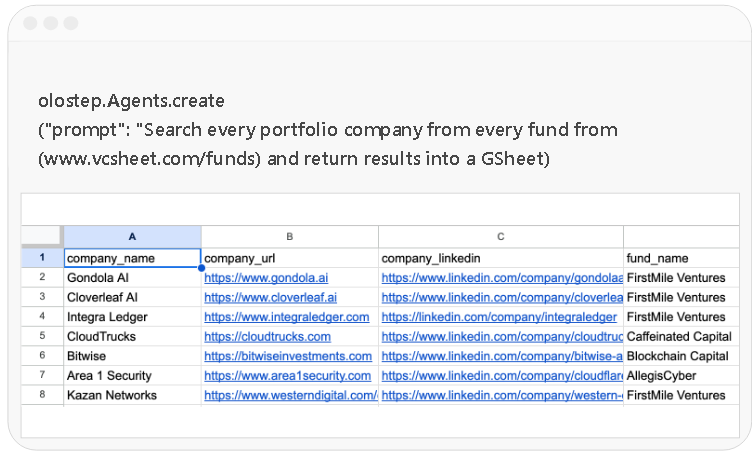
Automate complex data pipelines with the /agents endpoint through natural language prompts. You can also pass your own internal knowledge as context
-
Power your search product
-
Track portfolio companies
-
Build market intelligence
-
Research companies at scale
-
Automate GTM and recruiting
Automate complex data pipelines with the /agents endpoint through natural language prompts. You can also pass your own internal knowledge as context


A Web Time Machine for Knowledge Work AI
Search verticals of the web to see what's true today, what changed, when it changed, and why it matters.
Built for AI agents assisting knowledge work
Point-in-time
Search every relevant source in a vertical index to see what is true today.
Temporal
Compare snapshots over time to see how companies, markets and industries are changing.
Composite
Combine information across sources and time with LLMs and System 1 decision models to answer questions that require connecting different pieces of evidence.
Trusted by Amazing Teams Building the Future of AI
-
 Michelle JuliaCo-founder & CEO Aurium
Olostep is the best!!! We automated entire data pipelines with just a prompt
-
 Richard HeCo-founder & CEO Openmart
Olostep has become the default Web Layer infrastructure for our company
-
 Max Brodeur-UrbasCo-founder & CEO Gumloop
Olostep works like a charm! And your customer service is exceptional
-
 Rob HayesCo-founder Merchkit
Olostep lets us turn any website into an API. Great product, great people
-
 Brandon CohenCo-founder & CTO CivilGrid
I highly recommend Olostep, great product!
-
 Co-founder & CEO Gedd.it
We verify coupon codes at scale. Love Olostep. It works on any e-commerce
-
 Trevor WestCo-founder & CEO Podqi
Olostep is the best API to search, extract, and structure data from the Web. Happy to be customers
-
 Rida NaveedCo-founder Zecento
We use /batches combined with parsers and it's magical how we can get structured data at large scale
-
 Kieran V.Growth PlotsEvents
Olostep allowed us to search and structure events data across the Web
-
 Paul MitFounder Foundbase
Reliable and cost-effective API for working with data. Congrats on the cool product
Connect Olostep to Your AI Stack
Official Olostep integrations. Add web scraping,
crawling and AI-powered search to any tool in your stack.






























-

Connect with your AI agents
A deterministic, repeatable, controllable pipeline that automates any web research workflow and pipeline exactly as you described it.







-

Use the Olostep CLI
Map, scrape, crawl, batch process, and generate answers directly from your terminal, with clean JSON output built for scripts, CI pipelines and AI agents.
npx -y olostep-cli@latest --help -

Add Olostep to your MCP client
Works with any product that implements the Model Context Protocol: register Olostep once and call web tools from chat, agents, or IDEs that support MCP.
{
  "mcpServers": {
    "olostep-web": {
"command": "npx",
"args": ["-y", "olostep-mcp"],
"env": {
"OLOSTEP_API_KEY": "YOUR_API_KEY"
}
}
}
}
Ready to start?
Get clean data for your AI from any website with Olostep
Most cost-effective API. Built for scale
Frequently asked questions
-
What is Olostep?

Olostep is Web Infrastructure for Knowledge work AIs. It started by providing a suite of Web Data APIs that let businesses’ AI agents search, extract, and structure web data. It helps AI application companies turn public web content into clean, structured outputs. Olostep's mission is to make the world's data useful to knowledge work AIs and become the business operating systems of AI-native companies.
-
Why are we building Olostep?
Olostep is built on a bet that, over time, most knowledge work will flow through AI models. A new generation of AI application companies is emerging to assist and automate knowledge work in specific domains, such as marketing, manufacturing, legal and property appraisals. Olostep exists for them: the data infrastructure for their agents, enterprise-ready and embedded in their core products.
Those agents are shifting from writing text to making decisions. Decision models return a choice with a probability that code can act on directly, imbuing software itself with intelligence. Every decision needs fresh, domain-specific data and produces new data in turn. Within a year, these companies will rebuild around decision loops and lock in the infrastructure underneath. Olostep is positioned to be that infrastructure. -
Why do AI agents need web infrastructure?
The primary users of the web are shifting from humans to AI agents. Today, billions of people use the web. Tomorrow, trillions of agents will use it
These agents need web infrastructure built specifically for them — infrastructure that can help them access information, assist people, and automate knowledge work at a scale the web has never seen before. -
How is Olostep different?
Olostep is an infrastructure company for knowledge-work AIs, where data is a first-class citizen: data as infrastructure.
We’re not building Google for agents (search-as-infrastructure) or a developer tool. Search APIs index the whole web for anyone; we index the portions that matter to our customers and capture snapshots over time, so their agents see not just what the web says but what changed. And we’re built for AI knowledge-work businesses and their teams, not individual developers: enterprise-ready and embedded in their core products.
Our mission is to make the world’s data useful to knowledge-work AIs and to become the business operating system of AI-native companies. -
Why should I use Olostep?
Olostep is built for business use cases: reliable, scalable, cost-effective, flexible and designed to fit your existing workflows and backend. It’s enterprise-ready, trusted by teams that run it inside their core products. You can build custom parsers that return deterministic, structured results at scale, so your agents and decision models always get data in the exact shape they need. And our talent-dense team works alongside yours, building the features your product needs. You can test Olostep for free to see if it fits your use case. Get your free API keys here.
-
Who should use Olostep?
Olostep is built for AI agents deployed within businesses, especially agents built by AI application companies that assist areas of knowledge work — from AI for marketers and engineers to AI for lawyers and property appraisals.
What is a Web Data API?
A Web Data API allows developers to extract, crawl and structure data from websites at scale. It handles rendering, anti-bot protection and parsing, returning clean outputs such as JSON or HTML for use in applications, analytics or AI workflows.
-
Can Olostep support my high-volume requests?
Yes, Olostep is built to handle high-volume data extraction at scale, supporting up to billions of requests per month. With features like batch processing, distributed infrastructure and scalable workflows, it is designed for both growing teams and enterprise-level use cases.
-
How does a Web Data API work?
A Web Data API processes requests by rendering web pages, handling anti-bot protections, extracting structured data and returning it in formats such as JSON or Markdown. This removes the need to manage scraping infrastructure manually.
-
What is the difference between crawling and scraping?
Crawling refers to discovering and navigating multiple pages across a website, while scraping focuses on extracting data from a specific page. A Web Data API typically supports both processes in a unified workflow.
-
What formats does Olostep return results in?
Most Web Data APIs return data in structured formats such as JSON, as well as HTML, Markdown or raw content depending on the use case. Structured outputs are commonly used for automation and AI workflows.
-
Can Olostep automate my data pipelines?
Yes, Olostep is designed to support automated data pipelines and research workflows on the web. With capabilities for searching, crawling, scraping, structuring data and running repeatable workflows, it can support a wide range of business and AI use cases.
If you have a specific workflow in mind, contact the team at info@olostep.com or via the Contact Sales page to discuss the best setup for your use case. -
Can I extract data with a prompt?
Yes, Olostep lets you extract data using natural language prompts. If you already know the exact page you want to process, you can use the
/scrapesendpoint with LLM extraction to describe the data you want returned.
For high-volume or deterministic extraction, Olostep's parsers are the better option, as they return structured JSON more consistently at scale.
For more advanced workflows, such as searching for data, navigating across pages, handling pagination or validating results, the/agentsendpoint can automatically carry out multi-step extraction based on your prompt. -
What is counted as a request?
One request equals one webpage or one PDF processed. We do not charge separately for bandwidth, proxies, or data usage. All infrastructure costs are included in the price per request.
-
Does Olostep charge for failed requests?
No, Olostep does not charge for failed requests. You are only billed for successful requests, ensuring predictable and fair usage-based pricing.
For endpoints that involve LLM processing (such as the Answers API), any underlying model costs may still apply. However, Olostep itself only charges for requests that are successfully completed.
-
Does Olostep offer a free trial?
Yes, Olostep includes a free plan with 500 requests to help you test the API before upgrading. Paid plans start from $9/month and include 5,000 credits per month.
This gives teams a low-risk way to evaluate Olostep's reliability, scalability and cost-effectiveness before moving to higher-volume usage. -
Can I switch plans after signing up?
Yes, you can switch plans at any time. Plans are pro-rated, meaning any unused value from your current plan is carried over to your new plan.
This ensures you don't pay twice for usage you've already covered, giving you flexibility as your needs grow. -
Can I ask for a refund if I don't use it?
Yes. If you're not satisfied with the Olostep API or it doesn't end up being useful for your use case, you can email info@olostep.com to request a refund.
If you cancel after a period of non-use, Olostep can also refund the unused portion of your plan where applicable. -
How can I pay?
You can pay through Stripe Payment Links. To access billing, you must be logged in to your Olostep account. Go to your dashboard, navigate to Billing & Invoices, click Manage on Stripe, and add your card details. Once your card is added, you’re good to go.