

Vertraut von führenden Startups weltweit


















Eine API für automatisierte Webdaten
Durchsuchen, scrapen, strukturieren und überwachen Sie das gesamte Web mit einer
API. Zuverlässig, kosteneffizient, skalierbar. Verarbeitet Milliarden von Anfragen
Scrapen
Erhalten Sie Echtzeitdaten von Websites. Sauberes Markdown, HTML, Screenshots, JSON...
Crawlen
Rufen Sie alle Seiten einer Website ab und erhalten Sie deren Inhalte
Batch
Verarbeitet bis zu 100.000 URLs in 5-7 Minuten
Für Entwickler entwickelt
Objektorientierte API, native Python- und NodeJS-SDK-Clients,
Metadaten-Unterstützung, Webhook-Events, einfach zu testen und einfach zu skalieren


Erhalten Sie saubere Daten von jeder URL



1# pip install olostep
2from olostep import Olostep
3
4client = Olostep(api_key="YOUR_REAL_KEY")
5
6result = client.scrapes.create(
7    url_to_scrape="https://en.wikipedia.org/wiki/Alexander_the_Great",
8    formats=["markdown", "html"],
9)
10
11print(result.markdown_content)
12print(result.html_content)1// npm i olostep
2import Olostep from 'olostep'
3
4const client = new Olostep({ apiKey: 'YOUR_REAL_KEY' })
5
6const result = await client.scrapes.create({
7 url: 'https://en.wikipedia.org/wiki/Alexander_the_Great',
8 formats: ['markdown', 'html'],
9})
10
11console.log(result.markdown_content)
12console.log(result.html_content)1curl -s -X POST "https://api.olostep.com/v1/scrapes" \
2 -H "Authorization: Bearer <YOUR_API_KEY>" \
3 -H "Content-Type: application/json" \
4 -d '{
5 "url_to_scrape": "https://en.wikipedia.org/wiki/Alexander_the_Great",
6 "formats": ["markdown", "html"]
7 }'


Crawlen Sie alle Unterseiten
1# pip install olostep
2from olostep import Olostep
3
4client = Olostep(api_key="YOUR_REAL_KEY")
5
6crawl = client.crawls.create(
7    start_url="https://olostep.com",
8    max_pages=100,
9    include_urls=["/**"],
10    exclude_urls=["/collections/**"],
11    include_external=False,
12)
13
14print(crawl.id, crawl.status)
15
16# Wait for completion and iterate pages
17for page in crawl.pages():
18    print(page.url)
19    content = page.retrieve(["markdown"])
20 print(content.markdown_content[:200])1// npm i olostep
2import Olostep from 'olostep'
3
4const client = new Olostep({ apiKey: 'YOUR_REAL_KEY' })
5
6const crawl = await client.crawls.create({
7 url: 'https://olostep.com',
8 maxPages: 100,
9 includeUrls: ['/**'],
10 excludeUrls: ['/collections/**'],
11 includeExternal: false,
12})
13
14console.log(crawl.id, crawl.status)
15
16// Wait for completion and iterate pages
17for await (const page of crawl.pages()) {
18 console.log(page.url)
19 const content = await client.retrieve({ retrieveId: page.retrieve_id, formats: ['markdown'] })
20 console.log(content.markdown_content.slice(0, 200))
21}1# Start crawl
2curl -s -X POST "https://api.olostep.com/v1/crawls" \
3 -H "Authorization: Bearer <YOUR_API_KEY>" \
4 -H "Content-Type: application/json" \
5 -d '{
6 "start_url": "https://olostep.com",
7 "max_pages": 100,
8 "include_urls": ["/**"],
9 "exclude_urls": ["/collections/**"],
10 "include_external": false
11 }'
12
13# Check status (replace <CRAWL_ID>)
14curl -s "https://api.olostep.com/v1/crawls/<CRAWL_ID>" \
15 -H "Authorization: Bearer <YOUR_API_KEY>"
16
17# Get pages (replace <CRAWL_ID>)
18curl -s "https://api.olostep.com/v1/crawls/<CRAWL_ID>/pages" \
19 -H "Authorization: Bearer <YOUR_API_KEY>"
20
21# Retrieve content (replace <RETRIEVE_ID>)
22curl -s -G "https://api.olostep.com/v1/retrieve" \
23 -H "Authorization: Bearer <YOUR_API_KEY>" \
24 --data-urlencode "retrieve_id=<RETRIEVE_ID>" \
25 --data-urlencode "formats=markdown"Erhalten Sie alle URLs einer Website
1# pip install olostep
2from olostep import Olostep
3
4client = Olostep(api_key="YOUR_REAL_KEY")
5
6sitemap = client.maps.create(
7    url="https://docs.olostep.com",
8    include_urls=["/features/**"],
9    top_n=100,
10)
11
12print(f"Map ID: {sitemap.id}")
13
14# Iterate all URLs (handles pagination automatically)
15for url in sitemap.urls():
16 print(url)1// npm i olostep
2import Olostep from 'olostep'
3
4const client = new Olostep({ apiKey: 'YOUR_REAL_KEY' })
5
6const map = await client.maps.create({
7 url: 'https://docs.olostep.com',
8 includeUrls: ['/features/**'],
9 topN: 100,
10})
11
12console.log(`Map ID: ${map.id}`)
13
14// Iterate all URLs (handles pagination automatically)
15for await (const url of map.urls()) {
16 console.log(url)
17}1curl -s -X POST "https://api.olostep.com/v1/maps" \
2 -H "Authorization: Bearer <YOUR_API_KEY>" \
3 -H "Content-Type: application/json" \
4 -d '{
5 "url": "https://docs.olostep.com",
6 "include_urls": ["/features/**"],
7 "top_n": 100
8 }'Verarbeitet bis zu 10.000 URLs in einem Batch. Ergebnisse in 5-8 Minuten
1# pip install olostep
2from olostep import Olostep
3
4client = Olostep(api_key="YOUR_REAL_KEY")
5
6batch = client.batches.create(
7    urls=[
8        {"custom_id": "item-1", "url": "https://www.google.com/search?q=stripe&gl=us&hl=en"},
9        {"custom_id": "item-2", "url": "https://www.google.com/search?q=paddle&gl=us&hl=en"},
10    ],
11    parser="@olostep/google-search",
12)
13
14print(batch.id, batch.status)
15
16# Wait and iterate results (auto-waits for completion)
17for item in batch.items():
18    content = item.retrieve(["json"])
19    print(item.url, item.custom_id)
20 print(content.json_content)1// npm i olostep
2import Olostep from 'olostep'
3
4const client = new Olostep({ apiKey: 'YOUR_REAL_KEY' })
5
6const batch = await client.batches.create([
7 { url: 'https://www.google.com/search?q=stripe&gl=us&hl=en', customId: 'item-1' },
8 { url: 'https://www.google.com/search?q=paddle&gl=us&hl=en', customId: 'item-2' },
9], {
10 parser: '@olostep/google-search',
11})
12
13console.log(batch.id, batch.total_urls)
14
15// Wait and iterate results (auto-waits for completion)
16for await (const item of batch.items()) {
17 const content = await item.retrieve(['json'])
18 console.log(item.url, item.custom_id)
19 console.log(content.json_content)
20}1curl -s -X POST "https://api.olostep.com/v1/batches" \
2 -H "Authorization: Bearer <YOUR_API_KEY>" \
3 -H "Content-Type: application/json" \
4 -d '{
5 "items": [
6 {"custom_id": "item-1", "url": "https://www.google.com/search?q=stripe&gl=us&hl=en"},
7 {"custom_id": "item-2", "url": "https://www.google.com/search?q=paddle&gl=us&hl=en"}
8 ],
9 "parser": {"id": "@olostep/google-search"}
10 }'Durchsuchen Sie das Web semantisch
1# pip install olostep
2from olostep import Olostep
3
4client = Olostep(api_key="YOUR_REAL_KEY")
5
6search = client.searches.create("Latest updates with SpaceX")
7
8print(search.id, len(search.links))1// npm i olostep
2import Olostep from 'olostep'
3
4const client = new Olostep({ apiKey: 'YOUR_REAL_KEY' })
5
6const search = await client.searches.create('Latest updates with SpaceX')
7
8console.log(search.id, search.links.length)1curl -s -X POST "https://api.olostep.com/v1/searches" \
2 -H "Authorization: Bearer <YOUR_API_KEY>" \
3 -H "Content-Type: application/json" \
4 -d '{
5 "query": "Latest updates with SpaceX"
6 }'Erhalten Sie Antworten aus dem Web
1# pip install olostep
2from olostep import Olostep
3
4client = Olostep(api_key="YOUR_REAL_KEY")
5
6answer = client.answers.create(
7    task="What does Olostep do and what is its core offering?",
8    json_format={"company": "", "what_it_does": "", "core_offering": ""},
9)
10
11print(answer.json_content)
12print(answer.sources)1// npm i olostep
2import Olostep from 'olostep'
3
4const client = new Olostep({ apiKey: 'YOUR_REAL_KEY' })
5
6const answer = await client.answers.create({
7 task: 'What does Olostep do and what is its core offering?',
8 jsonFormat: { company: '', what_it_does: '', core_offering: '' },
9})
10
11console.log(answer.json_content)
12console.log(answer.sources)1curl -s -X POST "https://api.olostep.com/v1/answers" \
2 -H "Authorization: Bearer <YOUR_API_KEY>" \
3 -H "Content-Type: application/json" \
4 -d '{
5 "task": "What does Olostep do and what is its core offering?",
6 "json": {"company": "", "what_it_does": "", "core_offering": ""}
7 }'Überwachen Sie Seiten nach Zeitplan und erhalten Sie Änderungsbenachrichtigungen
1import requests
2import json
3
4API_KEY = "<YOUR_API_KEY>"
5API_URL = "https://api.olostep.com/v1"
6
7# Create a monitor
8payload = {
9    "query": "Alert me when Tesla stock price is above $500",
10    "frequency": "every hour",
11    "email": "alerts@example.com"
12}
13
14headers = {
15    "Authorization": f"Bearer {API_KEY}",
16    "Content-Type": "application/json"
17}
18
19response = requests.post(f"{API_URL}/monitors", headers=headers, json=payload)
20monitor = response.json()
21monitor_id = monitor['id']
22
23print(f"Monitor created: {monitor_id}")
24print(f"Status: {monitor['status']}")
25
26# List all monitors
27monitors = requests.get(f"{API_URL}/monitors", headers=headers).json()
28for m in monitors['monitors']:
29    print(f"{m['id']}: {m['url']} ({m['frequency']})")
30
31# Get monitor details
32details = requests.get(f"{API_URL}/monitors/{monitor_id}", headers=headers).json()
33print(json.dumps(details, indent=2))
34
35# Delete a monitor
36requests.delete(f"{API_URL}/monitors/{monitor_id}", headers=headers)
37print(f"Monitor {monitor_id} deleted")1const API_URL = 'https://api.olostep.com/v1'
2const headers = {
3 'Authorization': 'Bearer <YOUR_API_KEY>',
4 'Content-Type': 'application/json'
5}
6
7// Create a monitor
8const res = await fetch(`${API_URL}/monitors`, {
9 method: 'POST',
10 headers,
11 body: JSON.stringify({
12 query: 'Alert me when Tesla stock price is above $500',
13 frequency: 'every hour',
14 email: 'alerts@example.com'
15 })
16})
17
18const monitor = await res.json()
19console.log(`Monitor created: ${monitor.id}`)
20console.log(`Status: ${monitor.status}`)
21
22// List all monitors
23const monitors = await fetch(`${API_URL}/monitors`, { headers }).then(r => r.json())
24monitors.monitors.forEach(m => console.log(`${m.id}: ${m.url} (${m.frequency})`))
25
26// Get monitor details
27const details = await fetch(`${API_URL}/monitors/${monitor.id}`, { headers }).then(r => r.json())
28console.log(details)
29
30// Delete a monitor
31await fetch(`${API_URL}/monitors/${monitor.id}`, { method: 'DELETE', headers })
32console.log(`Monitor ${monitor.id} deleted`)1# Create a monitor
2curl -s -X POST "https://api.olostep.com/v1/monitors" \
3 -H "Authorization: Bearer <YOUR_API_KEY>" \
4 -H "Content-Type: application/json" \
5 -d '{
6 "query": "Track changes in product pricing and stock information",
7 "url": "https://example.com/products/widget-pro",
8 "frequency": "daily",
9 "email": "alerts@example.com"
10 }'
11
12# List all monitors
13curl -s "https://api.olostep.com/v1/monitors" \
14 -H "Authorization: Bearer <YOUR_API_KEY>"
15
16# Get monitor details (replace <MONITOR_ID>)
17curl -s "https://api.olostep.com/v1/monitors/<MONITOR_ID>" \
18 -H "Authorization: Bearer <YOUR_API_KEY>"
19
20# Delete a monitor (replace <MONITOR_ID>)
21curl -s -X DELETE "https://api.olostep.com/v1/monitors/<MONITOR_ID>" \
22 -H "Authorization: Bearer <YOUR_API_KEY>"-
/scrapes

Verwandle jede URL in LLM-taugliches Markdown, HTML, Screenshots, PDFs oder strukturiertes JSON. Verarbeite JS-gerenderte Seiten, Aktionen und Extraktions-Workflows, ohne Browser, Proxys oder fragile Scraper zu pflegen.
-
/crawls
Crawle Websites im großen Maßstab, sammle Inhalte von Unterseiten, steuere Tiefe und URL-Muster und rufe sauberes HTML oder Markdown für Indexierung, Anreicherung, RAG und KI-Workflows ab.
-
/maps
Entdecke jede URL einer Website mithilfe von Sitemaps und Links auf der Seite. Filtere nach Pfadmustern, paginiere große Ergebnismengen und bereite saubere URL-Listen für SEO, Crawls und Batches vor.
-
/batches
Verarbeitet bis zu 10.000 gleichzeitige URLs in einem einzigen Batch in 5-8 Minuten und aggregiert saubere Webdaten. Führen Sie viele Batches parallel aus, um auf Millionen gleichzeitiger Anfragen zu skalieren.
-
/searches
Stellen Sie Fragen in natürlicher Sprache und erhalten Sie KI-generierte Antworten, die in Webquellen verankert sind. Erhalten Sie validierte Daten in der gewünschten JSON-Form, mit NOT_FOUND, wenn Fakten nicht verifiziert werden können.
-
/answers
Erstellen Sie geplante Web-Monitore aus Anweisungen in natürlicher Sprache. Verfolgen Sie Änderungen auf einer einzelnen Seite oder im gesamten Web, extrahieren Sie strukturierte Erkenntnisse und erhalten Sie Benachrichtigungen per E-Mail, Webhook oder SMS.
-
/monitors
Verwandeln Sie wiederkehrende Website-Extraktion in schnelles, kosteneffizientes strukturiertes JSON. Nutzen Sie vorgefertigte Parser oder erstellen Sie eigene Parser für deterministische Datenpipelines. In Kombination mit Scrapes, Crawls und Batches nutzbar.

Lorem ipsum dolor sit amet, consectetur adipiscing elit. Donec velit dolor, malesuada non leo ut, mattis maximus sem
Lorem ipsum dolor sit amet, consectetur adipiscing elit. Donec velit dolor, malesuada non leo ut, mattis maximus sem
Lorem ipsum dolor sit amet, consectetur adipiscing elit. Donec velit dolor, malesuada non leo ut, mattis maximus sem
Lorem ipsum dolor sit amet, consectetur adipiscing elit. Donec velit dolor, malesuada non leo ut, mattis maximus sem
Lorem ipsum dolor sit amet, consectetur adipiscing elit. Donec velit dolor, malesuada non leo ut, mattis maximus sem
Lorem ipsum dolor sit amet, consectetur adipiscing elit. Donec velit dolor, malesuada non leo ut, mattis maximus sem
Lorem ipsum dolor sit amet, consectetur adipiscing elit. Donec velit dolor, malesuada non leo ut, mattis maximus sem







Daten, zugeschnitten auf Ihre Branche
Erfahre, wie Olostep KI-Plattformen, Sales-Lead-Anreicherung, Deep Research, Competitive Intelligence und SEO-Teams mit einer API antreibt.
Deep Search
Greifen Sie auf spezialisierte B2B-Indizes für Ihre Branche zu, um umfassende Daten zu durchsuchen und zu extrahieren, die über allgemeine Webindizes hinausgehen
-
 Personen in Unternehmen suchen
-
 Geschäftliche E-Mail-Adressen finden
 -
 Jahresumsätze finden
 -
 Stellenausschreibungen durchsuchen
 -
 Adresse finden
Recruiting
Identifiziere, recherchiere und validiere Kandidaten schneller mit Intelligence und Daten, aggregiert aus hochwertigen Profilen und spezialisierten Webquellen.
-
 Sourcing
 -
 Preprocessing
 -
 Labeling
 -
 Evaluation
 -
 Deployment
KI-Anwendungen antreiben
Erhalten Sie saubere, strukturierte Daten von jeder Website als Markdown, HTML, Screenshot usw., um Ihre KI-Anwendung und Workflows anzutreiben
-
 Als Markdown / HTML extrahieren
 -
 Als JSON extrahieren
 -
 Code extrahieren
 -
 Als Text / PDF extrahieren
 -
 Als Screenshot extrahieren
Das Web überwachen
Überwachen Sie jede Webseite auf DOM-Änderungen, Verfügbarkeit, Preisänderungen, Stellenanzeigen oder neue Inhalte. Automatisch nach Zeitplan ausführen und benachrichtigt werden
-
 Preise & Lagerbestand überwachen
 -
 Inhalts- & DOM-Änderungen überwachen
 -
Stellenausschreibungen überwachen
-
 Bewertungen & Rezensionen überwachen
 -
 Zeitplan & Benachrichtigungen einrichten
Datenpipelines automatisieren
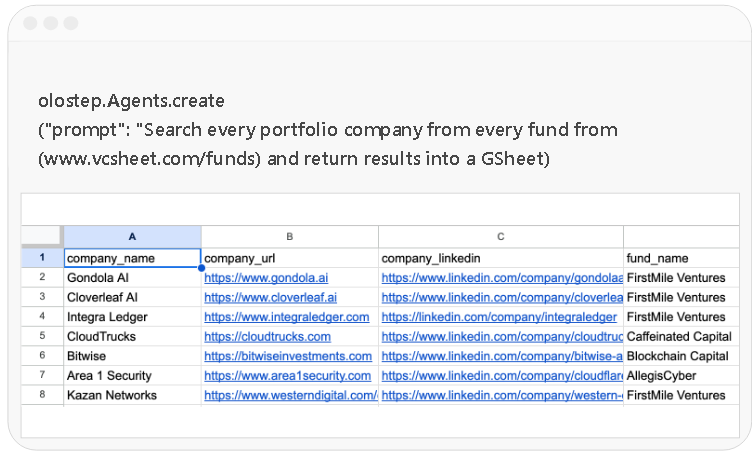
Automatisieren Sie komplexe Datenpipelines mit dem /agents-Endpunkt durch Anweisungen in natürlicher Sprache. Sie können auch Ihr eigenes internes Wissen als Kontext übergeben
-
Dein Suchprodukt antreiben
-
Portfolio-Unternehmen verfolgen
-
Market Intelligence aufbauen
-
Unternehmen im großen Maßstab recherchieren
-
GTM und Recruiting automatisieren
Automatisieren Sie komplexe Datenpipelines mit dem /agents-Endpunkt durch Anweisungen in natürlicher Sprache. Sie können auch Ihr eigenes internes Wissen als Kontext übergeben


Preise, die Sinn ergeben
Die kosteneffizienteste Web-Daten-API am Markt
-
LoslegenKeine Kreditkarte erforderlich
Testversion
$0Enthält: 500 erfolgreiche Anfragen
-
Alle Anfragen sind JS-gerendert und nutzen Residential-IP-Adressen
-
Niedrige Rate Limits
-
Jetzt kaufenKOSTEN/1K $1,800
Starter
$9/ MonatAlles in Free, plus:-
5000 erfolgreiche Anfragen
-
150 gleichzeitige Anfragen
-
Jetzt kaufenKOSTEN/1K $0,495
Standard
$99/ MonatAlles in Starter, plus:-
200.000 erfolgreiche Anfragen
-
500 gleichzeitige Anfragen
-
Jetzt kaufenKOSTEN/1K $0,399
Scale
$399/ MonatAlles in Standard, plus:-
1 Million erfolgreiche Anfragen
-
KI-gestützte Browser-Automatisierungen
Top-ups
Unregelmäßige Nutzung oder keine Lust auf Abos?
Sie können Credit-Pakete kaufen. Diese sind 6 Monate gültig.
10k Credits
250k Credits
2M Credits
Enterprise
Vertraut von großartigen Teams, die die Zukunft der KI gestalten
-
 Michelle JuliaMitgründer & CEO Aurium
Olostep ist das Beste!!! Wir haben komplette Datenpipelines mit nur einem Prompt automatisiert
-
 Richard HeMitgründer & CEO Openmart
Olostep ist zur Standard-Web-Layer-Infrastruktur unseres Unternehmens geworden
-
 Max Brodeur-UrbasMitgründer & CEO Gumloop
Olostep funktioniert wie ein Zauber! Und Ihr Kundenservice ist hervorragend
-
 Rob HayesMitgründer Merchkit
Mit Olostep können wir jede Website in eine API verwandeln. Tolles Produkt, tolle Leute
-
 Brandon CohenMitgründer & CTO CivilGrid
Ich kann Olostep sehr empfehlen, ein großartiges Produkt!
-
 Mitgründer & CEO Gedd.it
Wir verifizieren Gutscheincodes im großen Maßstab. Wir lieben Olostep. Es funktioniert mit jedem E-Commerce
-
 Trevor WestMitgründer & CEO Podqi
Olostep ist die beste API, um Daten aus dem Web zu suchen, zu extrahieren und zu strukturieren. Wir sind gerne Kunden
-
 Rida NaveedMitgründer Zecento
Wir nutzen /batches in Kombination mit Parsern, und es ist erstaunlich, wie wir strukturierte Daten in großem Maßstab erhalten
-
 Kieran V.Growth PlotsEvents
Mit Olostep konnten wir Eventdaten im gesamten Web suchen und strukturieren
-
 Paul MitGründer Foundbase
Zuverlässige und kosteneffiziente API für die Arbeit mit Daten. Glückwunsch zum coolen Produkt
Verbinden Sie Olostep mit Ihrem KI-Stack
Offizielle Olostep-Integrationen. Web-Scraping,
Crawling und KI-gestützte Suche zu jedem Tool in Ihrem Stack hinzufügen.






























-

Verbinden Sie sich mit Ihren KI-Agenten
Eine deterministische, wiederholbare, kontrollierbare Pipeline, die jeden Web-Recherche-Workflow und jede Pipeline genau so automatisiert, wie Sie sie beschrieben haben.







-

Nutze die Olostep CLI
Kartieren Sie, scrapen Sie, crawlen Sie, verarbeiten Sie Batches und generieren Sie Antworten direkt von Ihrem Terminal aus, mit sauberer JSON-Ausgabe für Skripte, CI-Pipelines und KI-Agenten.
npx -y olostep-cli@latest --help -

Fügen Sie Olostep zu Ihrem MCP-Client hinzu
Funktioniert mit jedem Produkt, das das Model Context Protocol implementiert: Registriere Olostep einmal und rufe Web-Tools aus Chat, Agenten oder IDEs auf, die MCP unterstützen.
{
  "mcpServers": {
    "olostep-web": {
"command": "npx",
"args": ["-y", "olostep-mcp"],
"env": {
"OLOSTEP_API_KEY": "YOUR_API_KEY"
}
}
}
}
Bereit loszulegen?
Erhalten Sie saubere Daten für Ihre KI von jeder Website mit Olostep
Die kosteneffizienteste API. Für Skalierung gebaut
Häufig gestellte Fragen
-
Was ist Olostep?

Olostep ist Web-Dateninfrastruktur für KI. Olostep bietet eine Suite von Web-Daten-APIs, mit denen Agenten Webdaten suchen, extrahieren und strukturieren können. Suchmaschinen liefern Links, KI-Suche liefert Antworten; Olostep bietet agentische Suche, die Erkenntnisse und erledigte Arbeit liefert. Entwickelt für moderne KI-Anwendungsschicht-Unternehmen, macht es die Umwandlung öffentlicher Webinhalte in saubere, strukturierte Ausgaben einfacher.
-
Was ist eine Web-Daten-API?
Eine Web-Daten-API ermöglicht es Entwicklern, Daten von Websites im großen Maßstab zu extrahieren, zu crawlen und zu strukturieren. Sie übernimmt Rendering, Anti-Bot-Schutz und Parsing und liefert saubere Ausgaben wie JSON oder HTML zur Nutzung in Anwendungen, Analysen oder KI-Workflows.
-
Warum sollte ich Olostep nutzen?
Olostep ist zuverlässig (99,5 % Verfügbarkeit), kosteneffizient (bis zu 70 % günstiger), skalierbar und flexibel genug, um mit Ihren bestehenden Workflows und Ihrem Backend zu arbeiten. Es ist eine der wenigen Plattformen, auf denen Sie eigene Parser erstellen können, um deterministische Ergebnisse kosteneffizient in großem Maßstab zu liefern. Sie können benötigte Funktionen anfragen, und unser Team wird an deren Umsetzung arbeiten. Sie können Olostep auch kostenlos testen, um zu sehen, ob es zu Ihrem Anwendungsfall passt. Holen Sie sich Ihre kostenlosen API-Schlüssel hier.
-
Wer sollte Olostep nutzen?
Olostep ist für KI-Startups, Entwickler, KI-Ingenieure, Data Scientists und Forschungsteams konzipiert, die auf Webdaten angewiesen sind, um Produkte anzutreiben, Datensätze anzureichern und Workflows zu automatisieren.
Es ist besonders nützlich für Teams, die Webdaten für Anwendungsfälle wie Marktforschung, Website-Überwachung, Datenanreicherung, historische Webanalyse, LLM-Feintuning und die Fundierung von KI-Systemen mit realen Daten durchsuchen, crawlen, scrapen und strukturieren müssen.
Durch die Rückgabe sauberer, strukturierter Ergebnisse über eine einzige API macht Olostep es einfacher, Webdaten in bestehende Backends, Pipelines und KI-Anwendungen einzubinden. -
Auf welche Websites kann Olostep zugreifen bzw. mit ihnen interagieren?
Olostep kann auf die meisten öffentlich zugänglichen Websites zugreifen und mit ihnen interagieren, einschließlich solcher, die JavaScript-Rendering erfordern.
Wenn Ihr Anwendungsfall Authentifizierung, Cookies oder eingeloggte Sitzungen betrifft, können Sie sich unter info@olostep.com melden, um unterstützte Optionen zu besprechen. -
Kann Olostep meine Anfragen mit hohem Volumen unterstützen?
Ja, Olostep ist darauf ausgelegt, Datenextraktion mit hohem Volumen im großen Maßstab zu bewältigen und unterstützt bis zu Milliarden von Anfragen pro Monat. Mit Funktionen wie Batch-Verarbeitung, verteilter Infrastruktur und skalierbaren Workflows ist es sowohl für wachsende Teams als auch für Enterprise-Anwendungsfälle konzipiert.
-
Wie funktioniert eine Web-Daten-API?
Eine Web-Daten-API verarbeitet Anfragen, indem sie Webseiten rendert, Anti-Bot-Schutzmaßnahmen handhabt, strukturierte Daten extrahiert und sie in Formaten wie JSON oder Markdown zurückgibt. Dadurch entfällt die Notwendigkeit, Scraping-Infrastruktur manuell zu verwalten.
-
Was ist der Unterschied zwischen Crawling und Scraping?
Crawling bezeichnet das Entdecken und Navigieren mehrerer Seiten auf einer Website, während sich Scraping auf die Extraktion von Daten aus einer bestimmten Seite konzentriert. Eine Web-Daten-API unterstützt in der Regel beide Prozesse in einem einheitlichen Workflow.
-
In welchen Formaten liefert Olostep die Ergebnisse zurück?
Die meisten Web-Daten-APIs liefern Daten in strukturierten Formaten wie JSON sowie als HTML, Markdown oder Rohinhalt, je nach Anwendungsfall. Strukturierte Ausgaben werden häufig für Automatisierung und KI-Workflows genutzt.
-
Kann Olostep meine Datenpipelines automatisieren?
Ja, Olostep ist darauf ausgelegt, automatisierte Datenpipelines und Rechercheworkflows im Web zu unterstützen. Mit Funktionen für Suche, Crawling, Scraping, Datenstrukturierung und wiederholbare Workflows kann es eine breite Palette von Geschäfts- und KI-Anwendungsfällen abdecken.
Wenn Sie einen bestimmten Workflow im Kopf haben, kontaktieren Sie das Team unter info@olostep.com oder über die Seite Vertrieb kontaktieren, um die beste Einrichtung für Ihren Anwendungsfall zu besprechen. -
Kann ich Daten mit einem Prompt extrahieren?
Ja, mit Olostep können Sie Daten mithilfe von Prompts in natürlicher Sprache extrahieren. Wenn Sie bereits die genaue Seite kennen, die Sie verarbeiten möchten, können Sie den
/scrapes-Endpunkt mit LLM-Extraktion nutzen, um die gewünschten Daten zu beschreiben.
Für hochvolumige oder deterministische Extraktion sind die Parser von Olostep die bessere Wahl, da sie strukturiertes JSON konsistenter in großem Maßstab liefern.
Für fortgeschrittenere Workflows, wie das Suchen nach Daten, das Navigieren über Seiten hinweg, das Handhaben von Paginierung oder das Validieren von Ergebnissen, kann der/agents-Endpunkt automatisch eine mehrstufige Extraktion basierend auf Ihrem Prompt durchführen. -
Was zählt als eine Anfrage?
Eine Anfrage entspricht einer verarbeiteten Webseite oder einem verarbeiteten PDF. Wir berechnen Bandbreite, Proxys oder Datennutzung nicht separat. Alle Infrastrukturkosten sind im Preis pro Anfrage enthalten.
-
Berechnet Olostep fehlgeschlagene Anfragen?
Nein, Olostep berechnet keine fehlgeschlagenen Anfragen. Sie zahlen nur für erfolgreiche Anfragen, was eine vorhersehbare und faire nutzungsbasierte Preisgestaltung gewährleistet.
Bei Endpunkten mit LLM-Verarbeitung (wie der Answers API) können zugrunde liegende Modellkosten dennoch anfallen. Olostep selbst berechnet jedoch nur erfolgreich abgeschlossene Anfragen. -
Ist Web Scraping legal?
Web Scraping ist in vielen Fällen legal, hängt aber davon ab, wie die Daten abgerufen und genutzt werden. Es ist wichtig, die Nutzungsbedingungen von Websites, Datenschutzbestimmungen und geltendes Recht bei der Extraktion von Webdaten einzuhalten.
-
Bietet Olostep eine kostenlose Testversion an?
Ja, Olostep bietet einen kostenlosen Plan mit 500 Anfragen, um die API vor einem Upgrade zu testen. Kostenpflichtige Pläne beginnen bei 9 $/Monat und enthalten 5.000 Credits pro Monat.
Das gibt Teams eine risikoarme Möglichkeit, die Zuverlässigkeit, Skalierbarkeit und Kosteneffizienz von Olostep zu bewerten, bevor sie zu einer höheren Nutzung wechseln. -
Kann ich nach der Anmeldung den Plan wechseln?
Ja, Sie können jederzeit den Plan wechseln. Pläne werden anteilig berechnet, sodass nicht genutzter Wert Ihres aktuellen Plans auf Ihren neuen Plan übertragen wird.
So zahlen Sie nicht doppelt für bereits abgedeckte Nutzung und bleiben flexibel, während Ihre Anforderungen wachsen. -
Kann ich eine Rückerstattung verlangen, wenn ich es nicht nutze?
Ja. Wenn Sie mit der Olostep API nicht zufrieden sind oder sie sich für Ihren Anwendungsfall nicht als nützlich erweist, können Sie eine E-Mail an info@olostep.com senden, um eine Rückerstattung zu beantragen.
Wenn Sie nach einer Phase der Nichtnutzung kündigen, kann Olostep auch den ungenutzten Teil Ihres Plans erstatten, sofern zutreffend. -
Wie kann ich bezahlen?
Sie können über Stripe Payment Links bezahlen. Um auf die Abrechnung zuzugreifen, müssen Sie in Ihrem Olostep-Konto angemeldet sein. Gehen Sie zu Ihrem Dashboard, navigieren Sie zu Abrechnung & Rechnungen, klicken Sie auf Verwalten bei Stripe und fügen Sie Ihre Kartendaten hinzu. Sobald Ihre Karte hinzugefügt ist, sind Sie startklar.