


Monitoring a website sounds simple: check the page every few minutes and tell me when something important changes.
But building that yourself quickly turns into a small infrastructure project.
First, you need a reliable way to scrape or extract the page. Then you need a scheduler running somewhere 24/7. You need to store previous versions, compare new snapshots against them, decide whether a change actually matters, and finally send an alert through email, Slack, a webhook, or whatever your workflow uses.
You can absolutely build all of this yourself. In some cases, you probably should. But for most applications, I would rather not maintain a scraper, scheduler, database, comparison agent, and notification system just to know when a pricing page changes.
That is where a Monitor API becomes useful. Instead of building the whole monitoring stack, you describe what you want to watch, how often it should be checked, and what kind of change you actually care about. The service handles the rest.
In this guide, we will use Olostep to monitor a web page for meaningful changes. We will first create a monitor from the dashboard, then use the Monitors API with Python to track another page from the same site, inspect the events it generates, and briefly compare Olostep with other monitoring APIs.
What Is the Olostep Monitors API?
The Olostep Monitors API lets you create a persistent process that watches a web page over time and alerts you when a change you care about happens.
You describe what you want to monitor in natural language and choose how often it should run. Olostep then turns that instruction into a recurring monitoring workflow that can be used for things like pricing pages, job listings, documentation, product availability, status pages, and changelogs.
AI is mainly used when the monitor is created to understand your instruction, identify what matters, and build a consistent monitoring plan. From there, Olostep runs that plan automatically on the schedule you selected.
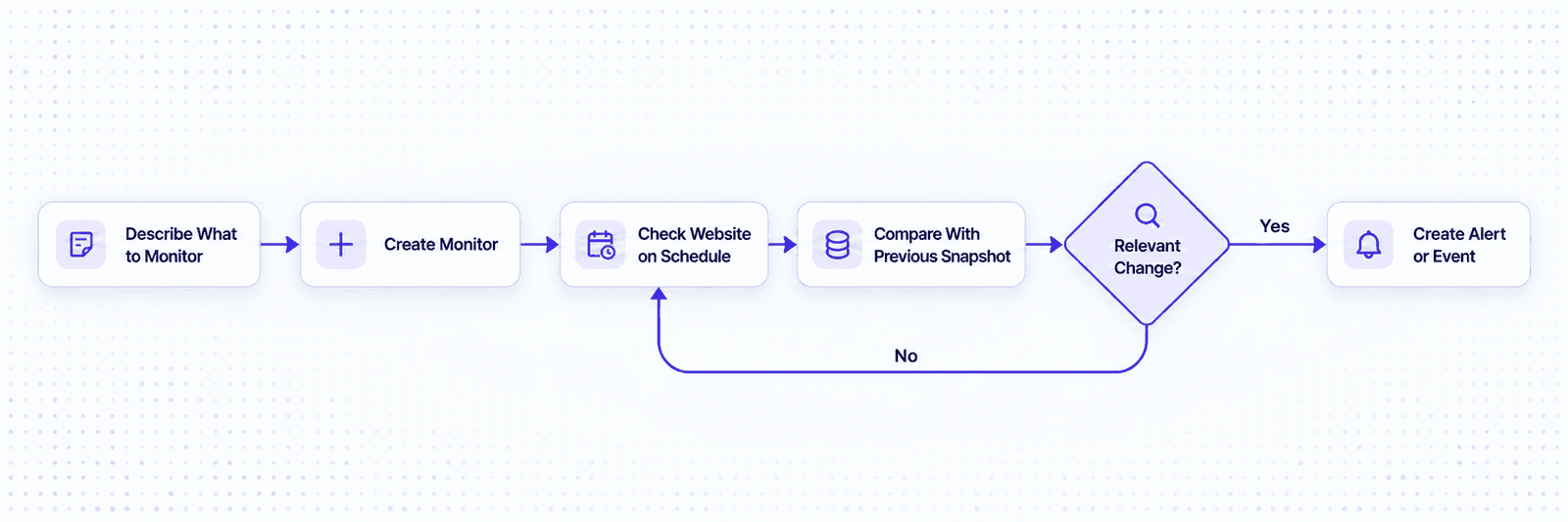
On each run, Olostep captures a new snapshot and compares it with the previous one. The comparison is evaluated against your original instruction to determine whether the change is worth reporting. If it is, Olostep creates an event and can send an alert through email, Slack, SMS, or a webhook. If not, it simply continues monitoring.
The useful part is that the monitor focuses on what actually matters. A page might update a timestamp, move content around, or change visually without the information you care about changing. By defining your intent when you create the monitor, Olostep can focus on the relevant change instead of reporting every small difference.
Monitoring a Website with the Olostep Dashboard
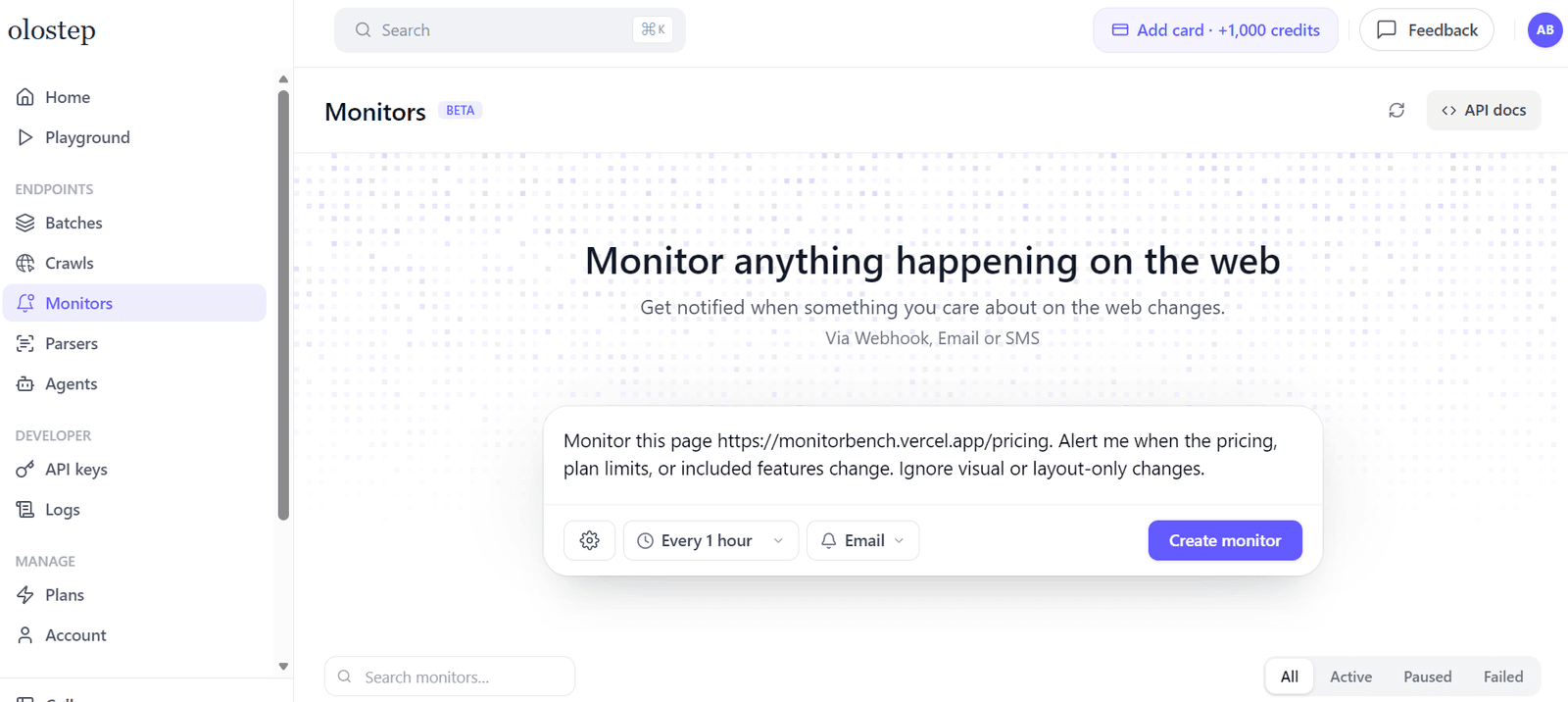
The easiest way to get started with Olostep Monitors is through the dashboard. You simply describe the page you want to watch, specify the change you care about, choose how often it should run, and select where you want to receive alerts.
Once the monitor is created, Olostep captures the first snapshot and uses it as the baseline. From there, it keeps checking the page on your chosen schedule until you pause or delete the monitor.
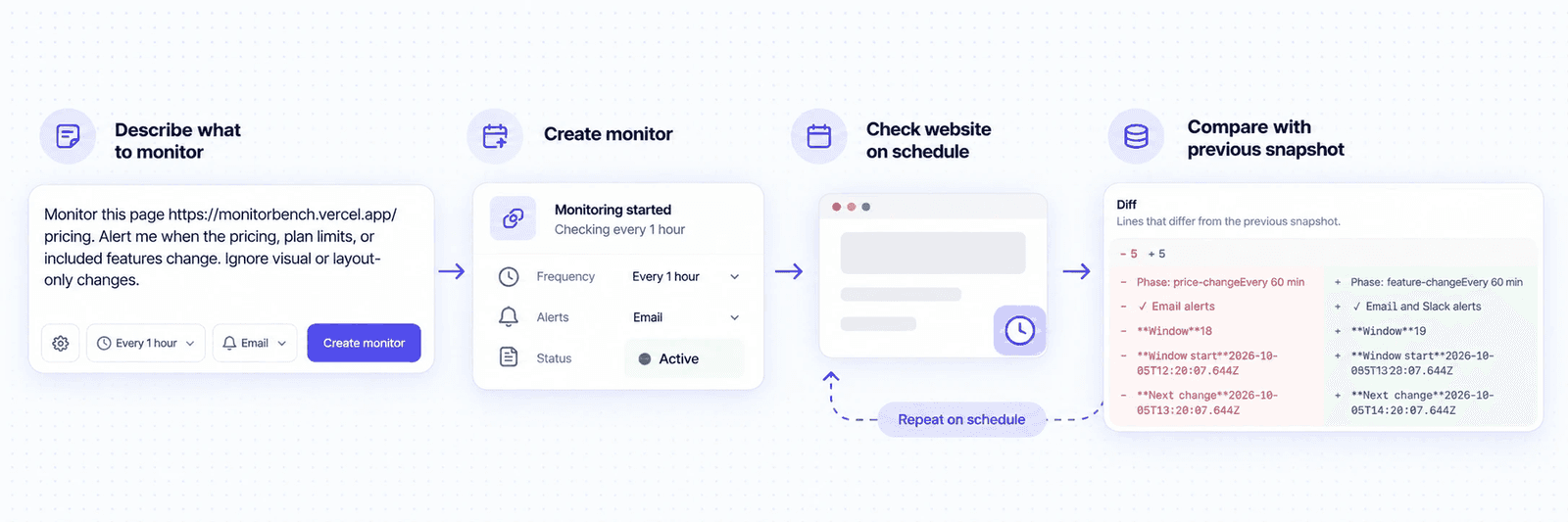
For this guide, we will use MonitorBench, a website built specifically for testing web-monitoring systems. Instead of waiting for a real website to change randomly, MonitorBench updates its pages on a known schedule and provides ground-truth data showing what changed and whether that change should trigger an alert.
We will monitor its pricing page:
https://monitorbench.vercel.app/pricing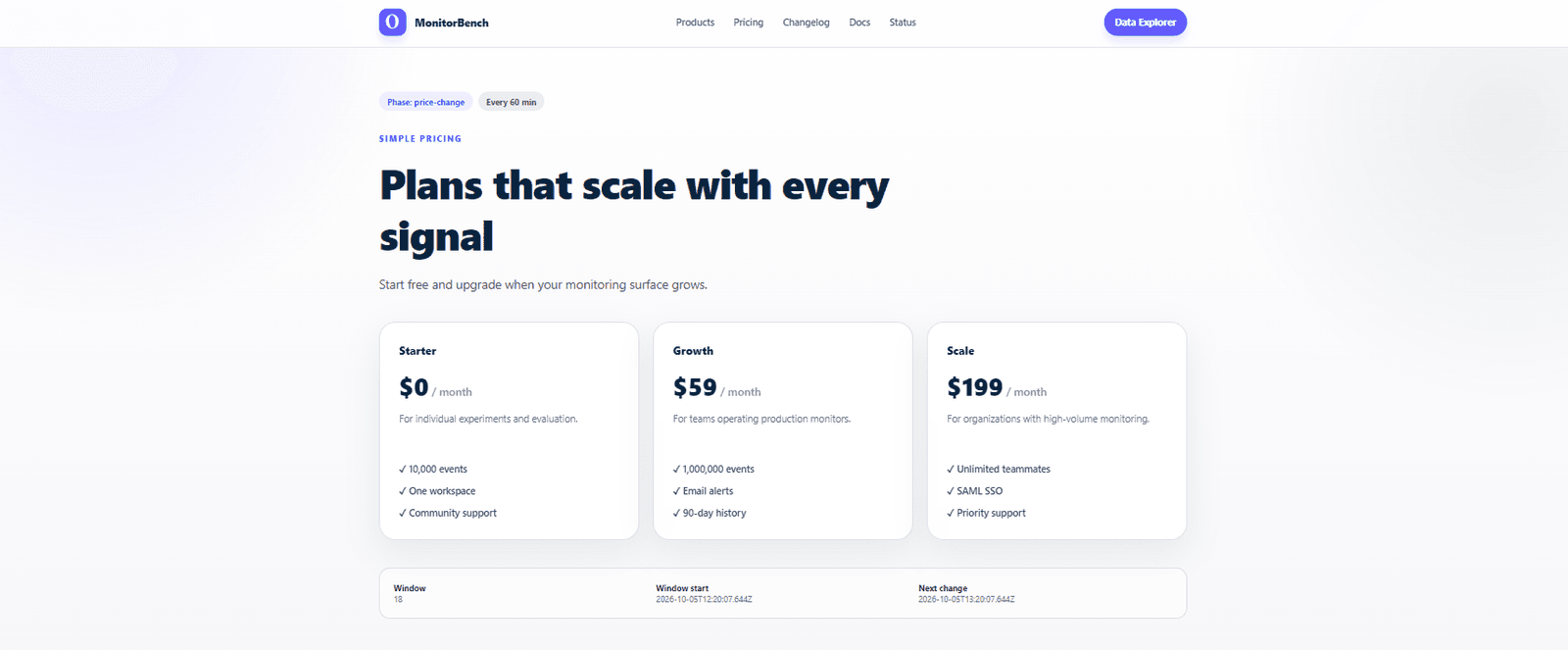
Before creating the monitor, sign up for a free Olostep account and open the Olostep dashboard. From there, select Monitors from the dashboard menu.
Add an instruction like:
Monitor this page: https://monitorbench.vercel.app/pricing

Alert me when the pricing, plan limits, or included features change. Ignore visual or layout-only changes.
Then set the monitoring interval to one hour and choose email as the notification channel. Once everything is configured, create the monitor. That is all you need to get it running.
After creating the monitor, Olostep takes the initial snapshot. On the next scheduled run, it captures the page again and checks whether anything relevant has changed.
In our test, it detected that the offering had been updated with an additional feature: email and Slack alerts.
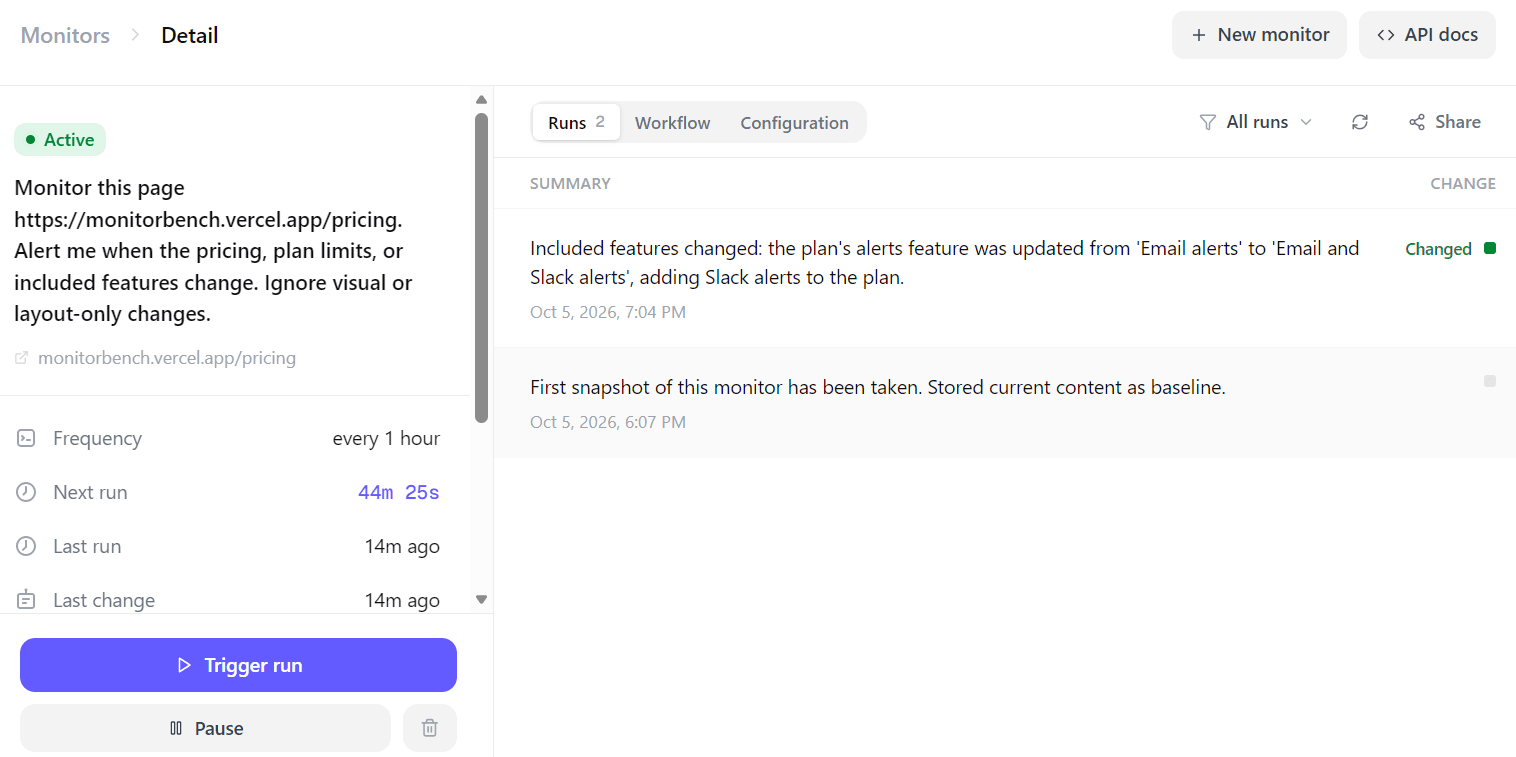
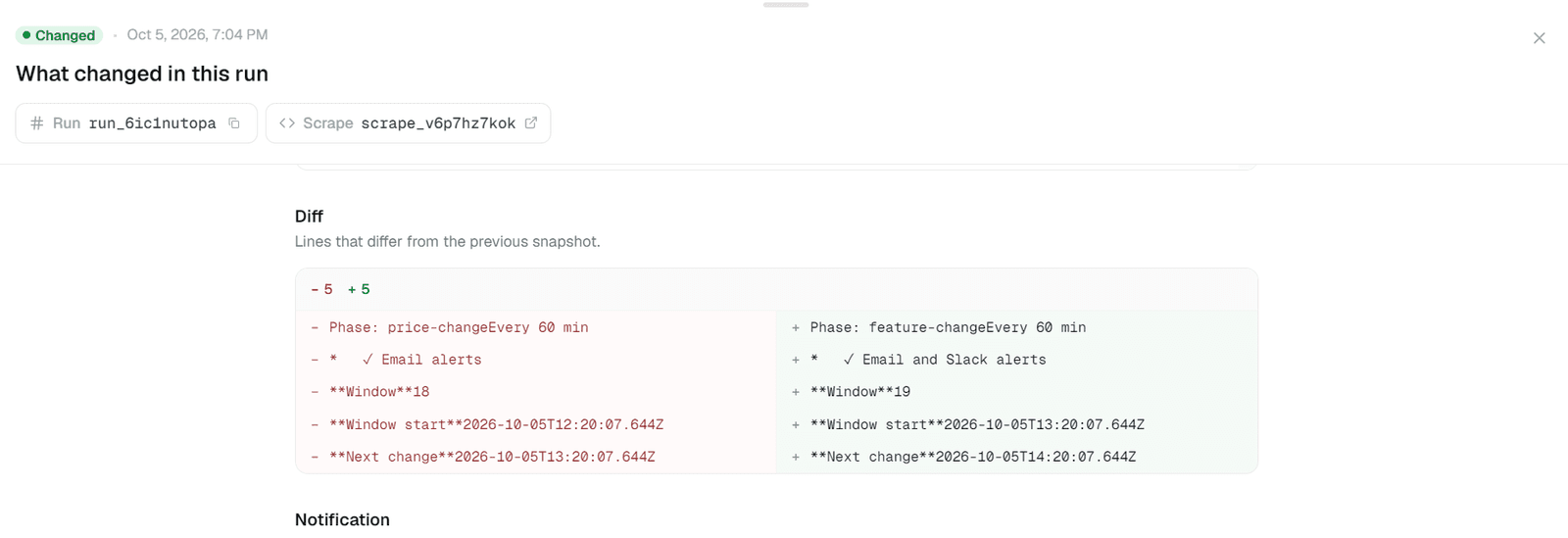
You can open any individual run to see exactly what happened. Olostep shows the detected difference along with a short summary explaining what changed, rather than making you compare the two versions manually.
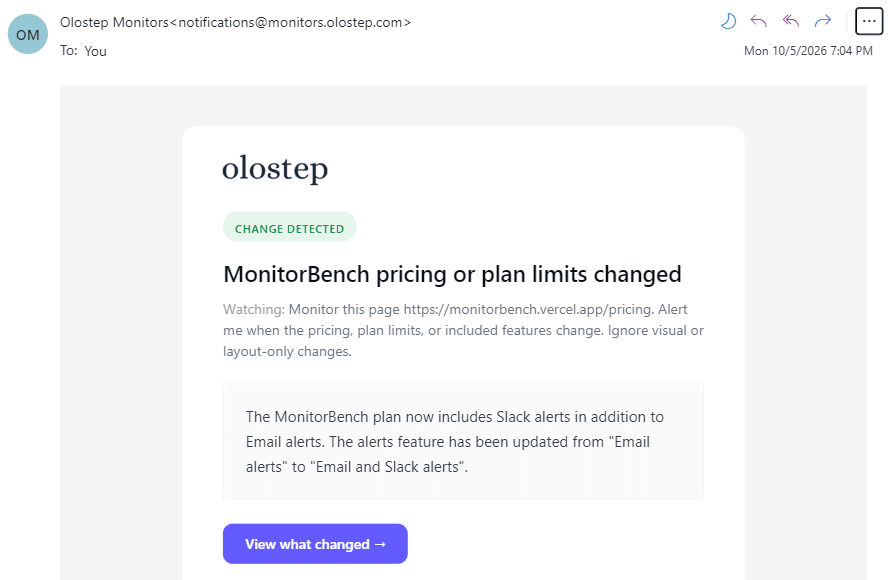
Because we enabled email notifications, the same update was also sent directly to the inbox. The email includes the important change and its summary, so once the monitor is running, you do not necessarily need to keep returning to the dashboard.
MonitorBench makes this a useful controlled test because we already know that the pricing page will change and what the expected change should be. In a real workflow, you would simply replace that URL with the pricing page, product page, documentation, job board, or other website you actually want to monitor.
Monitoring a Website with Olostep API
The dashboard works well when you only need to create and manage a few monitors manually. The API becomes more useful when you want to create monitors automatically, connect them to an application, or use monitoring inside a larger workflow.
For this example, we will monitor a different page from the same MonitorBench website, this time product-b, and track changes to its price, availability, and product details.
Setting up the Monitor
Before starting, create an Olostep API key, save it as the OLOSTEP_API_KEY environment variable, and install requests:
pip install requestsThen create the monitor:
import os
import requests

API_KEY = os.environ["OLOSTEP_API_KEY"]

url = "https://api.olostep.com/v1/monitors"

headers = {
    "Authorization": f"Bearer {API_KEY}",
    "Content-Type": "application/json",
}

payload = {
    "query": (
        "Monitor https://monitorbench.vercel.app/product-b. "
        "Alert me when the price, stock status, product details, "
        "or availability changes. "
        "Ignore timestamps, layout, styling, and other visual-only changes."
    ),
    "frequency": "every 30 minutes",
}

response = requests.post(
    url,
    headers=headers,
    json=payload,
)

response.raise_for_status()

monitor = response.json()

print(monitor)
The two main inputs are query, which describes what to monitor, and frequency, which controls how often it runs. Olostep supports natural-language schedules such as every 30 minutes, every hour, or every day at 9am, with a minimum interval of 10 minutes.
The response includes the monitor ID, current status, schedule, notification settings, and other configuration details. You can explore additional options such as webhooks, notifications, structured outputs, and source policies in the Olostep Monitors API documentation.
Monitoring changes with the Events API
Once the monitor starts running, we can retrieve its events using the monitor ID:
monitor_id = monitor["id"]

response = requests.get(
    f"https://api.olostep.com/v1/monitors/{monitor_id}/events",
    headers=headers,
)

events = response.json()

for event in events["data"]:
    print("Website Changed:", event["changed"], "| Summary:", event["summary"])
Our output was:
Website Changed: False | Summary: No changes to price, stock status, product details, or availability; the only differences are markdown heading formatting variations of the same 'Signal Hub' text.

Website Changed: True | Summary: Product B's availability changed from Available to Waitlist; the other diffs (window counter and timestamps) are incidental metadata.

Website Changed: False | Summary: First snapshot of this monitor has been taken. Stored current content as baseline.
The first run creates the baseline snapshot. Future runs compare against it and check whether the difference matches the original instruction.
Here, Olostep ignored a formatting-only change but detected when Product B moved from Available to Waitlist. The events API therefore gives your application both the change status and a short explanation of what actually happened.
How Does Olostep Compare With Other Monitor APIs?
Olostep is not the only API built for continuous web monitoring. Two of the closest options are Firecrawl Monitor and Parallel Monitor, although they approach the problem slightly differently.
| API | Best for |
|---|---|
| Olostep | Simple, intent-based monitoring of known pages |
| Firecrawl | Monitoring pages or sites with detailed diffs and AI-based change filtering |
| Parallel | Always-on web searches and discovering new events across the wider web |
Firecrawl Monitor is probably the closest alternative to Olostep. It follows a similar idea: monitor a page or site on a schedule, describe what you care about in natural language, and use an AI judge to decide whether a detected change is actually worth surfacing.
Parallel Monitor feels quite different to me. I would describe it more as an always-on web search than a traditional page monitor. You tell it what kind of information or event you are looking for, and it keeps scanning the wider web for new results.
In my small controlled test, Parallel was the least consistent for this particular use case. I tried a few different configurations, but sometimes it caught the expected change and sometimes it did not. I do not think that necessarily means Parallel is worse overall. It is just built for a broader discovery problem, while here I was testing something very specific: did this known page change in the way I expected?
Firecrawl performed much better and was very close to Olostep. Both were good at ignoring irrelevant differences and surfacing the changes that actually mattered.
For this workflow, though, I preferred Olostep. It felt simpler from start to finish. I could describe what I wanted to monitor in plain English, set the schedule and notifications, and then review everything from the dashboard without much setup. For monitoring known pages such as pricing, products, documentation, or status pages, Olostep would be my first choice based on this test, with Firecrawl a very close second.
What Can You Monitor in the Real World?
MonitorBench is useful for testing because we already know when the page will change. In the real world, monitoring becomes more valuable when it helps a person or business react faster.
- Competitor monitoring: Track pricing pages, product launches, new features, and announcements. Businesses can spot competitive moves early instead of discovering them weeks later.
- E-commerce and inventory: Watch prices, stock availability, discounts, and new product listings. This helps retailers track competitors, while individuals can monitor products they want to buy.
- Jobs and hiring: Monitor company career pages for new roles or changing hiring activity. Job seekers can catch openings quickly, while businesses can use hiring trends as a signal of where competitors are investing.
- Software and AI updates: Follow documentation, API changes, model releases, changelogs, and pricing updates. Developers can avoid missing breaking changes, while teams can react faster to new tools and capabilities.
- Business and regulatory updates: Monitor investor-relations pages, government notices, policies, filings, and industry announcements. This can help companies identify risks, opportunities, and important changes before they affect operations.
The main value is simple: instead of repeatedly checking important websites yourself, you turn them into a continuous source of alerts and signals that you can actually act on.
Final Thoughts
What I like most about a Monitor API is that it can become much more than just an alerting tool. Once you start getting structured output, you can plug those results directly into an automated pipeline and build a proper closed-loop system around them.
Take customer reviews as an example. A monitor could keep watching for new reviews, return the result in a structured format, and pass that into another step that checks whether negative feedback is just an occasional complaint or part of a larger trend. If the volume crosses a certain threshold, the system could automatically summarize the issue and escalate it to the right team or senior management.
The same idea can be applied to pricing pages, product availability, competitor updates, documentation, jobs, regulatory pages, customer feedback, and a lot more. The monitor becomes the trigger, and everything after that can be automated.
That is where I think this gets really interesting. With newer AI models, agents, and APIs, these workflows are becoming much cheaper and much easier to build. You no longer need a full engineering team to create an always-on monitoring and decision pipeline. In many cases, one person can connect the pieces, define the logic, and have the entire system running continuously in the background.
FAQs
Is the Olostep Monitors API free to use?
Yes. Olostep currently gives new accounts 500 free successful requests without requiring a credit card. Paid plans start at $9 per month for 5,000 successful requests.
How often can a monitor run?
The minimum interval is every 10 minutes, but you can choose schedules such as every 20 minutes, every 30 minutes, every hour, or once per day at a specific time. You can describe the schedule in natural language when creating the monitor.
How much does it cost to run one monitor?
The cost depends on how often the monitor runs and how many pages it checks. A single page monitored every hour uses about 720 requests per month, while every 30 minutes uses about 1,440 requests, and every 10 minutes uses about 4,320 requests. Based on the $9 Starter plan with 5,000 requests, that is roughly $1.30, $2.59, and $7.78 worth of monthly plan usage, respectively.
Does a monitor run count if nothing changes?
Yes. Olostep still needs to check the page and compare it with the previous snapshot, so the run counts toward your request usage even when no meaningful change is detected or no notification is sent.
Can Olostep Monitors return structured output?
Yes. The Monitors API supports structured output using JSON Schema, which is especially useful when you want to pass detected changes directly into another application, AI agent, or automated workflow.
How can I receive monitor alerts?
Olostep supports notifications through email, Slack, SMS, and webhooks, so you can either receive changes directly or use a webhook to trigger the next step in an automated pipeline.
Can I pause a monitor?
Yes. Monitors can be paused, resumed, updated, or deleted through the API, which is useful when you only need to track something for a limited period.