


TL;DR
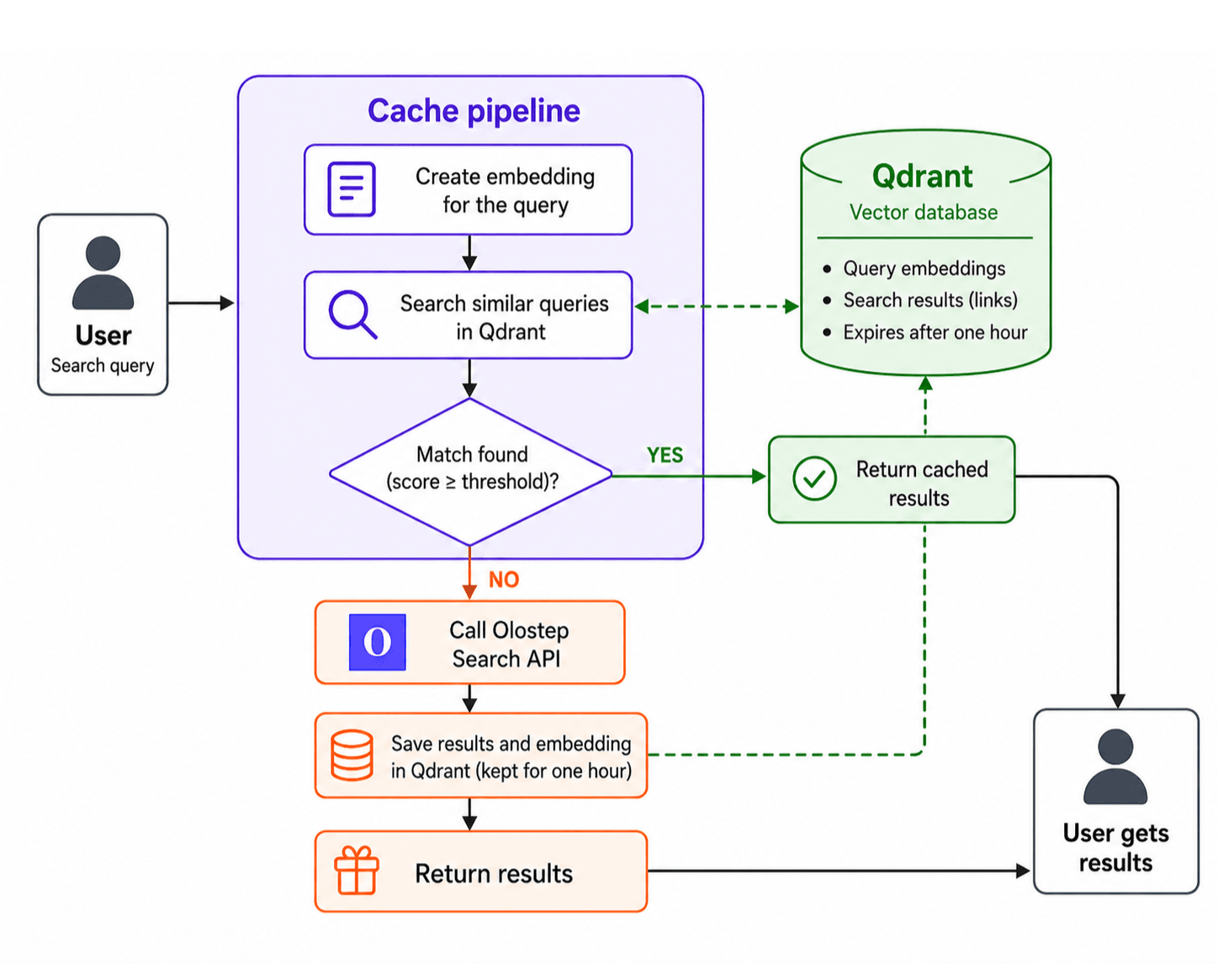
Semantic caching reduces the cost and latency of repeated web searches by recognizing when differently worded queries mean the same thing. Instead of calling the Olostep Search API every time, this project uses Qdrant to find semantically similar past queries and return a cached result when the similarity is high enough.
In the benchmark, the cache avoided 7 of 12 Olostep calls, achieved a 58.3% cache-hit rate, and reduced warm-cache latency from 2.70 seconds to 0.47 seconds, giving a 5.73× speedup.
Introduction
When you build a web search feature for customers or internal teams, people often ask the same question in different ways. For example, one person may search for “Olostep Python SDK search API guide,” while another may ask, “How do I search the web with the Olostep API?” The wording is different, but they are looking for almost the same information.
If you send every query directly to a web search API, the cost can add up quickly. You also make users wait for results that may already exist from a very similar previous search.
A traditional cache, such as Redis, works well when the same query is repeated exactly. However, it does not understand that two differently written queries can have the same meaning. As a result, it may treat similar requests as new searches and still make unnecessary API calls.
In this guide, we will build a semantic cache using Olostep and Qdrant. Olostep handles the web search, while Qdrant stores previous queries as vectors and compares new queries against them. When Qdrant finds a sufficiently similar query, the system returns the saved result instead of calling Olostep again.
To make sure results do not become too old, each saved search result is kept for one hour. During that period, similar queries can reuse the cached result. Once the hour has passed, the saved result expires and the next matching query runs a new Olostep search.
1. Prerequisites: Get Your Olostep and Qdrant API Keys
Before building the semantic cache, you need accounts and API credentials for Olostep and Qdrant.
Olostep will handle the web searches, while Qdrant will store previous queries and search results in a vector database. For this project, Olostep’s free access and a free Qdrant Cloud cluster should be enough for testing the pipeline.
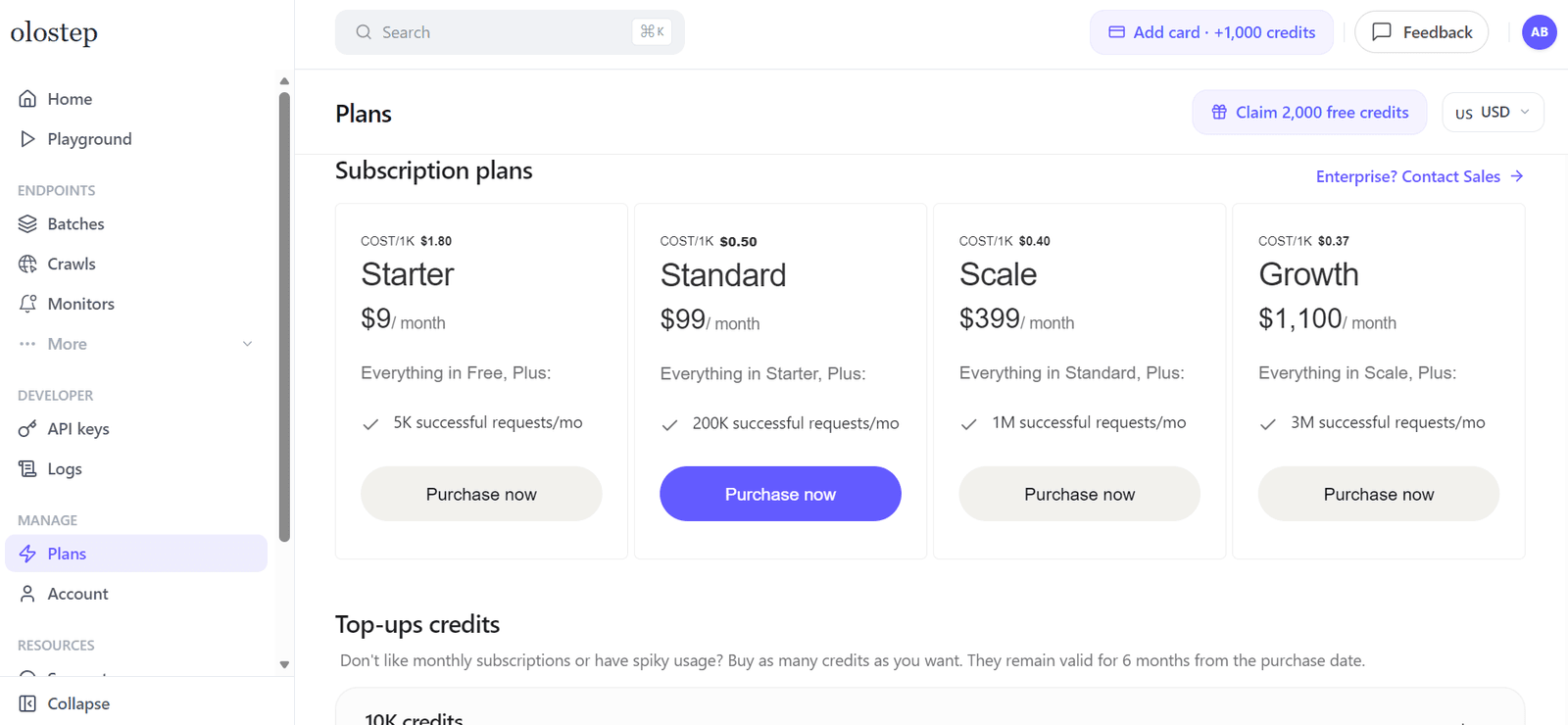
Create an Olostep API key
Start by creating a free account on the official Olostep website. Once you are in the dashboard, open the API Keys section and generate a new key.
Copy the key and keep it somewhere safe. You will add it to your project environment file in the next step.
If you plan to turn this into a production project, review Olostep’s current pricing first so you can choose a plan that matches your expected search volume.
Create a Qdrant Cloud API key
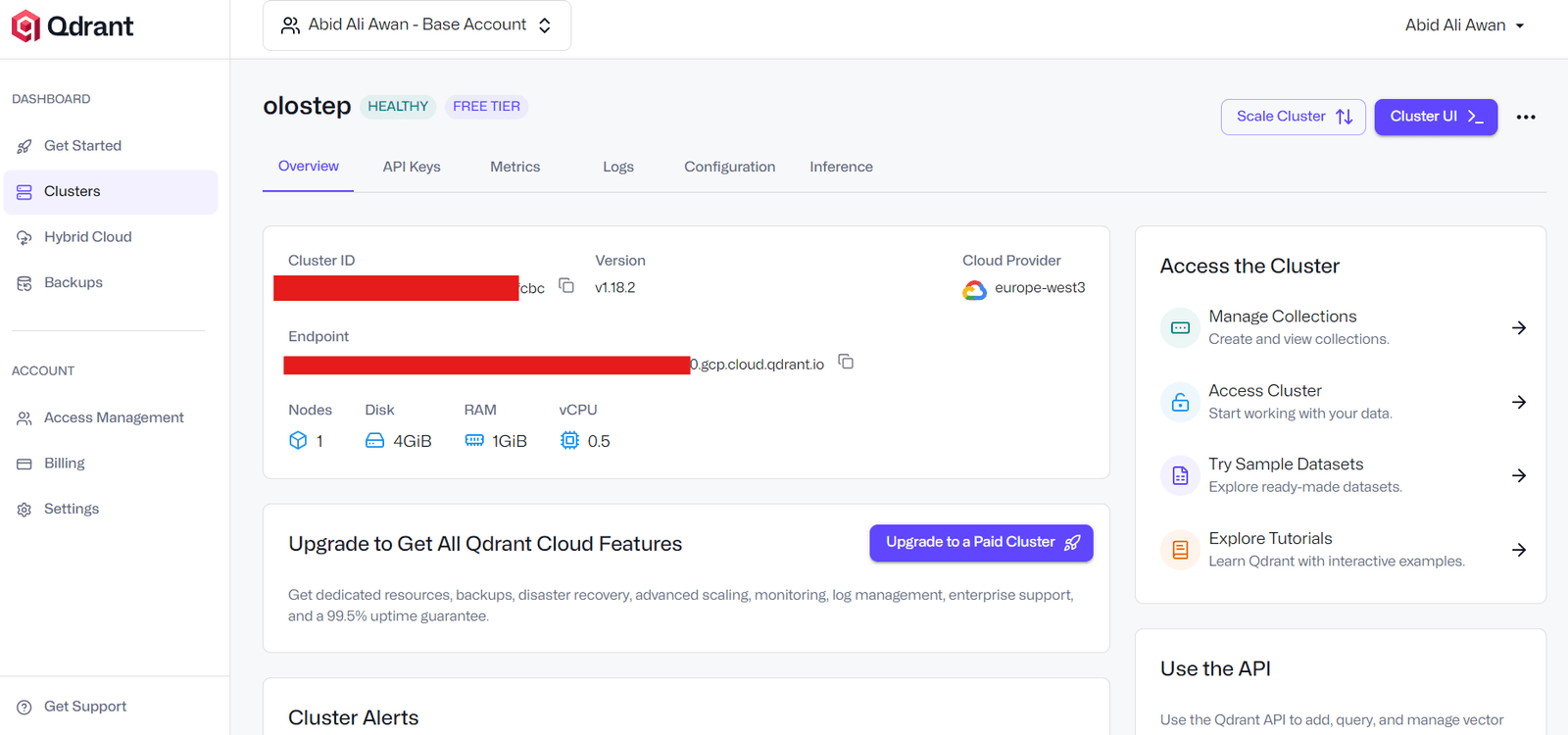
Next, create a free Qdrant Cloud account and set up a new cluster. During setup, choose a region that is close to where you plan to run or deploy your application.
After the cluster is created, Qdrant will provide two important values:
- Your cluster Endpoint URL
- Your API key
Copy both values, as you will need them to connect your Python application to Qdrant.
Add your keys to a .env file
Create a file named .env in the root directory of your project and add your credentials:
OLOSTEP_API_KEY=your_olostep_api_key |
Warning: Do not upload this file to GitHub or share it publicly. Add .env to your .gitignore file so your API keys stay private.
2. Set Up the Python Environment
For this guide, we will run the semantic cache benchmark in a Jupyter Notebook. This makes it easier to test the pipeline, inspect the results, and create visualizations for latency, cache hits, and estimated search-cost savings.
Install the required libraries
Run the following command in a notebook cell:
!pip install qdrant-client olostep python-dotenv pandas matplotlib |
These libraries let you connect to Olostep and Qdrant, load environment variables securely, analyze benchmark results with Pandas, and create charts with Matplotlib.
Import the required libraries
Next, import the libraries used throughout the project:
import os |
Load your environment variables
Load the API keys and Qdrant cluster details from the .env file you created earlier.
load_dotenv() |
This check stops the notebook early if one or more required values are missing. It is better to catch this before you try to connect to Olostep or Qdrant.
Set the project defaults
Now, define the main settings for the semantic cache:
COLLECTION_NAME = 'olostep_search_semantic_cache_1h' |
Here is what each setting does:
- COLLECTION_NAME is the name of the Qdrant collection that stores cached searches.
- EMBEDDING_MODEL converts user queries into vectors so Qdrant can compare their meaning.
- CACHE_THRESHOLD sets the minimum similarity score needed to reuse a saved result.
- CACHE_EXPIRY_SECONDS keeps each saved result for one hour before it expires.
A threshold of 0.86 is a good starting point for this example. You can increase it if you want stricter matching, or lower it if you want the cache to reuse results more often.
Create the Olostep client
Finally, initialize the Olostep client using the API key from your environment file:
olostep = Olostep(api_key=os.environ['OLOSTEP_API_KEY']) |
3. Create a Qdrant Vector Collection for the Cache
Now that the environment is ready, you can create the Qdrant collection that will store your semantic cache.
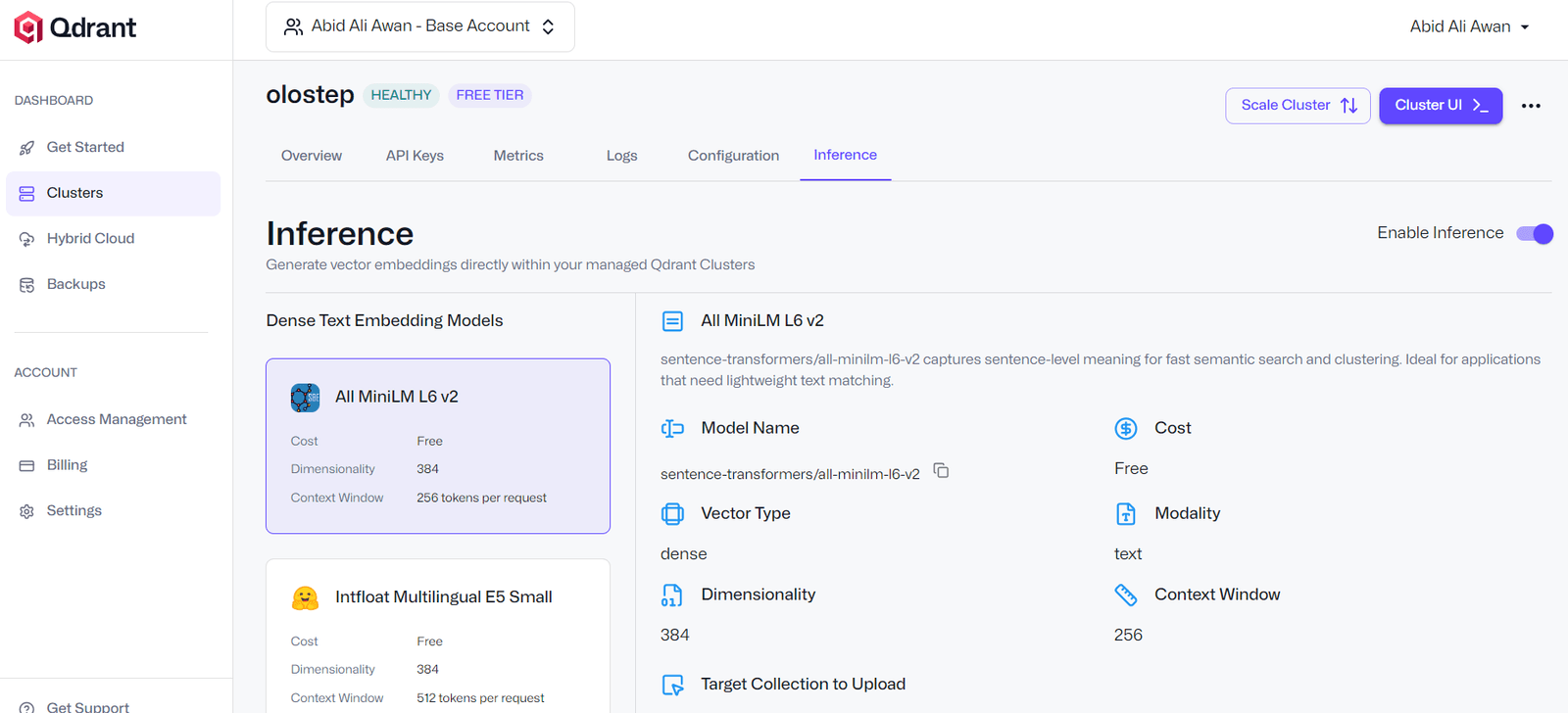
Qdrant stores queries as vectors, which lets it compare the meaning of a new query with previously saved queries. In this project, we use the sentence-transformers/all-minilm-l6-v2 embedding model. It produces vectors with 384 dimensions and can be used through Qdrant Cloud Inference, so you do not need to run or host the embedding model yourself.
The cache collection will store the original query, the Olostep search result, and an expiry timestamp. Each result remains available for one hour before it is treated as expired.
Connect to Qdrant Cloud
Use the Qdrant URL and API key from your .env file to create a client connection:
client = QdrantClient( |
Setting cloud_inference=True allows Qdrant to create embeddings from text using the embedding model defined earlier in the notebook.
Create the vector collection
Next, create the collection that will hold your cached searches. The code first checks whether the collection already exists, so you can rerun the notebook without creating duplicates.
if not client.collection_exists(COLLECTION_NAME): |
The vector size is set to 384 because this matches the output size of the all-minilm-l6-v2 embedding model.
Cosine distance is used to compare vectors. It measures how similar two query embeddings are, making it a good choice for finding queries with similar meanings.
Add an index for expiry filtering
Each cached result includes an expires_at value. Creating an index for this field helps Qdrant filter out expired entries efficiently when checking the cache.
client.create_payload_index( |
This index does not automatically remove expired records. Instead, the cache pipeline will check the expiry time before returning a result and delete outdated entries as part of its cleanup process.
4. Build the Semantic Cache Pipeline
The semantic cache pipeline checks Qdrant before sending a request to Olostep. If it finds a valid saved result for a sufficiently similar query, it returns that result immediately. Otherwise, it calls Olostep, saves the new result in Qdrant, and keeps it available for the next hour.
The pipeline has five main parts:
- Normalize queries before comparing them.
- Convert queries into vectors using Qdrant Cloud Inference.
- Remove expired cache entries.
- Check Qdrant for a similar saved query.
- Call Olostep only when the cache does not contain a suitable result.
Normalize the query
Users may enter extra spaces, different capitalization, or slightly inconsistent formatting. Normalizing the query makes these small differences less likely to affect the cache lookup.
def normalize_query(text): |
This function converts the query to lowercase, removes unnecessary spaces, and returns a clean version of the text.
Create a document helper
Qdrant Cloud Inference uses the embedding model defined earlier to convert text into vectors. This helper creates a Qdrant Document object for each normalized query.
def document(text): |
Clear the vector store
This helper removes every saved record from the collection. It is useful when you want to reset the cache before running a new benchmark.
def clear_vector_store(): |
The function returns the number of records removed, which makes it easy to confirm that the cache has been cleared.
Remove expired cache entries
Each saved result includes an expires_at timestamp. Before checking the cache, remove records that are older than one hour.
def purge_expired(): |
This keeps the collection clean and prevents outdated web-search results from being reused.
Create the Olostep search function
This function sends a query to Olostep and returns the search results. It also catches API errors so the notebook does not stop unexpectedly if a request fails.
def call_olostep(query): |
The limit=5 setting returns up to five search-result links for each query.
Build the cached search function
The cached_search() function brings the full pipeline together. It first removes expired records, then asks Qdrant whether a similar active query already exists.
If Qdrant finds a match with a similarity score above CACHE_THRESHOLD, the function returns the cached Olostep result. If no match is found, it calls Olostep and stores the new result in Qdrant for one hour.
def cached_search(query): |
When hit is True, Olostep was not called because Qdrant found a similar saved query. When hit is False, the system made a new Olostep request and saved the result for future similar queries.
5. Run the Search Cache Benchmark
Now that the semantic cache is ready, you can compare its performance with direct Olostep searches.
This benchmark tests three scenarios:
- Olostep only: Every query goes directly to Olostep, with no cache lookup.
- Cold cache pipeline: The cache starts empty. The first query in each topic group calls Olostep, while similar later queries may reuse the saved result.
- Warm cache pipeline: The same queries run again after the cache has been populated, showing the performance when matching results are already available.
Define the test queries
The test list includes several groups of queries with similar meanings. This helps test whether the semantic cache can recognize different ways of asking for the same information.
test_queries = [ |
Run the benchmark
Set RUN_BENCHMARK to True to run the test. The code records latency for direct Olostep searches, clears the cache, runs the cold-cache test, and then reruns the same queries to measure warm-cache performance.
RUN_BENCHMARK = True |
Review the results
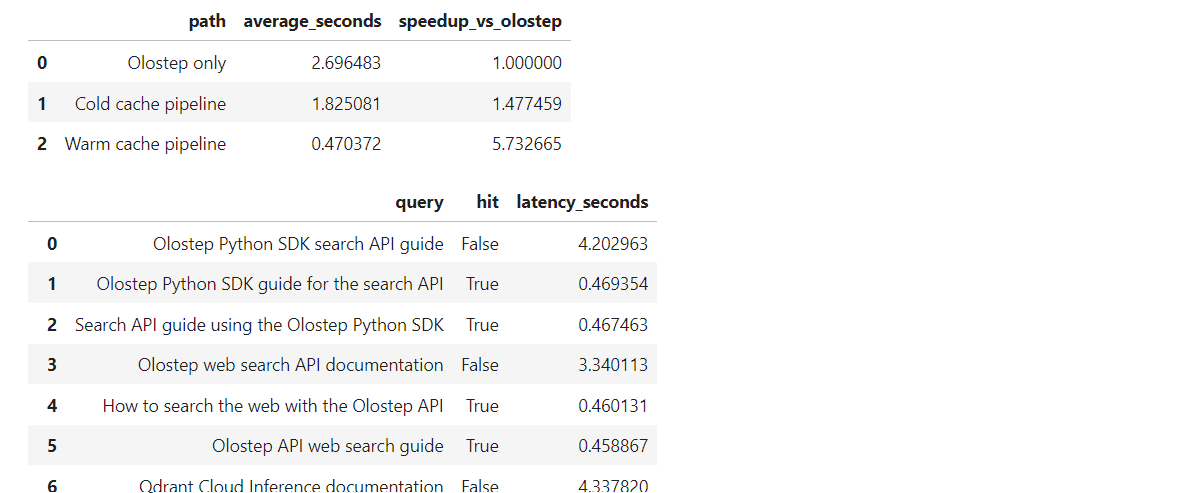
In this run, direct Olostep searches took an average of 2.70 seconds per query.
The cold-cache pipeline reduced average latency to 1.83 seconds, providing a 1.48× speedup. This happens because some later queries are similar enough to earlier queries that Qdrant can return a saved result instead of calling Olostep again.
After the cache was populated, the warm-cache pipeline reduced average latency to 0.47 seconds, resulting in a 5.73× speedup compared with sending every query directly to Olostep.
The query-level results also show which requests were cache hits. For example, the first Olostep API query was a cache miss, but similar variations that followed were served from Qdrant in less than half a second.
6. Analyze Latency, Hit Rate, and Cost Savings
The benchmark results show whether semantic caching reduces the number of Olostep searches, improves response time, and lowers estimated search-credit usage.
A cache hit means Qdrant found a similar saved query and returned its result without calling Olostep. A cache miss means the system needed to make a new Olostep search and then save that result for future requests.
Set the search-cost assumption
For this example, assume that each Olostep search costs one credit:
CREDITS_PER_OLOSTEP_SEARCH = 1.0 |
Update this value to match the number of credits consumed by a search on your Olostep plan. This calculation measures avoided Olostep search credits only. It does not include any Qdrant usage costs.
Calculate the benchmark metrics
Run the following code after completing the benchmark:
if RUN_BENCHMARK: |
Interpret the results
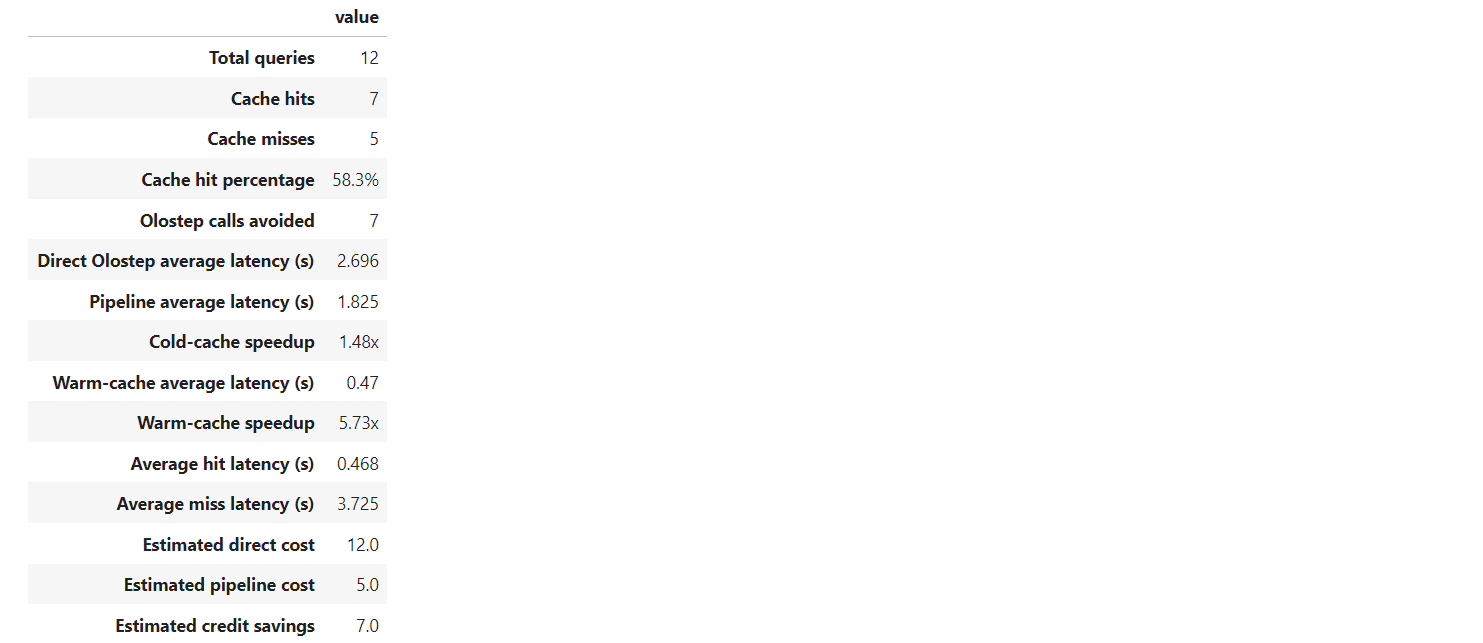
In this benchmark, the pipeline processed 12 queries. Qdrant identified 7 cache hits and 5 cache misses, resulting in a 58.3% cache-hit rate.
This means the semantic cache avoided 7 Olostep API calls. Without caching, all 12 queries would have required an Olostep search. With caching, only five new searches were needed.
Direct Olostep searches took an average of 2.696 seconds. The cold-cache pipeline reduced this to 1.825 seconds, which is a 1.48× speedup. Once the cache was populated, the average latency fell to 0.470 seconds, making the warm-cache pipeline 5.73× faster than sending every request directly to Olostep.
Using the one-credit assumption, direct searches would consume 12 credits, while the cached pipeline would consume 5 credits. That is an estimated saving of 7 Olostep credits, or about 58.3% fewer search calls for this set of queries.
7. Visualize the Benchmark Results
Numbers make it easy to compare performance, but charts make the impact of semantic caching easier to understand at a glance.
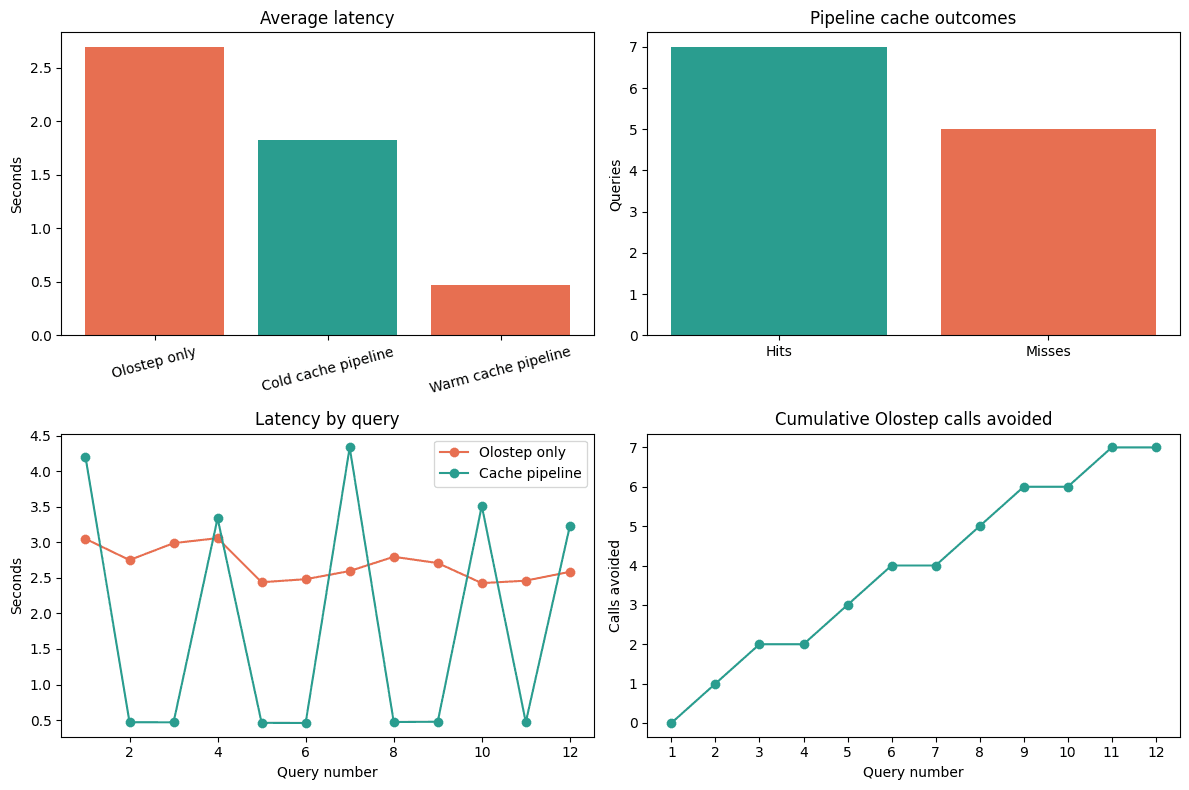
The following code creates four charts:
- Average latency for direct Olostep searches, cold-cache searches, and warm-cache searches.
- The number of cache hits and cache misses.
- Latency for each individual query.
- The cumulative number of Olostep calls avoided as the benchmark progresses.
Create the benchmark charts
Run this cell after completing the benchmark and analysis sections:
if RUN_BENCHMARK: |
Interpret the charts
The average latency chart compares the three search paths. In this benchmark, direct Olostep searches took the longest, while the warm-cache pipeline was the fastest because it could reuse saved results for most matching queries.
The pipeline cache outcomes chart shows that the semantic cache produced seven cache hits and five cache misses. Each hit represents an Olostep API call that the system avoided.
The latency by query chart highlights the difference between cache hits and misses. Queries that required a new Olostep search took several seconds, while similar queries served from Qdrant returned in less than half a second.
Finally, the cumulative Olostep calls avoided chart shows how savings build as more queries are processed. By the end of this benchmark, the cache had avoided seven Olostep searches.
These visualizations confirm that semantic caching can reduce repeated API calls, lower search-credit use, and deliver noticeably faster responses for semantically similar requests.
Note: If you encounter any issues replicating the results from the guide above, see semantic-web-cache/notebook.ipynb. It includes the complete code and outputs. Simply install the required Python libraries, configure the environment variables, and run the notebook locally.
8. Inspect API Requests and Cache Activity in the Dashboards
The notebook shows the benchmark results, but you can also verify the activity directly in the Olostep and Qdrant dashboards. This gives you a clearer view of the API calls, response times, cache records, and overall request activity.
Check requests in the Olostep logs
Open the Olostep dashboard and go to Developer > Logs. Here, you can see every request that was sent to the Olostep Search API.
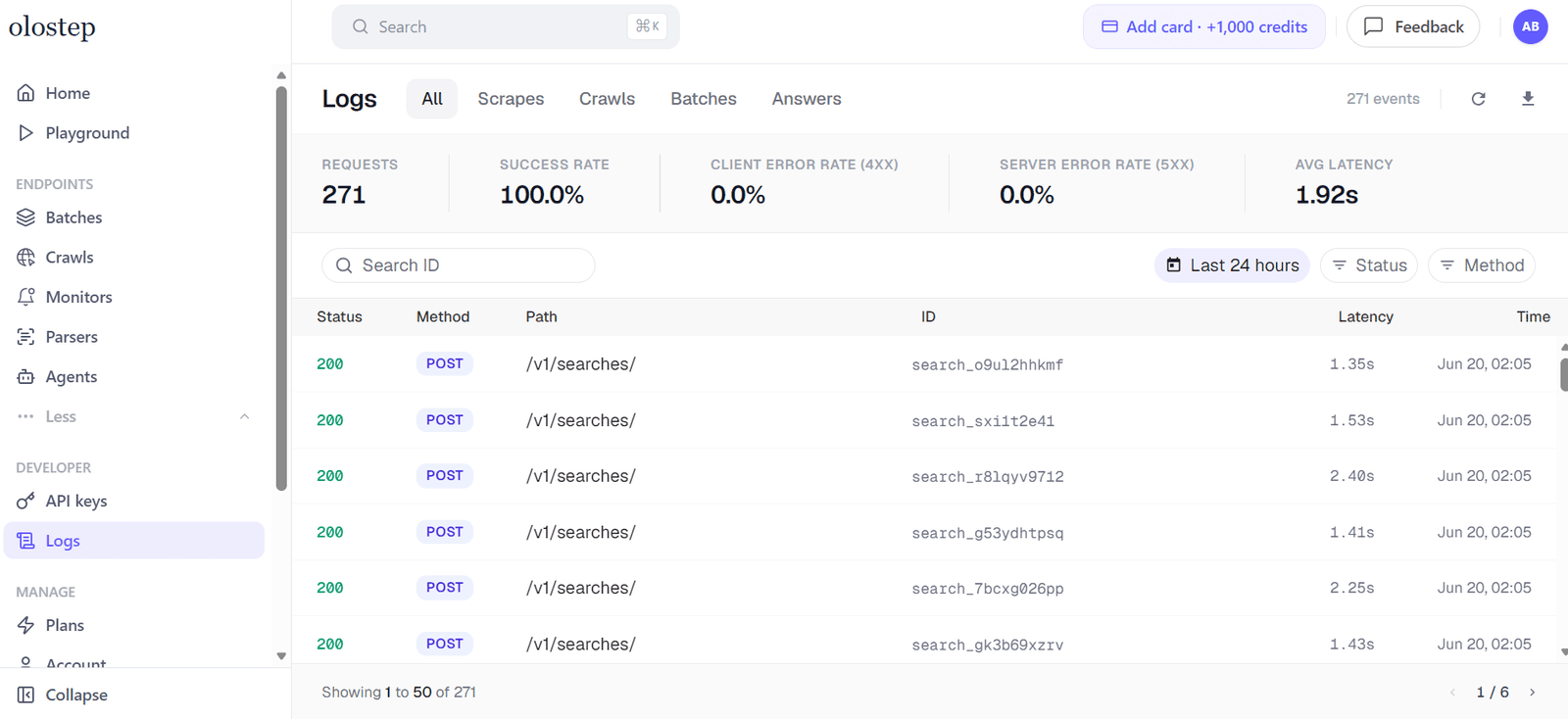
The logs show useful details such as the request status, API endpoint, latency, and time of each search. You can open an individual log entry to inspect the request in more detail and confirm that the search completed successfully.
As your application gets more traffic, you can use this page to monitor how many search requests are being made and compare that number with the cache-hit rate from your notebook.
Monitor request activity in Qdrant Cloud
You can also open your Qdrant Cloud cluster and check its request monitoring dashboard. The request chart shows how traffic and latency change over time.
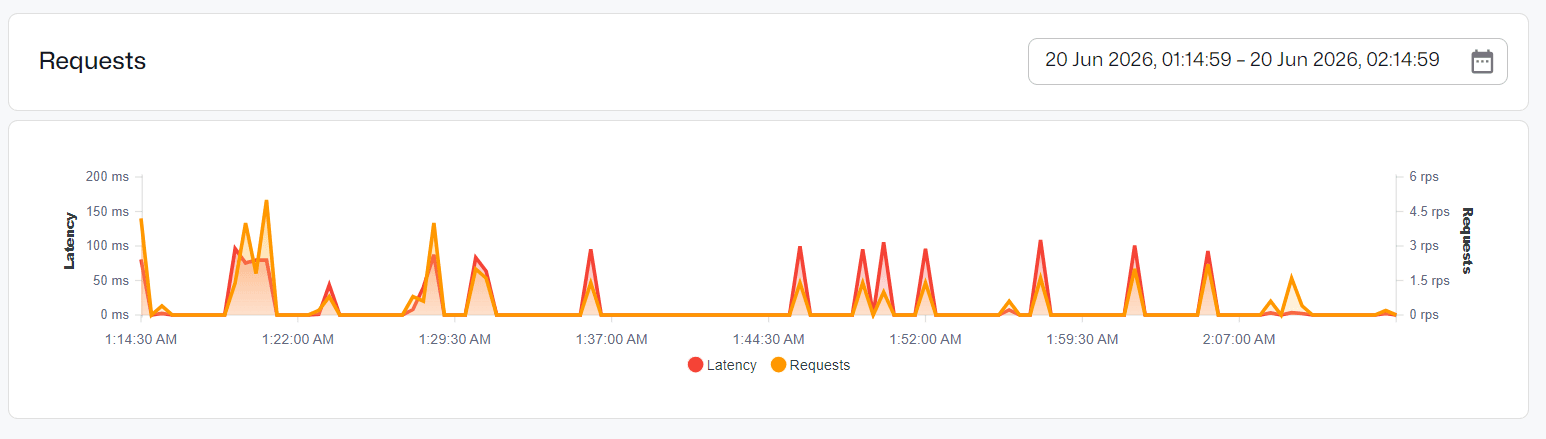
This view is useful for spotting spikes in activity, checking whether latency remains stable, and understanding how often your cache is being queried. For a small benchmark, the request volume will be low. As you move toward a production application, this dashboard can help you monitor the cache workload and identify periods of higher usage.
Inspect the Qdrant cache collection
Finally, go to Collections in the Qdrant Cloud dashboard and open the collection you created earlier, such as olostep_search_semantic_cache_1h.
You can inspect the saved points in the collection just like records in a database. Each point represents one cached search result and includes:
- The original user query
- The saved Olostep search-result links
- The expires_at timestamp that controls when the result becomes outdated
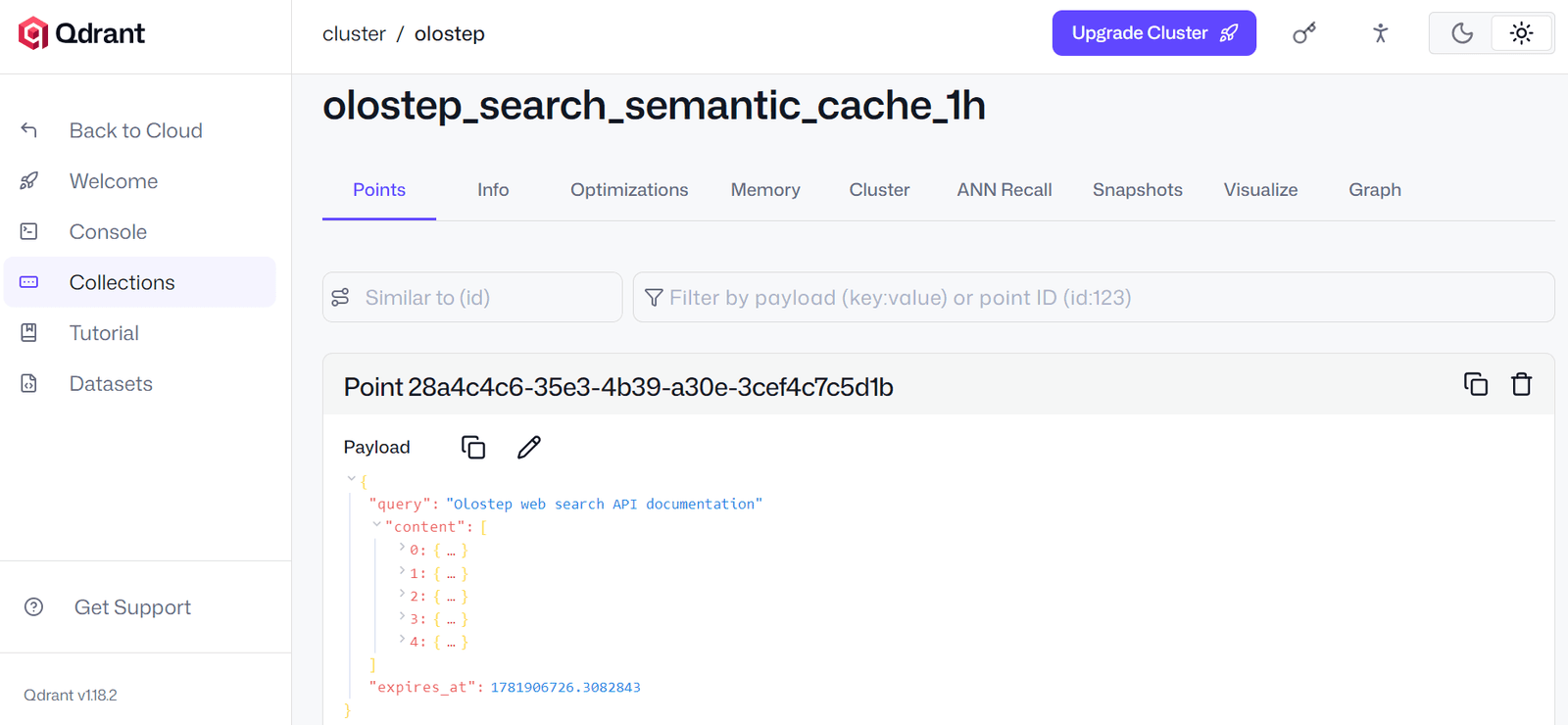
This is helpful when you want to confirm that new cache entries are being stored correctly, check which queries are currently saved, or troubleshoot why a query was treated as a cache hit or miss.
Together, the Olostep logs and Qdrant dashboard give you a practical way to validate the full semantic caching workflow outside the notebook.
Final Thoughts
As web search becomes a core part of more agentic workflows, semantic caching will become increasingly important. Whether you are building an AI coding agent, an n8n automation, an MCP server, or another tool that repeatedly searches the web, similar requests can quickly create unnecessary API calls.
A semantic cache helps reduce those repeated searches by recognizing when different queries have the same meaning. This can lower search costs and improve the overall speed of your application, especially when users or agents repeatedly ask for closely related information.
You can improve performance further by moving from free infrastructure to a paid Qdrant cluster with more memory, stronger CPUs, and faster storage. That can make vector search more reliable and responsive as traffic grows.
Lower Olostep usage does not automatically mean the system is cheaper overall. For a proper production setup, you also need to account for the cost of running the Qdrant cluster.
The right setup depends on your traffic, cache-hit rate, query similarity, and the cost of each web search. Semantic caching creates the most value when the savings from avoided search calls are higher than the cost of storing, embedding, and retrieving cached results. That is the trade-off you need to measure before moving from a prototype to production.
Frequently Asked Questions
What is semantic caching?
Semantic caching reuses a previous result when a new query has the same or a very similar meaning.
How is semantic caching different from traditional caching?
Traditional caching usually needs an exact match. Semantic caching can match differently worded queries with the same intent.
How does semantic caching work?
It converts queries into vectors, compares their meaning, and returns a saved result when the similarity is high enough.
When should I use semantic caching?
It works best for repeated questions, such as customer support, documentation search, FAQ bots, AI assistants, and agent workflows.
Does semantic caching reduce cost and latency?
Yes, when it avoids repeated API or LLM calls. A cache hit can return a saved result faster and with lower usage costs.
Can semantic caching return the wrong result?
Yes. A threshold that is too low can match queries that are not similar enough. Test your threshold with real queries before deploying.
How long should cached results be stored?
It depends on how often the information changes. This guide uses one hour, but you can change it to 20 minutes, 30 minutes, or another duration.
Is semantic caching the same as prompt caching?
No. Prompt caching reuses the same input context, while semantic caching reuses results for queries with similar meanings.
When should I avoid semantic caching?
Avoid it for information that changes every minute, such as live prices, breaking news, or real-time availability, unless you use a very short cache duration.