


Pulling useful data from websites is still more painful than it should be. You either write custom scrapers, deal with brittle HTML parsing, or rely on tools that break when page structure changes.
What you actually need is a way to take a website you care about and make it searchable and queryable.
In this tutorial, you’ll build a Streamlit app that crawls a website, stores its pages as vectors in Weaviate, and connects it to an Agno agent so you can ask questions about the content, with cited source URLs in every response. Instead of a traditional search bar, you interact with it through a chat interface that retrieves and answers in one step. We will use Agent Skills and Claude Code to build our entire application.
What are agent skills?
Agent skills are structured instructions that AI coding agents like Claude Code use while writing code. Each skill is a folder with a SKILL.md file that defines how to use a specific tool correctly. Instead of relying only on general training, the agent follows these instructions to produce more accurate, up-to-date code.
Skills used in this project include:
- Weaviate agent skills: provide the correct patterns for connecting, creating collections, and running queries using the Python SDK v4. This avoids outdated v3 approaches.
- Olostep skills: define how to use the SDK, handle the crawl process, and extract clean markdown from pages.
Building with Claude Code
This project was built using Claude Code, an agentic coding tool that runs in the terminal. It takes a prompt, writes the code, installs dependencies, and fixes errors end to end.
We started with this prompt:
“Scaffold a project called website-knowledge-base that uses Olostep for web ingestion, Weaviate as the vector store, Agno as the agent layer, and Streamlit as the frontend.”
From that single prompt, Claude Code scaffolded the entire project structure, wired up all three tools, and produced a working app.
What you'll build
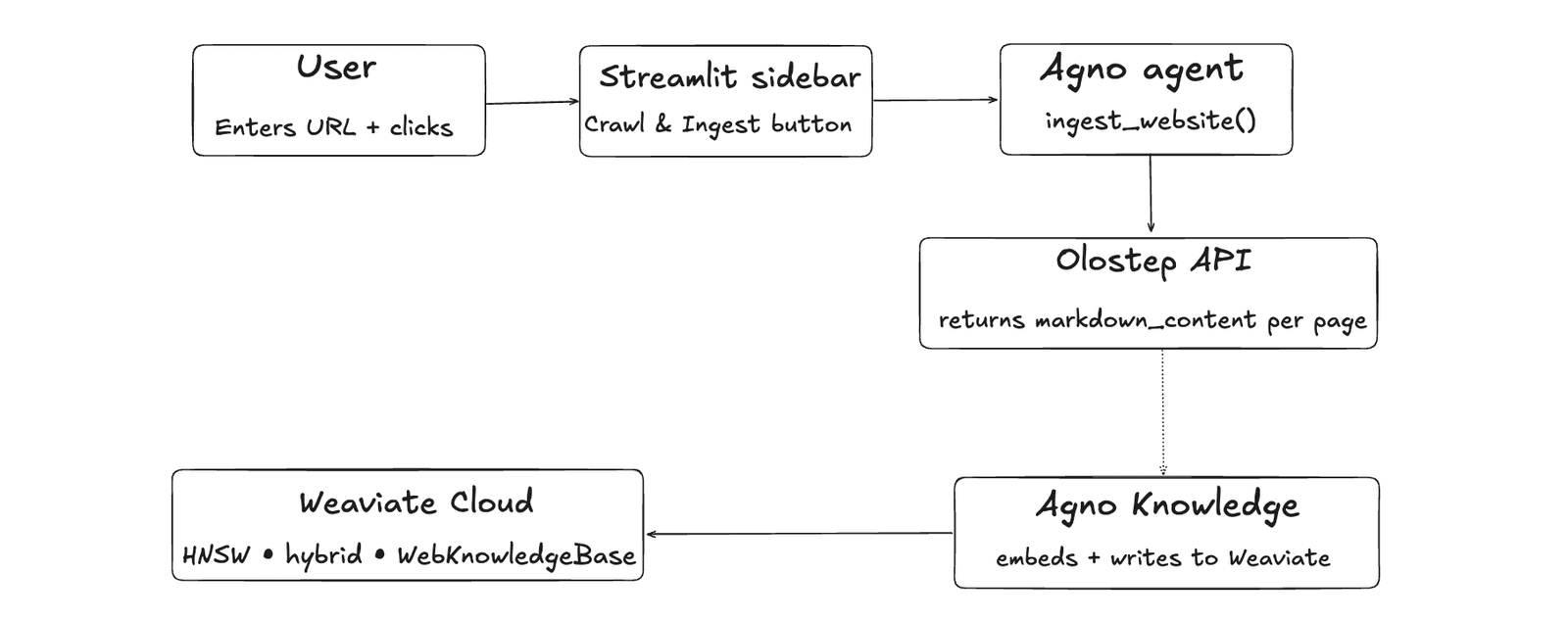
The app has two flows. The first is ingestion. Enter a URL in the sidebar, set a max page count, and click a button. Olostep crawls the site and everything lands in Weaviate.
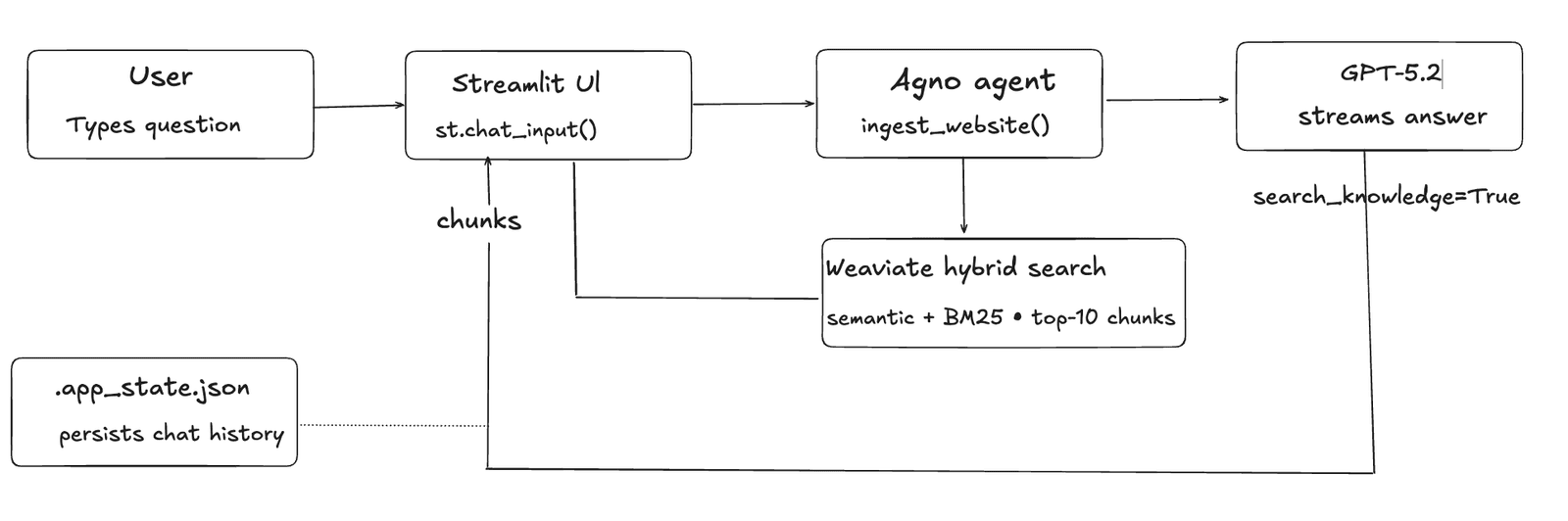
The second is the chat interface. Ask a question, the Agno agent searches Weaviate for relevant content, GPT-5.2 generates a sourced answer, and the response streams back token by token. Source URLs appear in a collapsible expander below each answer.
This is particularly useful for teams doing deep research or competitive analysis. Crawl a competitor's documentation, a vendor's product pages, or your own internal wiki and get an agent that can answer specific questions about that content instead of making someone read through it manually.
Three tools make this work. Olostep handles the crawling, returning each page as clean markdown via a single API call. Weaviate is the vector database that stores the content as embeddings and indexes them for fast retrieval using HNSW. It also runs hybrid search on every query, combining vector similarity and BM25 keyword search simultaneously. Agno ties it together as the agent layer, automatically searching the knowledge base before every response and grounding the answer in what was actually crawled.
Here's the ingestion pipeline from URL input to Weaviate storage:
Once the content is in Weaviate, this is what happens every time a user asks a question:
With that picture in mind, it’s time to build.
Project structure
Below is the project folder structure:
website-knowledge-base/
├── config.py       # env vars and shared constants
├── ingest.py       # Olostep crawl → Weaviate ingestion
├── agent.py        # Agno agent wired to Weaviate
├── app.py          # Streamlit UI
└── requirements.txt
Install dependencies
You’ll need to install the following dependencies for this project:
agno[weaviate]: the Agno agent framework with its Weaviate integration included. The[weaviate]extra installs the adapter that lets Agno's Knowledge class connect directly to a Weaviate collection.weaviate-client>=4.0.0: the official Weaviate Python client (v4 API). Used in bothingest.pyandagent.pyto open a connection to your Weaviate Cloud cluster viaweaviate.connect_to_weaviate_cloud().olostep>=1.0.0: the Olostep SDK. ProvidesAsyncOlostep, the async client used iningest.pyto create crawl jobs and retrieve clean markdown from each discovered page.streamlit>=1.35.0: a Python library for building interactive web apps. It powers the entire UI including the sidebar, chat interface, state management, and streaming response rendering.openai: the OpenAI Python SDK. Used by Agno in two places: generating embeddings when content is inserted into Weaviate, and running GPT-5.2 when the agent generates an answer.python-dotenv: loads your.envfile intoos.environat startup soconfig.pycan read your API keys without hardcoding them.
To install all of these, create a file at the root folder called requirements.txt. Add the following:
agno[weaviate]
weaviate-client>=4.0.0
olostep>=1.0.0
streamlit>=1.35.0
openai
python-dotenv
Afterwards, run this command:
pip install -r requirements.txtThis will install all the dependencies for this project.
Configure the project
You need accounts and API keys for three services
- Olostep: Sign up at olostep.com and copy your API key from the dashboard.
- Weaviate Cloud: Create a free Serverless cluster at console.weaviate.cloud. Once the cluster is created, find the REST endpoint on the cluster details page under "Endpoints." It looks like
your-cluster.c0.us-west3.gcp.weaviate.cloud. Copy it exactly as shown, no https:// prefix needed. Then navigate to the "API Keys" section, create an Admin key, and copy it immediately. It is only shown once. - OpenAI: Get an API key at platform.openai.com. This covers both embedding generation when inserting into Weaviate and GPT-5.2 for answer generation.
Next, create your project folder
mkdir website-knowledge-base
cd website-knowledge-base
Create a .env file at the root folder to store your API keys. Add the following:
OLOSTEP_API_KEY= “your_olostep_api_key”
WEAVIATE_URL= “your_waevate_url”
WEAVIATE_API_KEY="your_weavate_api_key”
OPENAI_API_KEY=”your_open_api_key”
Then create config.py, which every other module will import from:
import os
from dotenv import load_dotenv

# Load environment variables from .env file
load_dotenv()

# API key for Olostep service
OLOSTEP_API_KEY = os.getenv("OLOSTEP_API_KEY", "")

# Weaviate vector database connection settings
WEAVIATE_URL = os.getenv("WEAVIATE_URL", "")
WEAVIATE_API_KEY = os.getenv("WEAVIATE_API_KEY", "")

# OpenAI API key for embeddings/LLM usage
OPENAI_API_KEY = os.getenv("OPENAI_API_KEY", "")

# Name of the Weaviate collection to store web knowledge
COLLECTION_NAME = "WebKnowledgeBase"

# Default maximum number of pages to crawl/process
MAX_PAGES_DEFAULT = 20
This file loads your .env and exports both the API keys and the two constants that the rest of the app shares: the Weaviate collection name and the default max page count.
Ingest the Web with Olostep
The first thing the app needs to do is get content off the web and into Weaviate. To do that you need to crawl the target website, extract clean text from each page, and store it as vectors in your Weaviate collection. Every page that comes back from Olostep gets embedded and indexed in Weaviate, ready for the agent to search later.
We gave Claude Code this prompt for the Olostep crawl setup:
Build the ingestion pipeline. Use the Olostep async SDK to crawl a given URL up to a max page count, retrieve clean markdown from each page, and handle individual page failures gracefully without aborting the whole crawl.
And this one for the Weaviate connection:
Set up the Weaviate connection using Weaviate Cloud. Configure the collection with HNSW vector indexing, cosine distance, and hybrid search. Use Agno's Knowledge abstraction to handle embedding and insertion.
Note: Claude Code picked up the installed agent skills automatically. We did not mention them in either prompt.
The following code was generated for the ingest.py:
import asyncio
from olostep import AsyncOlostep
from config import OLOSTEP_API_KEY, WEAVIATE_URL, WEAVIATE_API_KEY, COLLECTION_NAME

def _get_knowledge_base():
    import weaviate
    from weaviate.auth import AuthApiKey
    from agno.vectordb.weaviate import Weaviate, VectorIndex, Distance
    from agno.vectordb.search import SearchType
    from agno.knowledge.knowledge import Knowledge

    weaviate_client = weaviate.connect_to_weaviate_cloud(
        cluster_url=WEAVIATE_URL,
        auth_credentials=AuthApiKey(WEAVIATE_API_KEY),
        skip_init_checks=True,
    )
    vector_db = Weaviate(
        collection=COLLECTION_NAME,
        client=weaviate_client,
        search_type=SearchType.hybrid,
        vector_index=VectorIndex.HNSW,
        distance=Distance.COSINE,
    )
    return Knowledge(vector_db=vector_db)

async def _crawl_and_collect(url: str, max_pages: int) -> list[dict]:
    pages = []
    async with AsyncOlostep(api_key=OLOSTEP_API_KEY) as client:
        crawl = await client.crawls.create(url=url, max_pages=max_pages)
        async for page in client.crawls.pages(crawl.id, wait_for_completion=True):
            try:
                result = await page.retrieve(formats=["markdown"])
                content = result.markdown_content or ""
                if content.strip():
                    pages.append({"url": page.url, "markdown_content": content})
            except Exception as e:
                print(f"Skipping {page.url}: {e}")
    return pages

def ingest_website(url: str, max_pages: int) -> dict:
    pages = asyncio.run(_crawl_and_collect(url, max_pages))
    knowledge_base = _get_knowledge_base()
    chunks_inserted = 0

    for page in pages:
        try:
            source_url = str(page["url"])
            knowledge_base.insert(
                text_content=page["markdown_content"],
                name=source_url,
                metadata={"source_url": source_url, "title": source_url},
            )
            chunks_inserted += 1
        except Exception as e:
            print(f"Failed to insert {page['url']}: {e}")

    return {"pages_crawled": len(pages), "chunks_inserted": chunks_inserted, "url": url}
The file has three functions, each responsible for one part of the pipeline.
_get_knowledge_base()sets up the Weaviate connection and returns an AgnoKnowledgeobject. Two details worth noting:skip_init_checks=Trueskips a gRPC health check that fails in most cloud environments even when the REST API is working fine.SearchType.hybridmeans every query will run both semantic vector search and BM25 keyword search simultaneously. Semantic handles conceptual questions, BM25 catches exact class names and method names._crawl_and_collect()is where Olostep does its work. It starts a crawl job, iterates through each discovered page, and callspage.retrieve(formats=["markdown"])on each one. This returns clean prose with no HTML, navigation, or boilerplate.wait_for_completion=Truemeans the SDK handles all polling internally. If a single page fails, it's skipped, so one bad page never aborts the whole crawl. The function is async because the Olostep SDK is async-native;asyncio.run()iningest_website()bridges it into Streamlit's synchronous context.ingest_website()is the function Streamlit calls directly. It runs the crawl, then iterates through the results and callsknowledge_base.insert()for each page. Agno handles the embedding and the write to Weaviate internally. It returns a summary dict that the sidebar uses to display the success message.
Build the Agno agent
With content now stored in Weaviate, you need an agent that can query it and answer questions.
We gave Claude Code this prompt for the agent setup:
Wire up an Agno agent that connects to the Weaviate knowledge base and automatically searches it before every response. The agent should use GPT-5.2, cite source URLs in every answer, and stream its response.
The following code was generated for the agent.py:
import weaviate
from weaviate.auth import AuthApiKey
from agno.agent import Agent
from agno.models.openai import OpenAIChat
from agno.vectordb.weaviate import Weaviate, VectorIndex, Distance
from agno.vectordb.search import SearchType
from agno.knowledge.knowledge import Knowledge
from config import WEAVIATE_URL, WEAVIATE_API_KEY, COLLECTION_NAME

def get_agent() -> Agent:
    weaviate_client = weaviate.connect_to_weaviate_cloud(
        cluster_url=WEAVIATE_URL,
        auth_credentials=AuthApiKey(WEAVIATE_API_KEY),
        skip_init_checks=True,
    )
    vector_db = Weaviate(
        collection=COLLECTION_NAME,
        client=weaviate_client,
        search_type=SearchType.hybrid,
        vector_index=VectorIndex.HNSW,
        distance=Distance.COSINE,
    )
    knowledge_base = Knowledge(vector_db=vector_db)

    return Agent(
        model=OpenAIChat(id="gpt-5.2"),
        knowledge=knowledge_base,
        search_knowledge=True,
        instructions=(
            "You are a helpful assistant that answers questions based strictly on "
            "the ingested website content. Always cite the source URL of the content "
            "you reference."
        ),
        markdown=True,
    )
search_knowledge=True registers the built-in tool that runs a hybrid search against Weaviate before every response, retrieves the top matching chunks, and injects them into the GPT-5.2 prompt as context. The system instructions keep the model grounded in the ingested content and tell it to cite source URLs. markdown=True formats output as markdown, which Streamlit renders via st.markdown().
Build the UI
With ingestion and the agent in place, the last piece is the Streamlit interface.
We gave Claude Code this prompt for the UI:
Build a Streamlit app with a dark navy theme. The sidebar should hold the Olostep logo, a URL input, a max pages control, and a crawl button. The main area should show an empty state before ingestion and a streaming chat interface after. Persist state across browser refreshes using a local JSON file and cache the agent with st.cache_resource.
The file has four distinct responsibilities worth understanding.
- State persistence. Streamlit resets
st.session_stateon every browser refresh._load_state()and_save_state()solve this by reading and writing a local.app_state.jsonfile that stores theingestedflag and message history across refreshes. - Agent caching.
@st.cache_resourceon_get_agent()means the Weaviate connection and Agno agent are created exactly once per server process. Without it, every question would rebuild the agent from scratch. - The sidebar. Holds the Olostep logo, URL input, max-pages control, and the crawl button. On success, the status badge updates from
○ No data ingested yetto● Knowledge base readyand the main area switches from the empty state to the chat interface. - The streaming chat loop. Two
st.empty()placeholders handle in-place updates — one for status labels, one for response text. The status label cycles through⏳ Thinking...→🔍 Searching knowledge base...→✍️ Writing response...based on elapsed time. When streaming completes, source URLs are extracted from the response and shown in a collapsible Sources expander, thenst.rerun()forces a clean re-render.
Test the Application
With all four files in place, start the app:
streamlit run app.py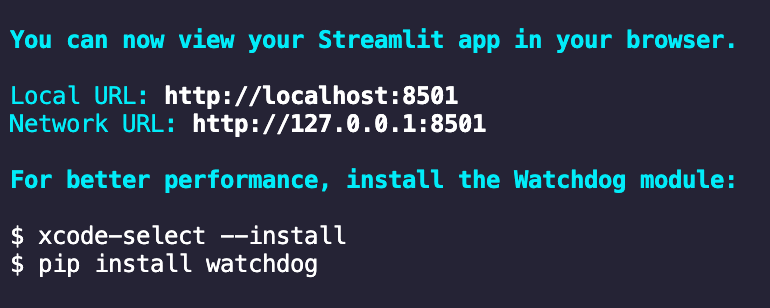
The app opens at http://localhost:8501. The main area shows the empty state and the sidebar is waiting for a URL.
For the demo, use https://docs.agno.com. It is well structured, crawls cleanly, and there is a satisfying angle to using an Agno agent to answer questions about Agno itself.
Set max pages to 20, click Crawl & Ingest, and wait. Expect around 90–140 seconds. When the sidebar badge switches to
Knowledge base ready, the chat interface appears.
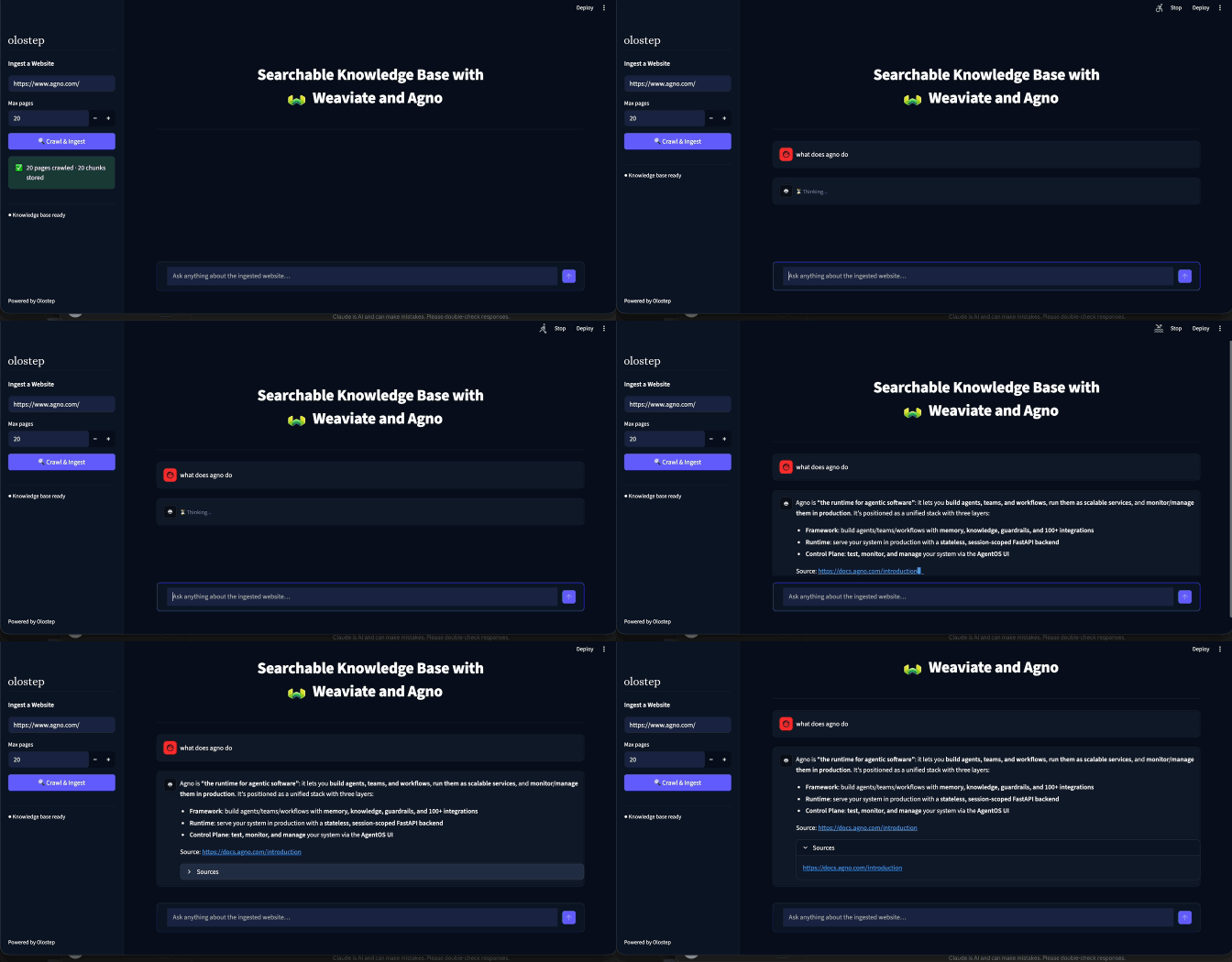
Conclusion
You now have a working app that takes any website and turns it into something you can have a conversation with. Olostep handled the crawling, Weaviate stored the content as vector embeddings and searched them using hybrid search, and Agno tied it together into an agent that retrieves and answers with citations.
The core pattern, crawl, store, ask, is reusable beyond this exact setup. Whether you are doing deep research, querying a competitor's documentation, or making an internal wiki actually useful, the architecture stays the same. Swap the website for any content source you care about. Swap GPT-5.2 for any other model Agno supports. The vector database and the agent layer stay in place.
The full source code for this project is available on GitHub.