


The internet holds the world’s most valuable data, but it is trapped in messy, unstructured formats. If you want to train an AI model, monitor competitors, or automate lead generation, you cannot afford to copy and paste manually.
What is web scraping?
Web scraping is the automated process of extracting structured data from websites. A web scraper works by fetching a web page, parsing the underlying HTML or JavaScript, extracting specific data fields, and exporting that information into usable formats like JSON, CSV, or database records.
We no longer live in an era of simple HTML extraction. Today, web scraping functions as the core data acquisition infrastructure for analytics, competitive intelligence, and artificial intelligence systems.
- What it is: Automated extraction of usable data from websites.
- How it works: A script fetches a webpage, parses the code, extracts target fields, and structures the output.
- The real challenge: Getting data once is easy. Maintaining reliability, scale, and compliance in production is the hard part.
Bots accounted for 51% of all internet traffic in 2024, with bad bots making up 37% (Imperva 2025 Bad Bot Report).The web scraping market was valued at $1.03 billion in 2025 and is projected to reach $2.23 billion by 2031 (Mordor Intelligence 2026).
(Need the decision fast? Jump to the Should You Scrape, Use an API, or Buy Data? section.)
Web Scraping Definition and Meaning
The web scraping definition revolves around using an automated script to request a web page and extract specific, usable data fields from it. You use it when a website displays valuable data but does not offer an official API to download that information.
What web scraping means in simple terms
When you visit a website, your browser renders code into a visual layout. You read the text, view the images, and click the links. When a machine visits a website, it reads the underlying HTML or intercepts the network requests.
Web scraping bridges this gap. It replaces human browsing with code that systematically locates, copies, and formats target information.
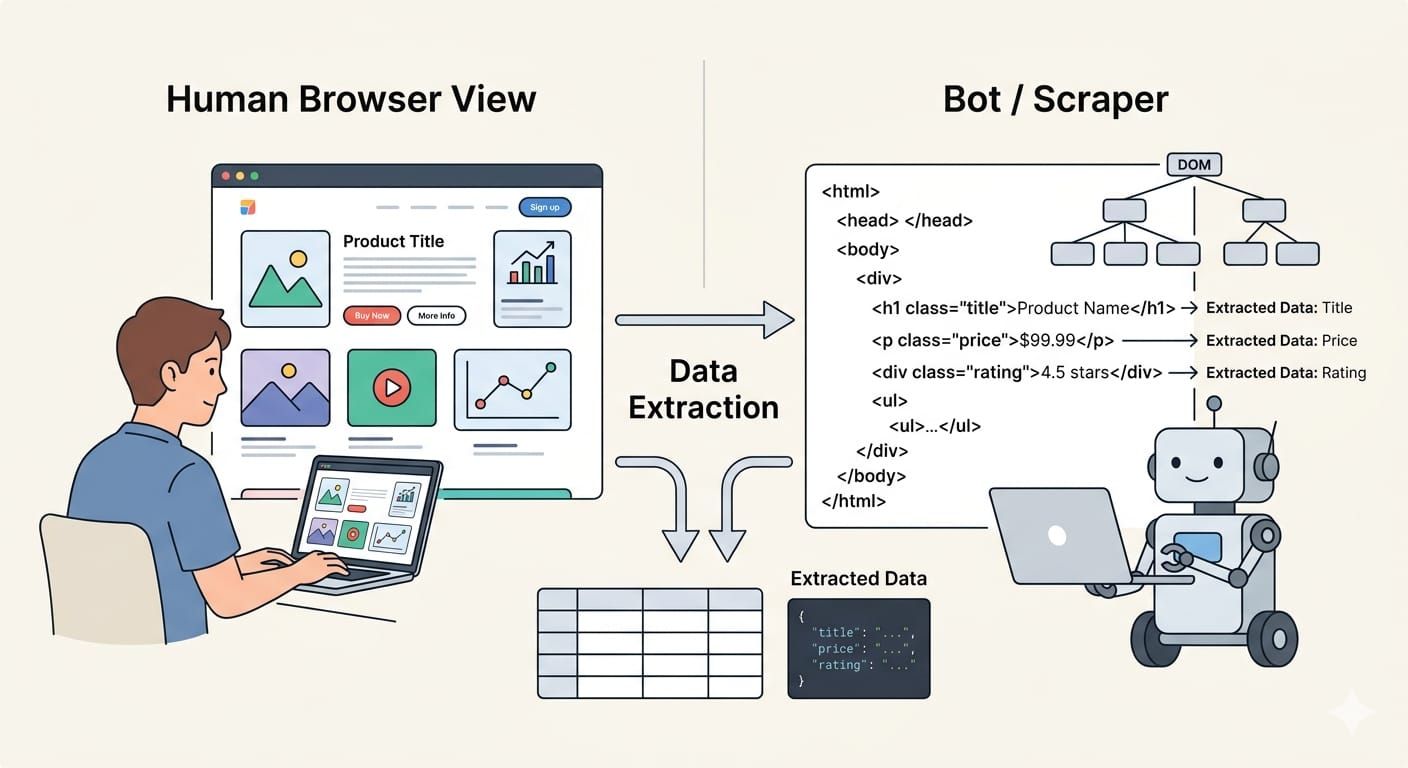
What a scraper actually extracts
A scraper targets concrete fields hidden within page elements. Common extraction targets include:
- Product prices and specifications
- Real estate listings
- Job descriptions
- News article text and metadata
- Customer reviews
The script then converts these raw fields into structured formats. Modern pipelines export this data as CSV for spreadsheets, JSON for application databases, or Markdown for AI workflows.
This is the exact problem WebCrawlerAPI solves: point it at any docs site or website and get back clean, ready-to-use markdown for an AI agent or knowledge base. Hundreds of developers already use it to power AI support bots and knowledge products in production.
Why the simple definition is no longer enough
Defining a scraper is easy. Designing a production-grade web data system is much harder. Early extraction relied entirely on downloading static HTML. Today, modern websites use complex JavaScript rendering, strict anti-bot protections, and dynamic data loading. A modern operation requires managing headless browsers, proxy networks, and legal compliance just as much as writing extraction code.
The meaning of web scraping goes beyond simply extracting data; modern teams must orchestrate complex infrastructure to bypass bot protections and render dynamic JavaScript.
How Web Scraping Works
Web scraping works by fetching a web page, parsing its underlying code, extracting specific data points, and structuring them for downstream use.
Step 1: Fetch the page
The first step is acquiring the page content.
Static pages: If the website embeds its data directly in the source code, we send a standard HTTP request. The server returns an HTML response. This method is incredibly fast, cheap, and relies on simple libraries like Python's requests.
Dynamic pages: Many modern sites use JavaScript to load data after the initial page load. A basic HTTP request returns a blank template. To scrape these sites, we use headless browsers. Tools like Playwright or Puppeteer launch a hidden browser, render the JavaScript, and expose the fully loaded Document Object Model (DOM).
Authenticated or complex pages: When content requires a login or sits behind application-like interactions, the approach shifts. We must manage session cookies, authentication tokens, and network interceptions.
Step 2: Parse HTML and the DOM
Once you fetch the page, the scraper must parse the code. HTML parsing breaks the raw text into a navigable tree structure. DOM extraction goes further, reading the live state of the page exactly as the browser renders it.
Step 3: Extract and structure the data
The script locates your target data using CSS selectors, XPath expressions, or specific parser rules. The scraper pulls the raw text, cleans away HTML tags, and normalizes the format. It maps the clean text to a predefined schema. Finally, it exports the data as JSON, CSV, NDJSON, or inserts it directly into database rows.
Step 4: Validate and use the output
Raw extraction is rarely perfect. Production pipelines run validation steps immediately after extraction. They execute deduplication tasks, check for missing fields, and enforce schema validation. Verified data then routes into business dashboards, search indices, analytics platforms, or AI retrieval pipelines.
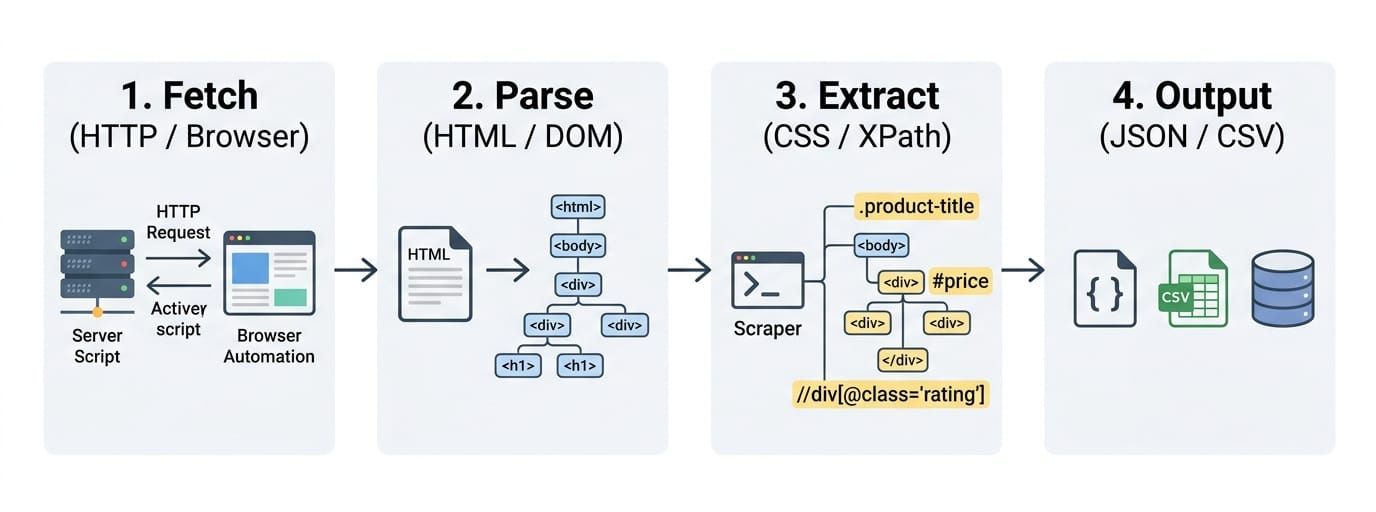
The workflow changes entirely based on the target site. Static pages require simple HTTP requests, while dynamic Single Page Applications (SPAs) demand headless browser execution.
When a Web Scraping API Makes Sense
A web scraping API makes sense when you need rendering, batching, structured output, and recurring jobs without maintaining brittle scrapers yourself.
What custom scripts handle well
Custom scripts excel at one-off research tasks. If you need a low-volume data pull from a simple static page, a custom script gives you full control. It requires zero budget and minimal infrastructure.
What gets painful at scale
When you move from a script on your laptop to a pipeline in the cloud, complexity multiplies. Orchestrating headless browsers consumes massive compute resources. Managing retries, scheduling concurrent jobs, handling proxy rotation, and maintaining schema consistency quickly drains engineering time.
Example: Olostep as modern scraping infrastructure
If your workload is recurring or large-scale, evaluate whether a web scraping API can remove the rendering, batching, and parsing overhead. We built Olostep to act as exactly this kind of managed infrastructure.
Instead of building fragile custom scrapers, developers use this unified API to scrape thousands of pages simultaneously. It automatically handles JavaScript rendering, proxy rotation, and anti-bot bypassing, converting raw web content into structured JSON or Markdown. This is the infrastructure teams use when data collection becomes a pipeline rather than a local script.
If your engineering team spends more time maintaining proxy networks and patching headless browser crashes than using the actual data, transition to a scraping API.
Web Crawler vs Scraper vs API
We frequently see confusion around these three distinct data collection methods. Crawlers discover URLs, scrapers extract data from those URLs, and APIs deliver data directly without parsing.
What a web crawler does
A web crawler discovers and maps web pages. It starts at a seed URL, reads the page, and traverses outgoing links. It builds a comprehensive list of pages to fetch but does not extract specific data points like prices or reviews.
What a web scraper does
A web scraper extracts specific fields from a target page. It takes the URL provided by a crawler, parses the layout, and converts the content into structured data.
What an API does
An API returns structured data directly from a documented server endpoint. It bypasses the graphical webpage entirely, offering a stable and highly efficient way to access information.
| System | Main Job | Input | Output | Best When |
|---|---|---|---|---|
| Crawler | URL discovery | Seed URLs | List of URLs | Mapping sites or finding new pages |
| Scraper | Field extraction | Specific URL | JSON/CSV data | Target site lacks an API |
| API | Direct data access | API Request | JSON/XML | Provider offers official access |
Crawling finds the pages, scraping pulls the specific field data out of them, and APIs deliver structured data directly from the source server.
What Web Scraping Is Used For
Teams use web scraping when valuable data exists on websites but is not available in a convenient, complete, or affordable API.
Web scraping for data analysis
Data analysts rely on scraping to build market intelligence. They use automated extraction to monitor product catalogs across hundreds of retailers. Analysts also track job posting trends, aggregate customer reviews for sentiment analysis, and monitor news cycles for financial modeling.
Web scraping for SEO, growth, and competitive intelligence
Growth teams use scraping to gain visibility into competitor strategies. They monitor search engine result pages (SERPs) to track ranking volatility. Competitive intelligence teams build scrapers to benchmark content strategies, track pricing changes, monitor promotions, and verify product listing coverage across third-party marketplaces.
Web scraping for AI training data and RAG
AI engineers use web data extraction to feed large language models (LLMs). They scrape technical documentation and knowledge bases to ingest fresh context into Retrieval-Augmented Generation (RAG) pipelines. Automated extraction builds the domain-specific corpora required to fine-tune specialized models.
The strongest use cases are recurring, structured, and time-sensitive—especially in analytics, competitive monitoring, and AI model training.
Web Scraping Tools and Methods
The best web scraping tool depends on page type, JavaScript complexity, scale, maintenance burden, and output needs.
Python tools for static and structured pages
For simple HTML pages, Python provides the most robust foundation. requests handles the network calls, while BeautifulSoup provides an elegant interface for HTML parsing. When scaling these static requests into a structured pipeline, Scrapy remains the industry standard framework. These tools are fast, lightweight, and ideal for straightforward extraction.
Headless browsers for JavaScript-heavy sites
When sites rely heavily on client-side rendering, static tools fail. We must use headless browser automation. Playwright and Puppeteer are the modern standards for rendering dynamic JavaScript and interacting with the DOM. Playwright offers superior speed, auto-waiting, and network interception capabilities for extraction.
Web scraping APIs and managed infrastructure
Managing your own headless browsers introduces severe operational friction at scale. Web scraping APIs handle this infrastructure for you. They manage the proxy rotation, JavaScript rendering, concurrent batching, request retries, and scheduled jobs. You send a target URL, and the API returns stable, structured output.
LLM-assisted extraction and hybrid pipelines
Traditional extraction relies on rigid CSS selectors. Large Language Models allow for semantic extraction. LLMs excel at pulling structured data from semi-structured or highly variable page layouts where standard rules break.
However, traditional selector-based pipelines still win heavily on cost, execution speed, and absolute predictability. Modern architectures use a hybrid approach: rigid scrapers handle the bulk volume, while LLMs process the messy edge cases.
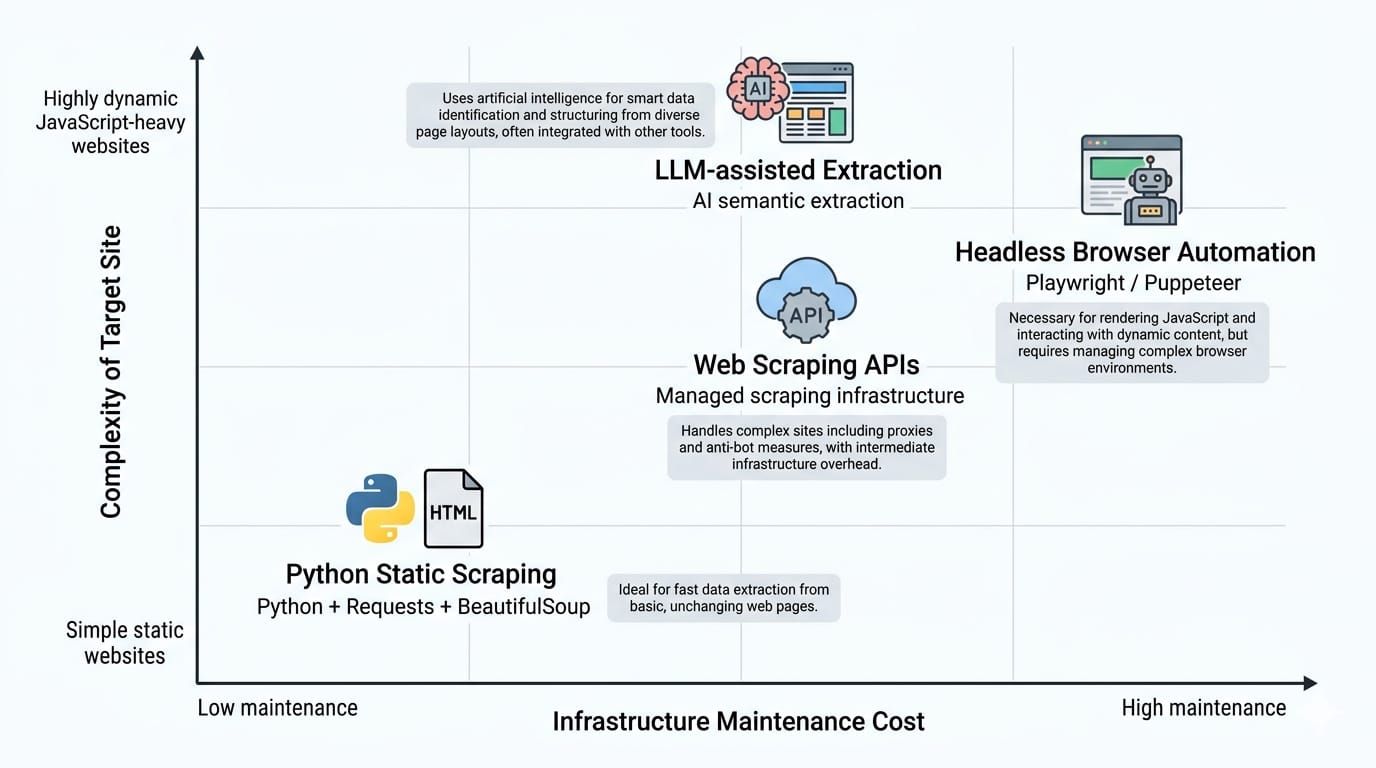
Use simple Python libraries for simple static pages. Move up the stack to managed APIs or LLMs when dealing with dynamic Javascript, massive scale, or variable layouts.
Should You Scrape, Use an API, or Buy Data?
Start with the official API if it exists and meets your needs, scrape when page data is the only viable source, and buy or license data when time, compliance, and coverage matter more than custom control.
Use the official API when
Always check for a documented API first. Use it when the provider offers the exact fields you need under clear terms of service. If the rate limits are acceptable and the structured output fulfills your requirements, an official API is always the safest path.
Build a custom scraper when
Write custom code when you need granular, page-level data that the official API omits. Custom scrapers make sense when your total volume is manageable, you require complete architectural control, and your engineering team has the bandwidth to support ongoing maintenance.
Use a scraping API when
Switch to a managed scraping API when the job is recurring, the target pages are highly dynamic, and the required volume is large. Scraping APIs are the correct choice when you need structured output rapidly and pipeline reliability matters more than owning every moving part.
Buy or license data when
Procure licensed datasets when the information is business-critical and coverage is incredibly difficult to maintain independently. Buying data is the smartest route when legal and compliance risks are high, or when your time-to-value must be measured in days rather than months.
The first question is not "How do I scrape this?" It is "What is the most reliable, compliant data-access method for this job?"
Is Web Scraping Legal?
Note: This section provides general educational context, not legal advice. Always consult counsel for specific legal guidance.
Web scraping is not automatically legal or illegal; risk depends entirely on the data extracted, the access method, site terms, jurisdiction, and the specific use case.
The short answer
There is no universal law banning web scraping. Extracting factual, public data without bypassing security controls generally carries lower legal risk. Extracting private, copyrighted, or sensitive data behind authentication walls elevates legal risk significantly.
What changes legal risk
Public pages vs logged-in or gated pages:
Data accessible on the public web without requiring an account generally carries fewer legal protections against automated access. Once you log into a platform, you agree to its specific Terms of Service. Bypassing login screens fundamentally changes the legal analysis.
For example, in early 2024, the US District Court in Meta v. Bright Data ruled in favor of Bright Data. The judge clarified that Meta's Terms of Service did not explicitly prohibit the logged-off scraping of public data. This reaffirmed the right to collect public web data as long as the scraper is not logged into an account bound by restrictive platform terms.
Personal data and privacy laws:
Extracting Personally Identifiable Information (PII) triggers strict privacy frameworks. Regulations like the GDPR and CCPA apply regardless of how you acquired the data. Scraping personal data requires strict minimization, defined purpose, and secure handling.
Copyright and AI training:
Factual data (like a product price) generally cannot be copyrighted. Creative text, images, and curated database arrangements frequently are. Using scraped copyrighted material to train AI models remains a rapidly evolving and highly contested area of law.
A practical risk matrix
| Scenario | Example | Main Risk | Relative Risk | Safer Alternative |
|---|---|---|---|---|
| Public Factual Data | Retail price tracking | Site blocking, IP bans | Low | Respect rate limits, use APIs |
| Public Copyrighted Text | Scraping news for AI | Copyright infringement | Medium-High | License data, use public domain sets |
| Public PII | Extracting user profiles | GDPR/CCPA violations | High | Avoid PII, anonymize immediately |
| Gated / Logged-in Data | Scraping behind a paywall | Breach of Contract | Very High | Use official vendor integrations |
Scraping public, factual data while logged out is generally legally safer. Scraping logged-in data, PII, or copyrighted material introduces massive legal risk.
Why Web Scraping Gets Hard in Production
Web scraping is getting easier to start and harder to sustain. Writing a script to extract a single price takes five minutes. Running that script ten thousand times a day with 99.9% uptime requires a dedicated engineering team.
Why scrapers break
Websites are living documents. A simple layout update, CSS class drift, or a total site redesign will break a selector-based scraper instantly. JavaScript rendering patterns change. Pagination logic updates. If a required field temporarily disappears from a target page, a fragile script crashes the entire pipeline.
Anti-bot systems and operational friction
Sites actively defend against automated traffic. They deploy rate limiting to slow down aggressive requests. They trigger CAPTCHAs, analyze IP reputation, and use browser fingerprinting to identify headless browsers. Navigating these technical controls requires constant monitoring and sophisticated infrastructure scaling.
The real cost model
The true cost of web scraping is rarely the initial development time. It is the ongoing maintenance tax. Engineers must continuously update broken selectors. Proxy network costs scale aggressively with volume. Add the cost of cloud compute for browser orchestration and pipeline failures, and the Total Cost of Ownership (TCO) for a custom system becomes immense.
The first successful run proves the idea. Production proves the system. If maintenance and proxy costs are eating your roadmap, it is time to upgrade your infrastructure.
The Future of Web Scraping
Web scraping is becoming more important at the exact time the web is becoming more permissioned.
Scraping as part of the AI data supply chain
Web data extraction is the foundational supply chain for artificial intelligence. AI models require continuous ingestion of fresh web knowledge to prevent hallucination. Recurring web ingestion feeds massive vector databases. Structured extraction converts unstructured internet noise into clean context for RAG pipelines.
From selectors to semantic extraction
Traditional scraping relies entirely on exact DOM selectors. The future belongs to semantic, LLM-assisted extraction. Modern pipelines utilize AI models to interpret page layouts dynamically, extracting requested concepts rather than relying on brittle CSS classes. Output formats are shifting to match AI needs: while CSV dominated the past, modern pipelines increasingly export to JSON, NDJSON, and cleanly formatted Markdown.
A more permissioned web
Because AI crawlers extract immense value without sending referral traffic back to publishers, websites are fighting back. We are moving toward a permissioned web defined by strict licensing agreements, pay-per-crawl models, and aggressive platform restrictions. The robots.txt protocol is showing its limitations in the AI era, forcing platforms to adopt hard technical blocks.
The future of web data extraction is smarter, more governed, and tightly integrated with AI. Teams must rely on robust managed systems rather than evasive hacks.
FAQ About Web Scraping
What is web scraping in simple terms?
Web scraping is the automated process of using a script to extract usable data from websites. It replaces manual copy-pasting by systematically reading webpage code, locating specific information, and downloading it into structured formats like spreadsheets or databases.
How does web scraping work?
A scraper sends a request to a website or uses a headless browser to load the page. It parses the underlying HTML and DOM structure, locates target fields using specific selectors, extracts the clean text, and exports the result.
What tools are used for web scraping?
Simple tasks rely on Python libraries like requests and BeautifulSoup. Dynamic pages require headless browsers like Playwright or Puppeteer. Production workloads frequently utilize managed web scraping APIs (like Olostep) to handle proxy rotation, rendering, and infrastructure scaling automatically.
What is the difference between crawling and scraping?
A web crawler discovers and maps URLs by following links across the internet. A web scraper targets a specific URL to extract concrete data fields from its layout.
Is web scraping legal?
The legality depends on what data you extract, how you access it, and your jurisdiction. Extracting public, factual data carries lower risk, while scraping personal data, copyrighted content, or bypassing logins heavily increases legal exposure.
What is web scraping used for?
It aggregates data unavailable via standard APIs. Common use cases include tracking competitor pricing, monitoring SEO rankings, analyzing financial news, and ingesting massive amounts of fresh web text into AI training and RAG pipelines.
Final Takeaway: Web Scraping Is Easy to Define, Hard to Run Well
The concept of web data extraction remains straightforward, but executing it flawlessly in a modern environment is complex.
- Web scraping is the automated extraction of structured data from websites.
- The correct technical architecture depends on the specific job: you might need a custom scraper, a managed scraping API, an official API, or licensed data.
- Production success is dictated by your ability to maintain reliability, navigate compliance, and minimize ongoing maintenance costs.
If you need large-scale structured extraction without maintaining brittle scrapers and complex proxy networks, explore how Olostep's web scraping API fits into a modern web data pipeline.