


You are scraping a critical target, and suddenly, your pipeline hits a wall: a CAPTCHA. If you are wondering how to bypass CAPTCHA, you are asking the wrong question.
Treating CAPTCHA bypass in web scraping as a pure puzzle-solving exercise fails at scale. The real barrier is not the image grid; it is the underlying bot detection system evaluating your trust signals. By the time a puzzle renders, you have already failed.
To build reliable scraping pipelines, you must shift your mindset from "solving" to "not triggering." This guide breaks down exactly how modern anti-bot systems work, how to fix the network and fingerprint signals triggering the blocks, and when to use automated solvers as an absolute last resort.
Treat CAPTCHA as a symptom, not the root cause. Fix the underlying trust signals (IP reputation, browser fingerprint, request pacing) that trigger the block before trying to solve the puzzle.
Automated bots now account for 51% of all global web traffic.
To combat this volume, modern systems like reCAPTCHA v3 and Cloudflare Turnstile rely on backend scoring and non-interactive challenge flows without interrupting users by default.
Even when visible puzzles do appear, the puzzle itself is often no longer the main barrier in evaluation.
Can CAPTCHA Be Bypassed?
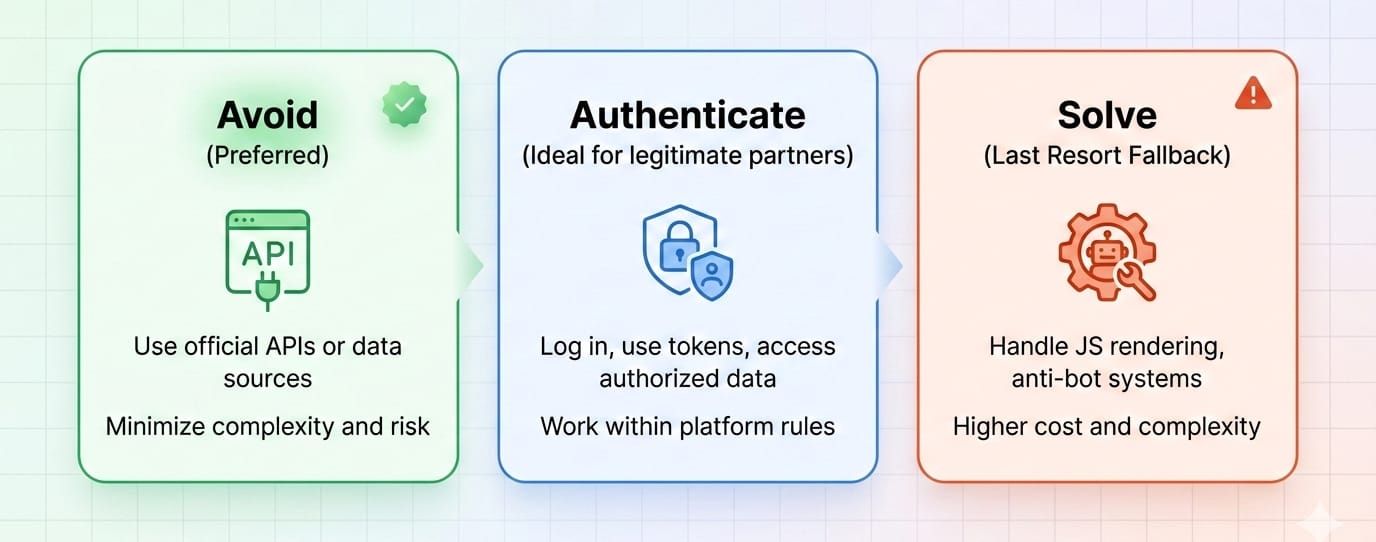
Yes, you can bypass CAPTCHA in web scraping by manipulating your request signals to appear human. The most effective method is avoiding the challenge entirely by lowering request frequency, maintaining coherent browser fingerprints, managing IP reputation with residential proxies, and preserving session cookies. If avoidance fails, API-driven CAPTCHA solvers act as a fallback.
What works best in practice
You successfully avoid CAPTCHA scraping friction by structuring your requests to look inherently trustworthy.
- Lower request frequency: Eliminate burst traffic.
- Use coherent headers: Align User-Agents with underlying client hints.
- Manage IP reputation: Prioritize residential or mobile ASNs.
- Preserve session state: Keep cookies intact across requests.
- Limit headless browsers: Use them only when JavaScript execution is strictly necessary.
The most reliable CAPTCHA bypass is not solving CAPTCHAs at all. It is preventing them from rendering.
What CAPTCHA Is and Why Websites Use It
What CAPTCHA is
CAPTCHA distinguishes human users from automated agents using behavioral analysis, environment checks, and visual challenges. Websites deploy it to prevent spam, stop account takeovers, and filter aggressive web scraping traffic that drains server resources.
The Main Types of CAPTCHA Scraping Solutions Face
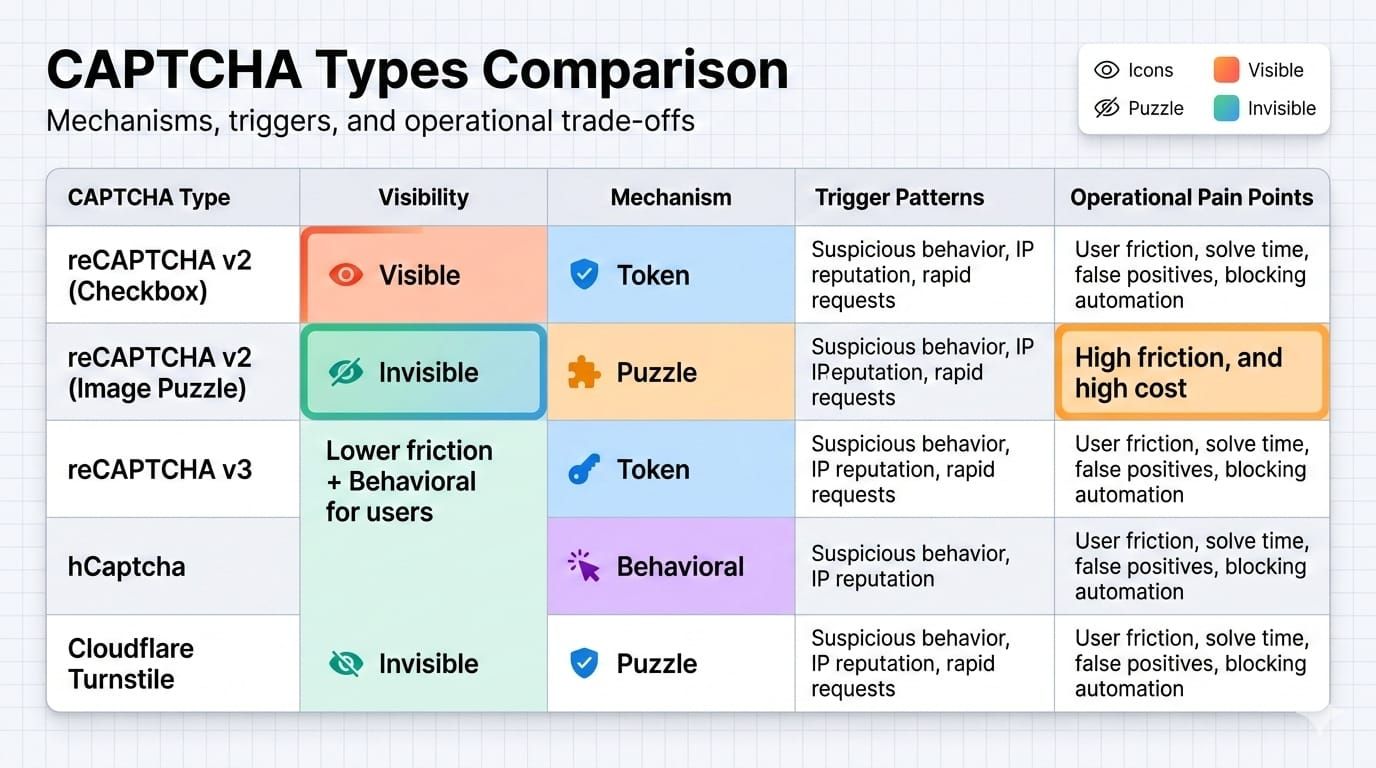
Different providers use distinct interaction models. Understanding these mechanisms dictates how you structure your data extraction pipelines.
Google reCAPTCHA v2 & v3
Google reCAPTCHA combines a visible checkbox flow in v2 with a score-based invisible model in v3. reCAPTCHA v2 falls back to an image grid challenge if you lack trust signals. Conversely, reCAPTCHA v3 returns a risk score based on behavioral interactions, meaning a visual challenge may never actually appear if your score drops too low.
hCaptcha
hCaptcha can require solving a prompt and returning a challenge token. Sites heavily targeted by bots use it to protect endpoints against aggressive automation.
Cloudflare Turnstile
Turnstile functions as a CAPTCHA alternative running background checks on the browser environment. It operates primarily in non-interactive modes, analyzing browser quirks and executing proof-of-work challenges invisibly.
Different CAPTCHA types expose different failure modes, but the upstream detection logic is always more important than the widget branding.
Why CAPTCHA Appears During Scraping
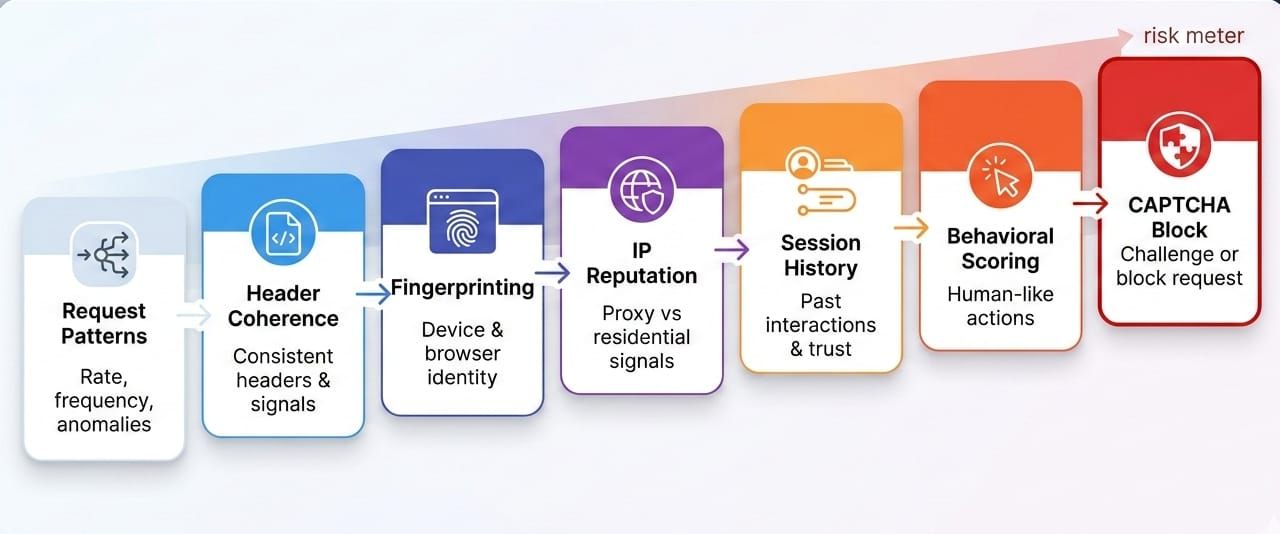
CAPTCHA is the last visible layer
Anti-bot systems typically assign a risk score long before a visual challenge renders. If you see a CAPTCHA, your trust score has already dropped below the acceptable threshold.
Layer 1: Request rate and concurrency
Systems flag burst traffic, perfectly synchronized requests, and massive concurrency spikes immediately. A scraper hitting the same endpoint 50 times a second triggers rate limits independently of the payload.
Layer 2: Headers and request coherence
Rotating a User-Agent alone provides zero protection if the surrounding headers contradict it. Client hints, accept headers, language preferences, and their specific ordering must make sense together to pass consistency checks.
Layer 3: Browser and JavaScript fingerprinting
Headless browsers leak their automated nature through missing APIs, default plugins, or canvas inconsistencies. A vanilla Puppeteer or Selenium instance instantly fails runtime consistency checks on heavily protected domains.
Layer 4: IP reputation
Datacenter IPs carry inherently lower trust scores than residential or mobile ASNs. While clean IPs help establish initial trust, they will never rescue a broken browser fingerprint.
Layer 5: Cookies, session age, and history
Fresh, stateless sessions appear highly suspicious. Session continuity directly improves your trust scoring, as tokens and cookies often bind to specific environmental states.
Layer 6: Behavioral analysis
Security platforms monitor timing regularity, impossible page transitions, and clicks without reasonable reading time. Rapid, stateless requests fail these checks instantly.
The challenge page is downstream. The actual decision is made upstream by traffic quality, fingerprint coherence, session age, and behavioral patterns.
Data Context: APIs are now the prime target for automated traffic, with 44% of advanced bot traffic targeting APIs in 2024. Security platforms aggressively tune defenses against stateless, high-volume requests.
How to Avoid CAPTCHA While Scraping
Reduce request frequency and burstiness
Shape your traffic to mimic natural human pacing. Avoid perfectly timed, synchronized spikes.
- Why it works: Prevents tripping rate-limiting anomaly detectors.
- What it affects: Layer 1 network and concurrency scoring.
Enforce strict header coherence
Supply full header sets, valid client hints, and align your language/locale settings with your IP origin. UA rotation without deep header coherence actually increases detection rates.
- Why it works: Matches the expected payload format of legitimate browsers.
- What it affects: Layer 2 protocol and TLS fingerprinting.
Manage IP reputation, not just proxy count
Use cleaner residential or mobile IPs rather than burning through thousands of cheap datacenter proxies.
- Why it works: Premium ASNs possess inherently higher baseline trust scores.
- What it affects: Layer 4 IP reputation models.
Deploy headless browsers strategically
Use real browsers only for pages that strictly require JavaScript execution for data rendering.
- Why it works: Bypassing the browser entirely on static pages removes JS fingerprinting risk.
- What it affects: Layer 3 environment checks and resource load times.
Preserve cookies, sessions, and context
Repeat requests using session continuity rather than initializing a brand-new user state every time.
- Why it works: Established sessions accumulate trust over time.
- What it affects: Layer 5 session age and history scoring.
Track CAPTCHA Encounter Rate as your core KPI
Measure the percentage of total requests that trigger a challenge page. Optimizing your solve rate only addresses the symptom; minimizing your encounter rate resolves the actual architectural flaw.
If you measure only solve rate, you optimize the symptom. Measure how often you trigger a challenge in the first place to fix the root cause.
Field Note: One scraping team rotated 10,000 proxies and saw no improvement. Their scraper worked only after they stopped rotating User-Agents blindly and began preserving session cookies. Their encounter rate dropped rapidly because headers and state finally aligned.
CAPTCHA Bypass Python & Selenium Patterns
The Python path for low-friction pages
Use standard Python HTTP libraries (like requests or httpx) to detect challenge pages early via status codes or specific HTML tags. Retry blocked requests with preserved state variables. Escalate to heavy browsers only when these lightweight requests repeatedly fail.
The Browser path for JS-heavy pages
Execute Selenium or Playwright only when the site structurally depends on JavaScript to load the target DOM. Persist cookies across navigations. Avoid spinning up a totally clean, stateless browser instance for every single URL.
Selenium and headless browser caveats
Default Selenium headless modes are highly detectable out of the box. Often, the automation tooling itself is the direct reason the CAPTCHA appears. Relying purely on open-source stealth plugins requires constant patching as detection scripts evolve weekly.
Minimal fallback architecture
A production-grade pipeline requires structured logic:
- Fetch the page.
- Detect the challenge.
- Preserve the session context.
- Retry with adjusted pacing or a clean IP.
- Escalate to a solver API only if unavoidable.
- Validate the returned content structure.
Python and Selenium are not CAPTCHA solutions by themselves. They are transport layers that must be configured coherently to avoid detection.
CAPTCHA Solver Scraping Tools
What CAPTCHA solvers are
Solvers are third-party services that bypass challenges using either human-assisted click farms, automated AI/vision models, or direct token-returning APIs. You send the challenge data, and the service returns a payload to submit.
Manual vs automated CAPTCHA solving
Human solvers boast high accuracy on complex visual tasks but introduce massive latency and high operational cost. Automated AI solvers scale well and respond quickly, but struggle consistently against heavily randomized or illusion-based puzzle variants.
The hidden costs of solver services
Bolting a solver API onto a broken script is easy, but it introduces severe latency, directly inflates extraction costs, forces complex retry loops, and offers lower reliability than marketing pages imply.
Why solver tokens get rejected
- Token expiration: Tokens carry strict validity windows. reCAPTCHA and hCaptcha response tokens expire within roughly two minutes.
- Session mismatch: The injected token is just one variable. Submitting a valid token without the matching session cookie that initiated the challenge results in instant rejection.
- IP mismatch: If the IP address that requested the CAPTCHA differs from the IP address submitting the solved token, security rules nullify the response.
- Environment mismatch: Submitting a valid token from an environment where the headers contradict the JavaScript runtime fingerprint triggers an immediate secondary challenge.
Solvers can help, but they are a fragile fallback tool, not a stable scraping architecture.
Data Context: Automatic solving costs typically range from $1 to $3 per thousand requests, introducing 10 to 60 seconds of latency per challenge.
Furthermore, relying purely on generalized AI models is inefficient; recent benchmarking found top general AI models achieved only 28% to 60% success rates on standard reCAPTCHA v2 challenges.
Solving vs. Avoiding vs. Authenticating
Option 1: Avoid the CAPTCHA
Avoiding detection is cheaper, fundamentally faster, and highly scalable. However, engineering perfect header coherence and managing fingerprint consistency requires significant upfront technical investment.
Option 2: Solve the CAPTCHA
This path is significantly slower, operationally fragile, and scales poorly as latency and API costs compound daily. Use it strictly as a fallback.
Option 3: Authenticate the bot
The industry is slowly shifting toward trusted automation. Establishing a cryptographic identity for your bot creates a less adversarial access path, allowing legitimate data workflows to bypass public puzzle friction entirely.
Decision rules by situation
- Occasional encounters: Optimize strictly for avoidance.
- Universal challenges: Solver fallback becomes necessary.
- Legitimate/recurring workflows: Investigate formal authenticated access paths.
The right question is not "How do I solve this CAPTCHA?" It is "Which path gives me the lowest cost per successful page over time?"
What Happens After You "Solve" the CAPTCHA
Repeat challenge loops
You submit a valid token, the challenge disappears, and the exact same CAPTCHA instantly reloads. This occurs because the overall trust score associated with your session never actually improved.
Soft blocks and degraded pages
Many systems return a fake-success HTTP 200 status code while delivering empty results, truncated lists, or shadow-banned HTML. Always validate data completeness computationally, not just the network status code.
Session invalidation
Swapping an IP mid-flow or failing a secondary check instantly resets your cookies. The site refuses your challenge cookies, invalidating the entire extraction flow and forcing a restart.
Observability and monitoring
Stop measuring basic uptime. Monitor your CAPTCHA Encounter Rate, solve success rate, median solve time, cost per successful page, soft-block rate, and total time to usable content.
"Solved" is not the same as "usable." Your pipeline only succeeds when it returns complete, trustworthy data.
Field Note: A scraper's logs showed perfect 200 OK responses, but the exported dataset was 90% thinner than usual. The root cause was silent behavioral throttling and soft-blocking, not a bug in the JSON parsers.
When Patchwork Anti-Bot Systems Stop Scaling
Signs your current approach is breaking down
Your infrastructure requires a systemic overhaul if you are solving too many requests and latency is exploding. When fingerprints drift weekly, output content is inconsistent, and your team spends more time on anti-bot plumbing than actual data quality, tactical hacks no longer suffice.
What a system-level solution should do
A scalable extraction layer must inherently manage dynamic rendering and request environments. It should return structured outputs natively, support massive batch scale, execute scheduled workflows, preserve state intelligently, and entirely remove manual anti-detection engineering.
How Olostep fits that model
Olostep operates as a higher-level web data layer, abstracting away the friction of manual CAPTCHA handling and proxy rotation.
- Scrapes: Olostep’s
/v1/scrapesendpoint dynamically returns Markdown, HTML, raw text, screenshots, and structured JSON in real time, bypassing the need to manage transport layers manually. - JS rendering and request environment: JavaScript rendering is enabled by default. The platform actively manages the underlying JS-rendered requests and residential IP configurations automatically.
- Batches: The Batch endpoint handles up to 10,000 URLs per submission with roughly constant 5 to 8 minute processing times, executing massive workloads without triggering localized rate limits.
- Parsers: Olostep’s parsers return backend-compatible JSON instantly, proving significantly faster and more cost-efficient than running expensive LLM extraction loops for high-scale, recurring extraction.
- Context reuse: Olostep’s Context feature allows you to seamlessly reuse cookies, authentication states, and cached data across requests, preserving the session continuity required to maintain high trust scores.
Once you stop treating CAPTCHA as a one-off puzzle and start treating it as an environment problem, a system-level platform becomes significantly more attractive than stitching together proxies, headless browsers, solvers, and parsers by hand.
If the operational burden is the real cost, the right upgrade is not a better solver. It is a cleaner system.
If you want to stop hand-assembling browsers, proxies, and parsers, test Olostep on a few of your hardest URLs first. The free plan includes 500 requests, and failed requests are not billed.
FAQ
Can CAPTCHA be bypassed?
Yes, you can bypass CAPTCHA by maintaining perfect fingerprint consistency, clean IPs, and realistic session history. However, no single tactic works universally. Avoiding the conditions that trigger the challenge is always more reliable than trying to solve it.
Why do websites use CAPTCHA?
Websites deploy CAPTCHA to mitigate abuse, stop spam, prevent fraud, and block aggressive bot pressure. It acts as a gatekeeper to protect server resources and secure user data against automated extraction.
What is the best CAPTCHA solver for scraping?
There is no one-size-fits-all solver. The best "solver" is actually a lower encounter rate achieved through high-quality request shaping. When necessary, use API-driven AI solvers for basic puzzles and human fallback for highly complex challenges.
How do bots avoid CAPTCHA?
Sophisticated bots avoid CAPTCHA by optimizing their trust scores. They utilize premium residential IPs, maintain strict header coherence, preserve session continuity, and limit request concurrency to bypass upstream anomaly detection.
How do I handle CAPTCHA in Python scraping?
Handle it by shaping your requests properly first. Reuse sessions, rely on HTTP clients for static pages, use browsers strictly when JS rendering is required, and configure a fallback solver only for unavoidable challenges. Always validate your output to catch soft blocks.
Conclusion
When figuring out how to bypass CAPTCHA, remember that the puzzle is strictly the visible symptom of a blocked request. The underlying detection systems are the actual problem. Scaling web data collection requires shifting your architecture away from solving endless puzzles and toward generating trustworthy, coherent request signals. Optimize your CAPTCHA Encounter Rate, not just your API solve rate.
Use patchwork tactics and solver APIs for occasional friction on low-volume targets. For recurring pipelines, migrate to system-level tooling that abstracts the environment complexity entirely.
If your team needs structured output from JS-heavy sites without spending weeks on fingerprinting, proxy reputation, batch orchestration, and parser maintenance, test Olostep on one workflow end-to-end before building more anti-detection plumbing yourself.